EN 18
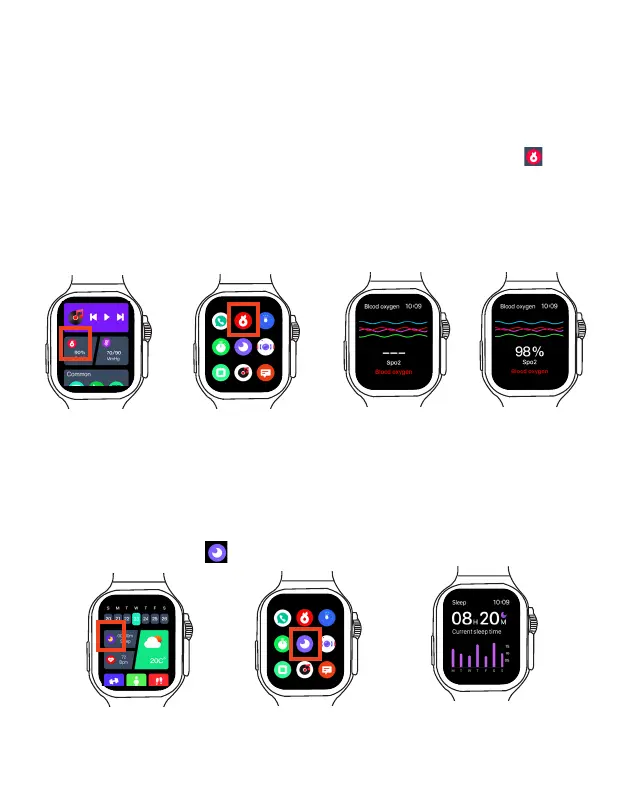
Start blood oxygen saturation measurement
1. Wear your Smart Watch, while trying to keep still.
2. On the home screen or main menu, select the Blood Oxygen Saturation App to start
measurement. Wait a few seconds, your Smart Watch will display your blood oxygen saturation
in real time.
Swipe right to return to previous screen to redo the blood oxygen saturation measurement.
Note: To ensure accurate blood oxygen saturation, make sure the Smart Watch is securely
fastened, and the Smart Watch heart rate sensor contacts your skin directly without any
obstructions.
Check your blood oxygen saturation
The Smart Watch provides an immediate estimate of blood oxygen saturation. Usually, healthy
blood oxygen saturation is between 95 and 100 percent, though patients with lung issues often
have a lower percentage.
Sleep tracking
The Smart Watch's sensor can track your sleep, including sleep quality and duration, as well as
different sleep cycle phases.
Start Sleep tracking
Before going to sleep, wear your Smart Watch, on the home screen or main menu, select and
open the Sleep Tracking App to start sleep tracking.



 To Next Page