Check your heart rate
Your Smart Watch features a heart rate sensor, which can continuously monitor and record your
heart rate throughout the day, helping you keep track of your health and fitness.
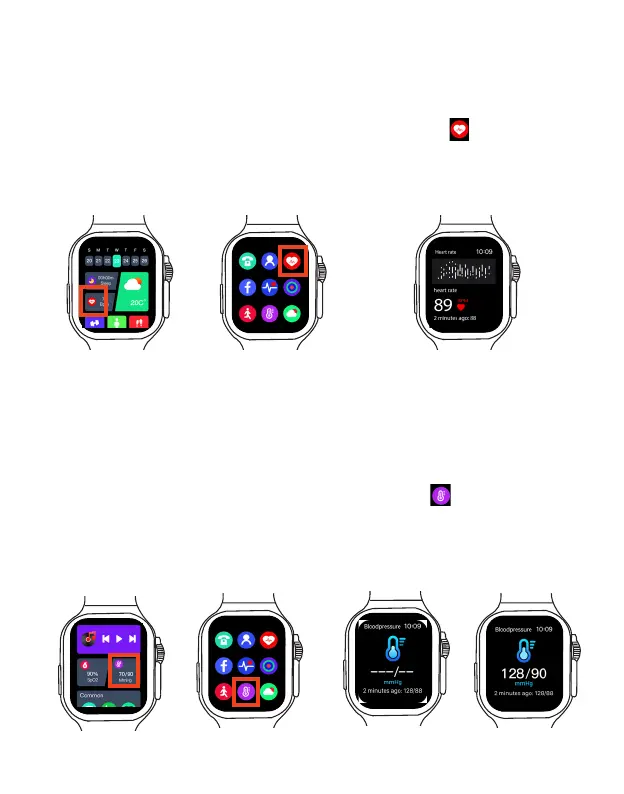
Start heart rate measurement
1. Wear your Smart Watch while keeping still.
2. On the home screen or main menu, select the Hear Rate App to start heart rate
measurement. Wait a few seconds, your Smart Watch will display your heart rate in real time.
Swipe right to return to previous screen to redo the heart rate measurement.
Note: To ensure accurate heart rate, make sure the Smart Watch is securely fastened, and the
Smart Watch heart rate sensor contacts your skin directly without any obstructions.
Check your blood pressure
It is considered that a person's blood pressure of 90-140/60-90 mmHg (millimeters of
mercury) is in normal range. High and low blood pressure can cause health problems, so
keeping your blood pressure at a proper level is essential to good long-term health.
A person's blood pressure usually goes up and down within a certain range every day, so it's
best to use more than one blood pressure reading to determine your average blood pressure.
Start blood pressure measurement
1. Wear your Smart Watch, while trying to keep still.
2. On the home screen or main menu, select the Bood Pressure App to start blood pressure
measurement. Wait a few seconds, your Smart Watch will display your blood pressure in real time.
Swipe right to return to previous screen to redo the blood pressure measurement.
Note: To ensure accurate
blood pressure
, make sure the Smart Watch is securely fastened, and
the Smart Watch heart rate sensor contacts your skin directly without any obstructions.
EN 17



 To Next Page