EasyManua.ls Logo

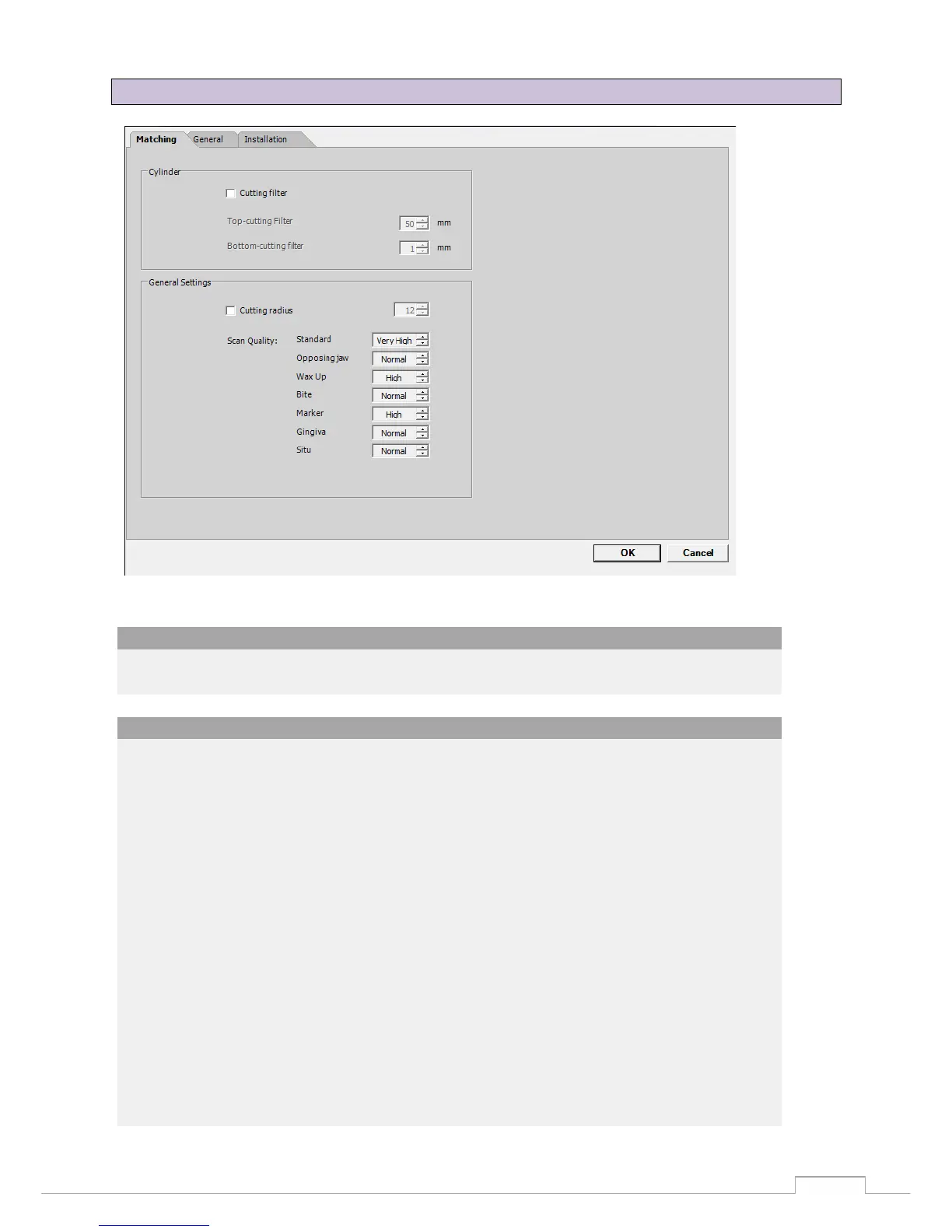
Smartoptics Activity 885 - Options  Settings  Matching; Figure 56: Settings-Matching

Smartoptics Activity 885
57 pages
Print Icon
To Next Page IconTo Next Page
To Previous Page IconTo Previous Page
Loading...
Symbols
51
Figure 56: settings-matching
13.4 Options
Settings
Matching
The checkbox is used to activate a cut filter, which cuts the upper and/or lower area of the STL
data set. The dimensional unit is millimetres.
Base:
The STL surface details and so also the data size are determined by the scan quality.
The higher the surface details, the lower the distance between the pixels.
The maximum distance between the pixels is reproduced by selecting "Very high".
A slightly larger distance between the pixels is cross-linked to a data set by selecting "High".
This distance gets bigger by selecting "Normal" and "Low".
The highest precision is achieved by selecting the scan quality "Very high".

General settings:

Table of Contents