10 Copyright © 2025 Sol-Ark LLC
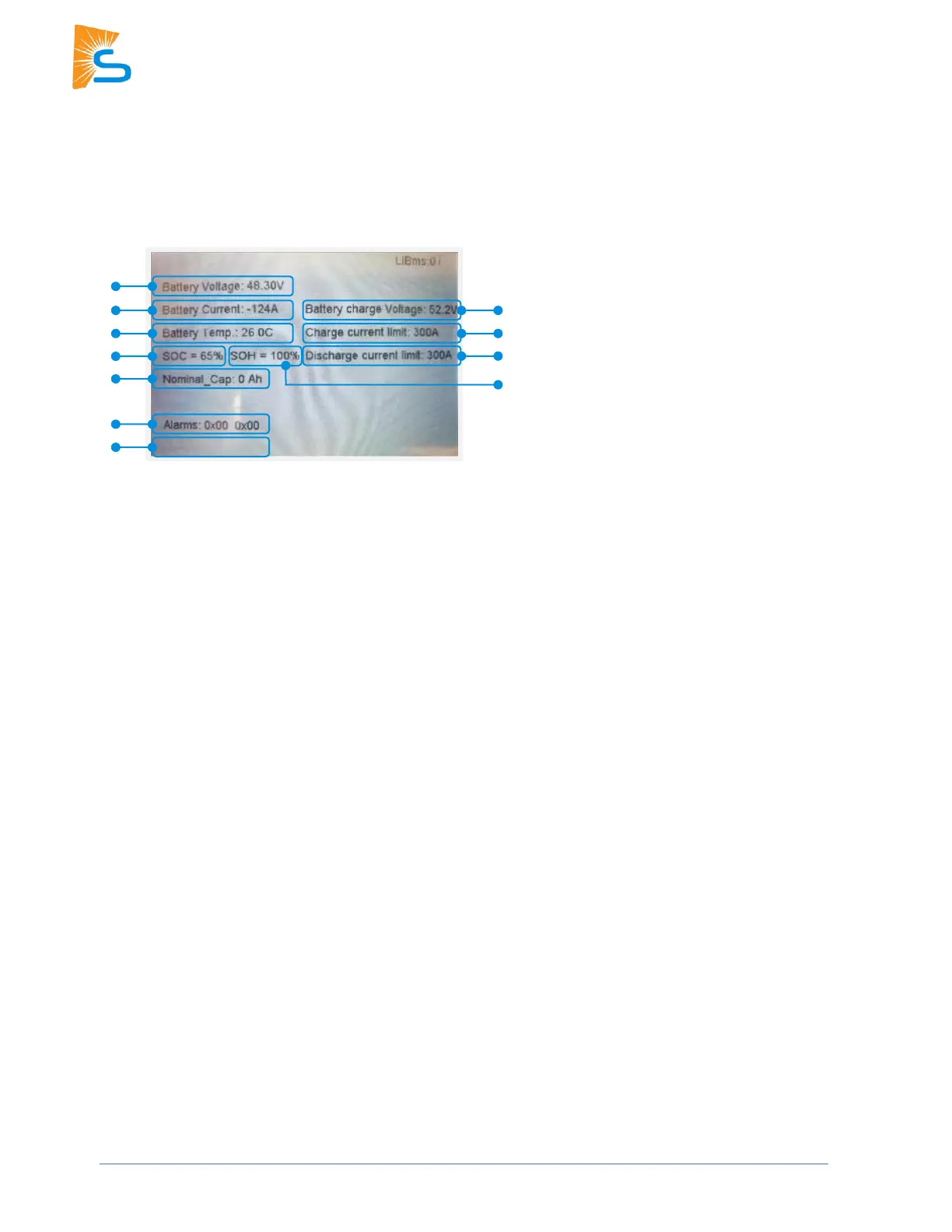
CANBus Battery Screen
This is what the Li Batt Info screen looks like when communications are enabled for CANBus batteries
(“BMS Lithium Batt 00”).
1. Battery Voltage
Real-time voltage measured between the battery terminals.
2. Battery Voltage
Real-time current flowing into or out of battery’s + terminal. (negative / positive sign respectively).
3. Battery Temp:
Real-time temperature measured at the BMS.
4. SOC
State of charge remaining in the battery according to the BMS.
5. SOH
State of health of the battery according to the BMS.
6. Battery Charge Voltage
The inverter should charge the battery to the maximum voltage.
7. Charge Current Limit
Maximum current allowed to the battery.
8. Discharge Current Limit
Maximum current allowed out of the battery.
9. Nominal_Cap
Amp-hour design capacity of the battery (not used on all batteries).
10. Alarms
Displays any alarm codes from the battery (manufacturer-specific).
11. Force Charge Request
Command sent by the BMS telling the inverter to charge the battery from any available power source
regardless of inverter settings. This is not shown in the image, but it’s located below the “Alarms” field.



 To Next Page