Highlighting Your Results as Before and After Meals Tests
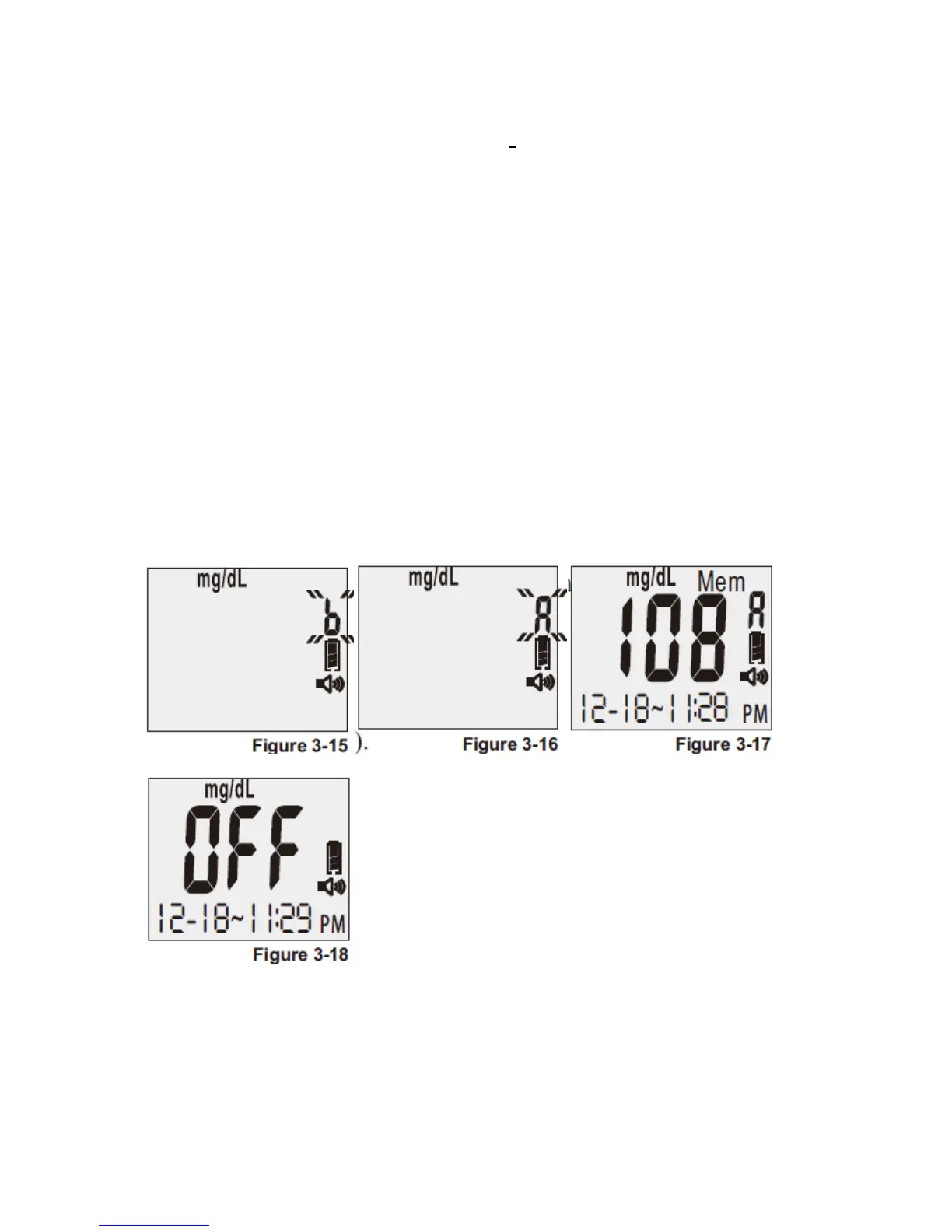
1. To flag a before-meal test, press the “R” right function button two (2) times after you
hear: “Apply blood now.” You will then hear: “Ready for test before meal.” Apply blood
to the edge of the strip. You will hear “Testing in process” (see Figure 3-15).
2. To flag an after-meal test, press the “R ” right function button three (3) times after you
hear: “Apply blood now.” You will then hear: “Ready for test after meal.” Apply blood to
the edge of the strip. You will hear “Testing in process” (see Figure 3-16).
3. After a six-second countdown, you will hear: “The glucose level is [number/unit].” For
those glucose tests that were flagged, the screen will display an “A” for an after-meal test
and a “b” for a before-meal test (see Figure 3-17).
4. As long as the strip is still inserted, press the “R” right function button and the meter will
repeat the test results no matter how many times the “R” right function button is pressed
until strip is taken out or waiting time runs out.
5. Once you remove the used strip, the meter will turn off automatically and you will hear:
“Goodbye.” The LCD screen will then display “OFF” (see Figure 3-18).
Understanding Your Test Results
1
Blood glucose levels are fluid and change all the time depending on food intake, medication
dosages, health, stress, and exercise. Consult your physician or healthcare professional for



 To Next Page