(10)
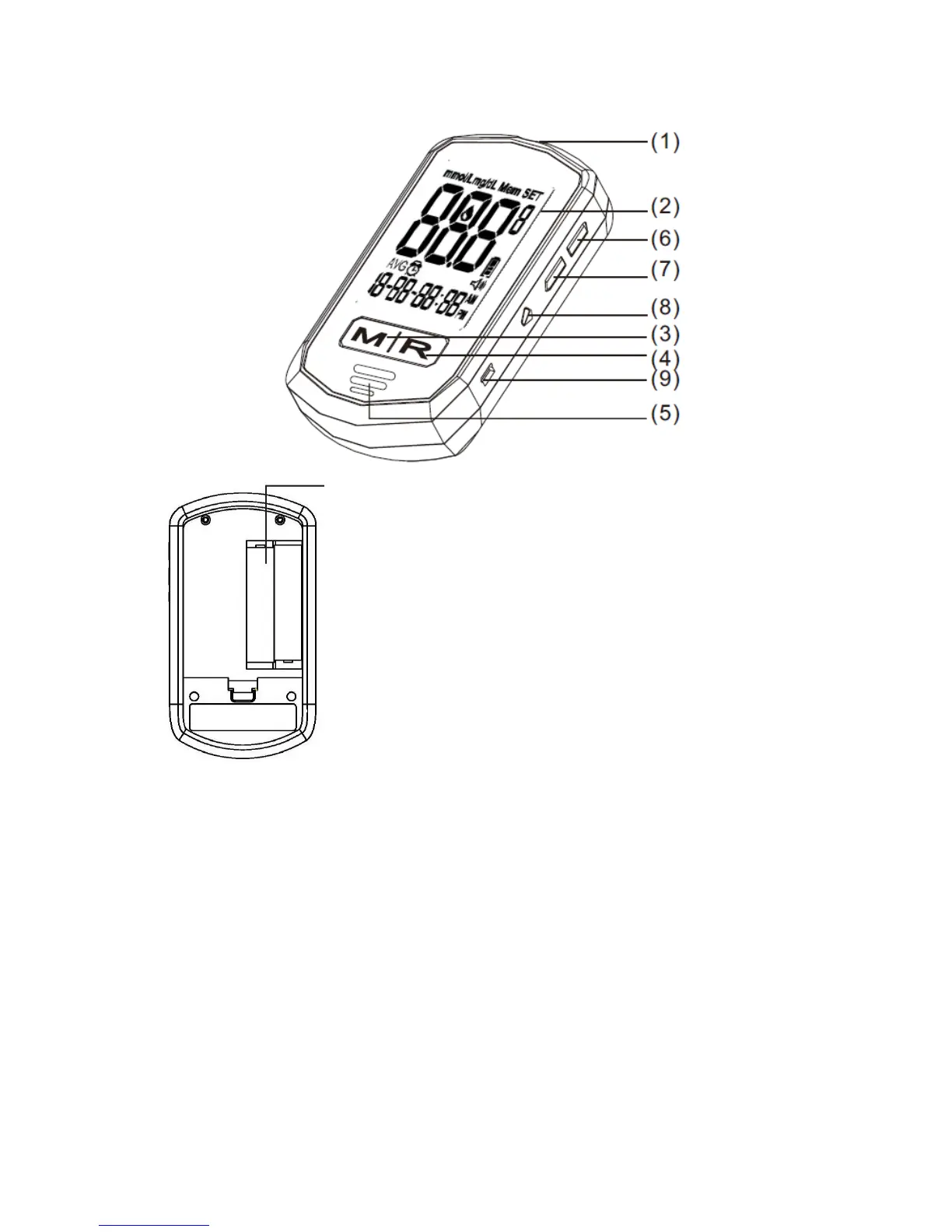
1. Test Strip Port - Insert the test strip here and the meter will turn on
automatically for testing.
2. LCD Display - Large screen with large numbers and symbols
that makes testing simple and easy. Guides the user through the
test using symbols and simple messages.
3. “M” Left Function Button - Powers the meter ON and OFF; in
the OFF position, pushing this button allows access to the
memory and setting modes.
4. “R” Right Function Button – Allows the user to confirm settings,
view averages, and highlight tests before meals and after meals.
In the OFF position, push this button to hear the current date and time. (Please refer to
manual for detailed function description.)
5. Speaker Slot –Allows the audible output to be heard.
6. Up Button - Increase the value of the current setting and increases the voice volume.
7. Down Button - Decreases the value of the current setting and decreases the voice volume.
8. Language Selection Button –Pressing twice (2x) allows user to change between audible
languages (English or Spanish). If pressed once, the meter defaults to the current language
setting.
9. Mini USB Port - the site where the mini USB cable is inserted for data transmission
between your meter and your computer. USB cable provided separately.
10. Battery Compartment –Area that holds two (2) AAA alkaline batteries.



 To Next Page