SUBTITLE (page 68)/CC
~
Selects the subtitle language
when multi-lingual subtitles are recorded
on a
BD-ROM/DVD VIDEO.
em
Changes the subtitle
of
the TV.
THEATER (page 54)
em
Automatically switches to the
optimum video mode for watching
movies.
[§] AUDIO (page 68)/FAVORITES
~
I
AMP
I Selects the language
when multi-lingual tracks are recorded
on a
BD-ROM/DVD VIDEO.
Selects the sound track on CDs.
em
Displays the favorite TV channel
list.
"
The THEATER button functions only when a
Theater Mode-compatible TV
is
connected.
@]
Number buttons (page 38,40, 58,
68,69,70)
~emIAMPI
Enters the title/chapter numbers, etc.
ENTER (page 38, 40, 58, 60)
~
em
Enters a selected item.
CLEAR!·
(dot)
~
Clears the entry field.
em
Inputs "." (dot) when inputting
numencs.
[II
AV 1/6 (on/standby) (page 57)
em
I
AMP
I Turns on the connected
TV
or
AV amplifier, or sets to standby
mode.
1/6 (on/standby) (page 30)
~
Turns on the player, or sets to
standby mode.
[g]
OPERATION CHANGE (page 56)
Changes the operation mode to control
the component by the remote.
~
Operates the player.
em
Operates a connected TV.
I
AMP
I Operates a connected AV
amplifier.
@]
~
OPEN/CLOSE (page 33)
~
Opens
or
closes the front cover.
INPUT (input select)
em
I
AMP
ISwitches between TV and
other input sources.
Ht-----l11
VOLUME
DISC
SKIP
;o~
~
1~~~---(10
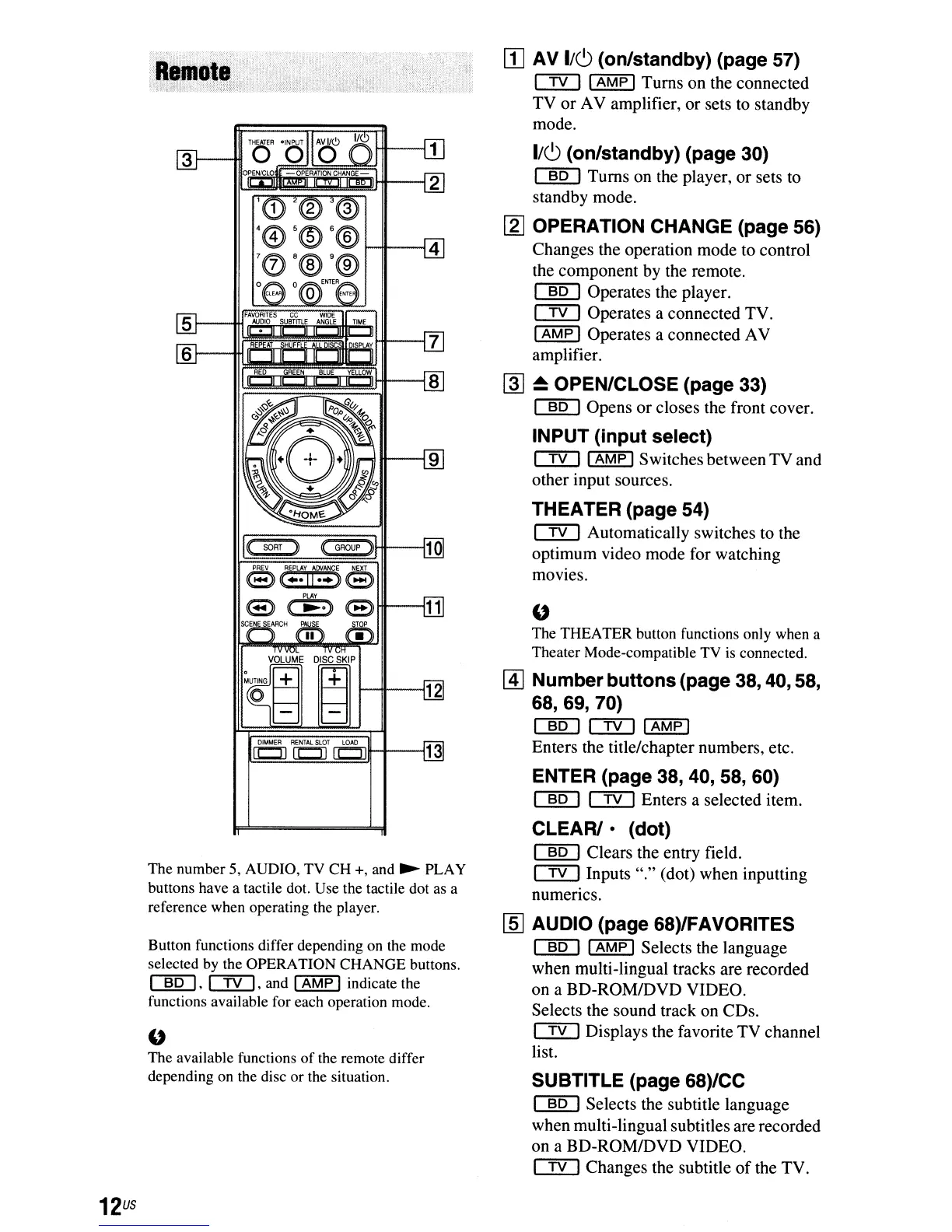
Button functions differ depending on the mode
selected by the OPERA
nON
CHANGE buttons.
~'
em,
and I
AMP
I indicate the
functions available for each operation mode.
The number 5, AUDIO, TV CH +, and
~
PLAY
buttons have a tactile dot. Use the tactile dot as a
reference when operating the player.
"
The available functions
of
the remote differ
depending on the disc
or
the situation.
12
us



 To Next Page