To
delete
data
in
the
external
memory
You can delete unnecessary data.
1 Press HOME.
2 Select
u:u
(Video) using
./+.
3 Select "BD Data" using +/+, and press
8.
4 Select the disc name, and press
OPTIONS.
5 Select "Erase," and press 8 .
6 Select "OK," and press 8 .
The data
of
the selected disc will be
deleted.
.
".
• To delete all data in the external memory at once,
select "Erase All" in step
5.
• Press 8 instead
of
OPTIONS in step 4 to skip
step 5.
U
Depending on the BD-ROM, the disc name may not
be displayed.
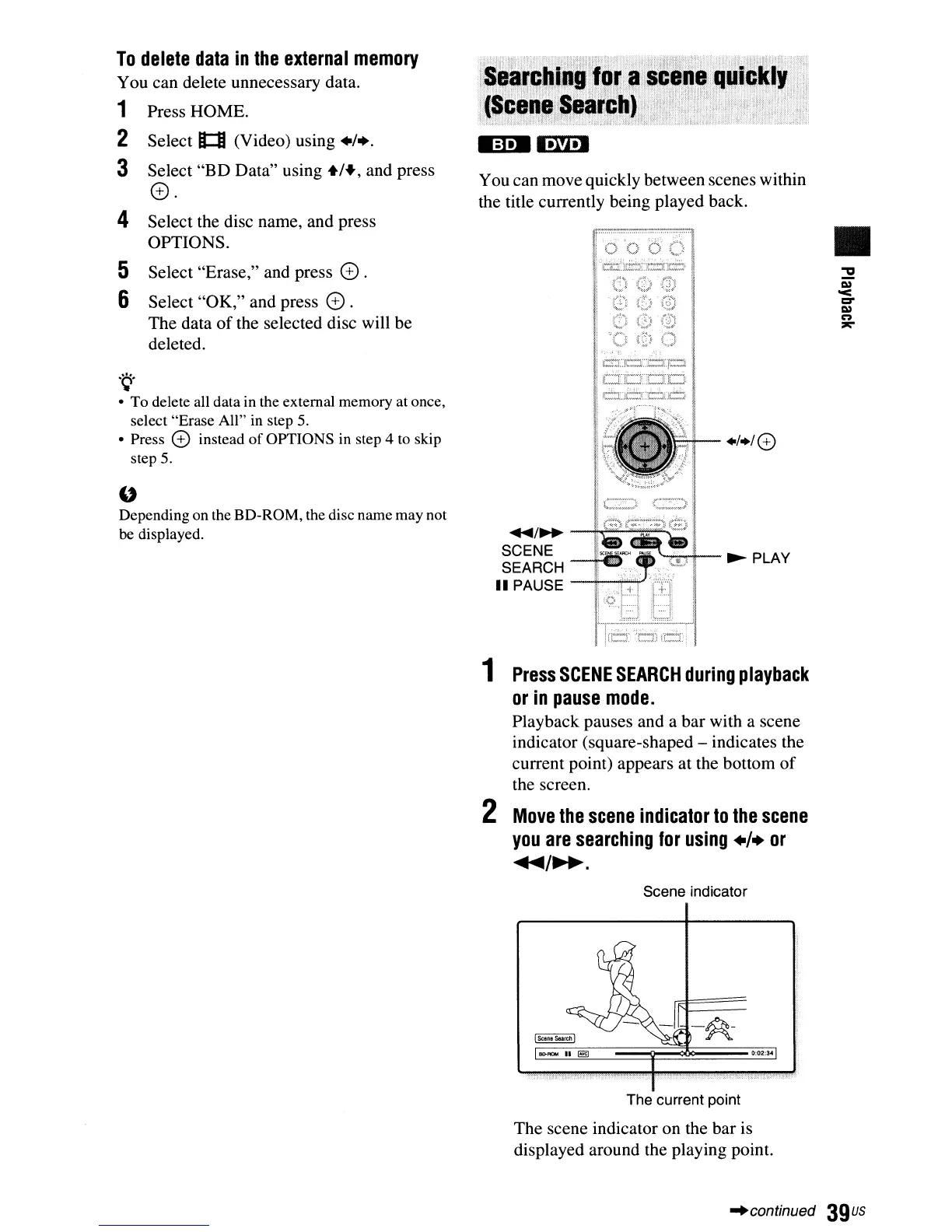
You can move quickly between scenes within
the title currently being played back.
+1+/8
....
/~
--h4~~=:';'''"''
SCENE
SEARCH
-tGJ
••
......"."..,,+--
~
PLAY
II
PAUSE
1
Press
SCENE
SEARCH
during
playback
or
in
pause
mode.
Playback pauses and a bar with a scene
indicator (square-shaped - indicates the
current point) appears at the bottom
of
the screen.
2
Move
the
scene
indicator
to
the
scene
you
are
searching
for
using
./.
or
...
/~.
Scene indicator
•
0:02:3-04
The current point
The scene indicator on the bar is
displayed around the playing point.
"continued
39us



 To Next Page