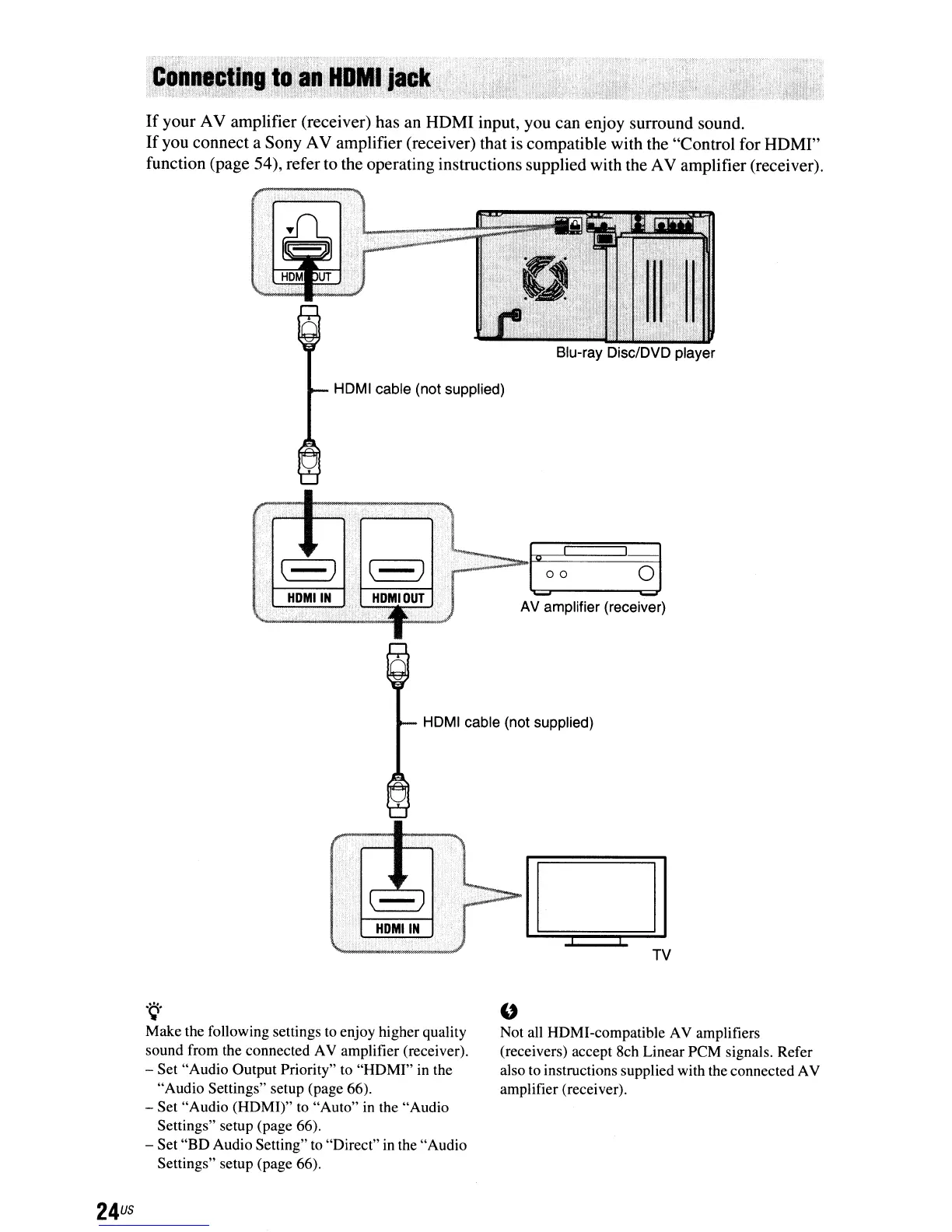
If
your AV amplifier (receiver) has an HDMI input, you can enjoy surround sound.
If
you connect a Sony AV amplifier (receiver) that is compatible with the "Control for HDMI"
function (page 54), refer to the operating instructions supplied with the AV amplifier (receiver).
HDMI cable (not supplied)
AV amplifier (receiver)
HDMI cable (not supplied)
24
us
.~.
Make the following settings
to
enjoy higher quality
sound from the connected AV amplifier (receiver).
- Set "Audio Output Priority" to "HDMI"
in
the
"Audio Settings" setup (page 66).
- Set "Audio (HDMI)"
to
"Auto"
in
the "Audio
Settings" setup (page 66).
- Set "BD Audio Setting"
to
"Direct"
in
the "Audio
Settings" setup (page 66).
"
Not all HDMI-compatible AV amplifiers
(receivers) accept 8ch Linear PCM signals. Refer
also
to
instructions supplied with the connected AV
amplifier (receiver).



 To Next Page