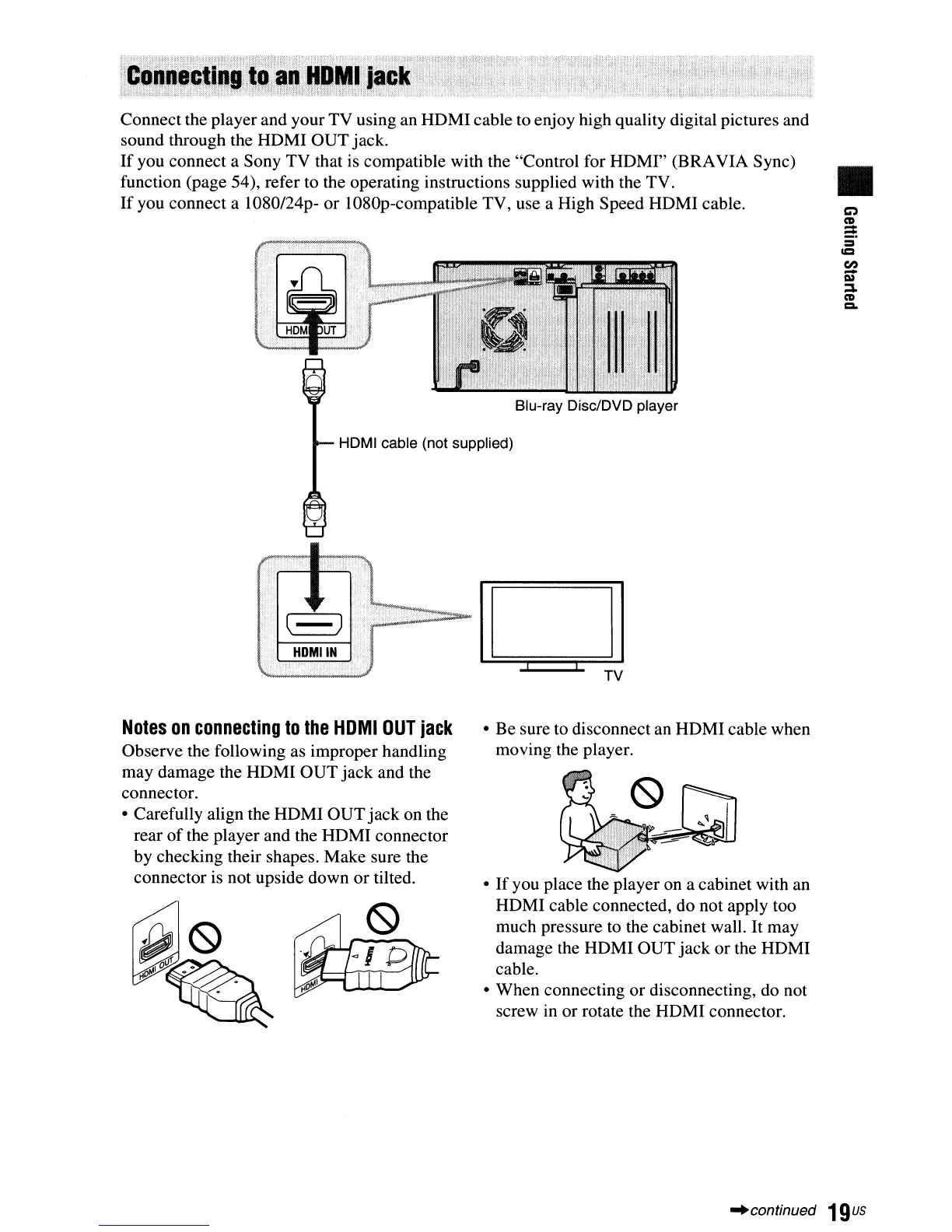
Connect the player and your TV using an HDMIcable to enjoy high quality digital pictures and
sound through the HDMI OUT jack.
If
you connect a Sony TV that is compatible with the "Control for HDMI" (BRAVIA Sync)
function (page 54), refer to the operating instructions supplied with the TV.
If
you connect a 1080/24p- or 1080p-compatible TV, use a High Speed HDMI cable.
HDMI cable (not supplied)
•
Notes
on
connecting
to
the
HDMI
OUT
jack
Observe the following as improper handling
may damage the HDMI OUT jack and the
connector.
• Carefully align the HDMI OUTjack on the
rear
of
the player and the HDMI connector
by checking their shapes. Make sure the
connector is not upside down
or
tilted.
• Be sure to disconnect an HDMI cable when
moving the player.
•
If
you place the player on a cabinet with an
HDMI cable connected, do not apply too
much pressure to the cabinet wall. It may
damage the HDMI OUT jack or the HDMI
cable.
• When connecting
or
disconnecting, do not
screw in or rotate the HDMI connector.
"continued
19us



 To Next Page