EasyManua.ls Logo

Sony BDP-CX960 - Step 1: Connecting to Vour TV

Sony BDP-CX960
106 pages
Print Icon
To Next Page IconTo Next Page
To Previous Page IconTo Previous Page
Loading...
Step
1:
Connecting
to
Your
TV
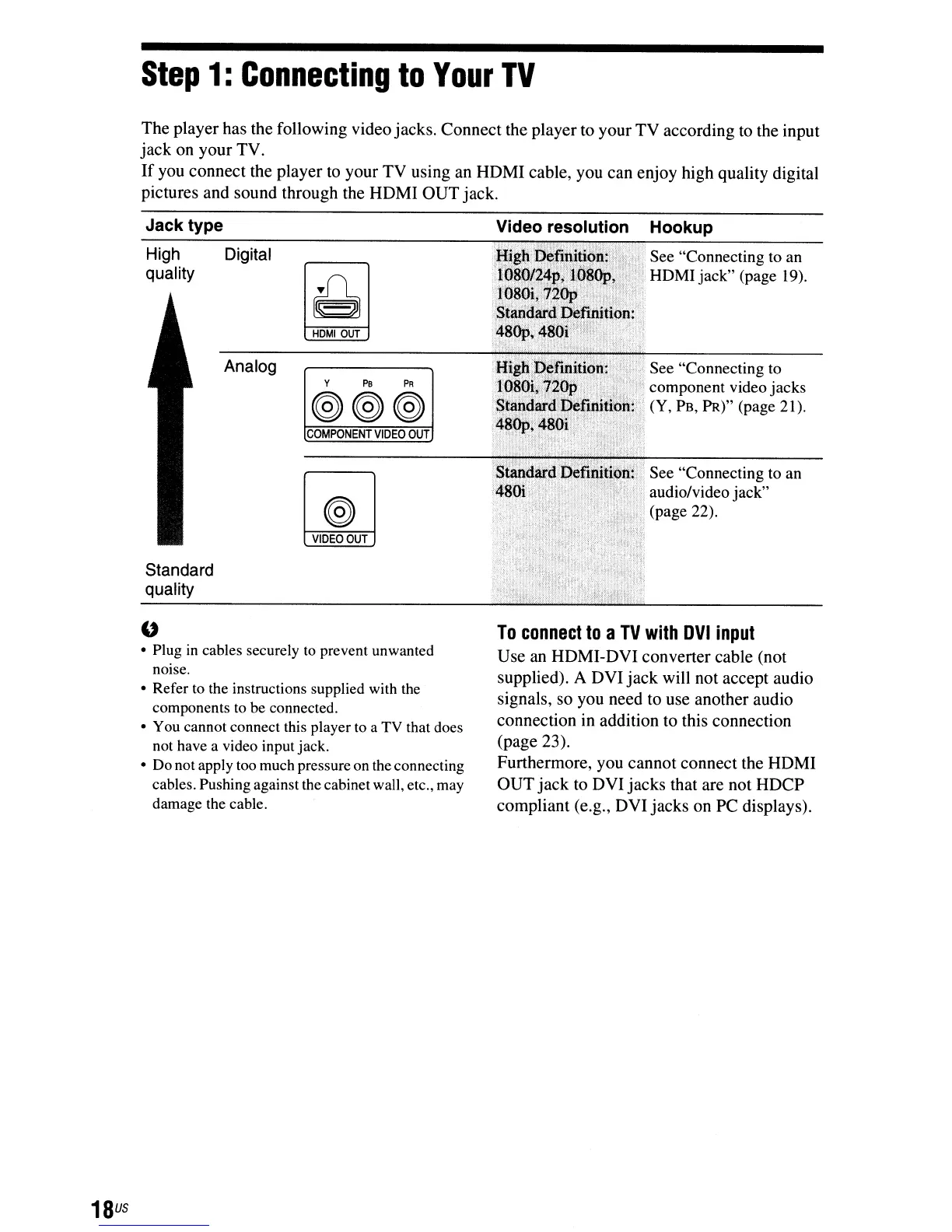
The
player
has the following video
jacks.
Connect
the
player
to
your
TV
according
to the
input
jack
on
your
TV.
If
you
connect
the
player
to
your
TV
using
an
HOMI
cable,
you
can
enjoy
high quality digital
pictures
and
sound
through
the
HOMI
OUT
jack.
18
us
Jack type
High Digital
quality
HOMIOUT
Analog
Y
PB
PR
(@(@(@
COMPONENT
VIDEO
OUT
VIDEO
OUT
Standard
quality
"
Plug
in
cables securely
to
prevent unwanted
nOIse.
Refer
to
the instructions supplied with
the
components
to
be
connected.
You
cannot connect this player
to
a
TV
that does
not
have
a video input jack.
Do
not apply
too
much pressure
on
the
connecting
cables. Pushing against the cabinet wall, etc.,
may
damage
the
cable.
See "Connecting
to
component video jacks
(Y,
PB,
PR)" (page 21).
n~;O"
See "Connecting to an
",~"
audio/video jack"
(page 22).
To
connect
to
a
TV
with
DVI
input
Use
an
HOMI-OVI
converter
cable (not
supplied). A
OVI
jack
will not
accept
audio
signals,
so
you need to use
another
audio
connection
in addition to this connection
(page 23).
Furthermore, you
cannot
connect
the
HOMI
OUT
jack
to
OVI
jacks
that are
not
HOCP
compliant
(e.g.,
OVI
jacks
on
PC
displays).

Other manuals for Sony BDP-CX960

Related product manuals