accordance with the instructions,
may cause harmful interference to
radio communications. However,
there is
no
guarantee that
interference will not occur
in
a
particular installation.
If
this
equipment does cause harmful
interference to radio or television
reception, which can be
determined
by
turning the
equipment offand on, the user is
encouraged to try to correct the
interference by one or more
of
the
following measures:
- Reorient or relocate the
receiving antenna.
- Increase the separation between
the equipment and receiver.
- Connect the equipment into an
outlet on a circuit different from
that to which the receiver is
connected.
- Consult the dealer or an
experienced radiorrV technician
for help.
CAUTION
You are cautioned that any
changes or modifications not
expressly approved in this manual
could void your authority to
operate this equipment.
If
you have any questions about
this product, you may call; Sony
Customer Information Service
Center 1-800-222-7669 or
http://www.sony.com!
For Customers
in
Canada
This Class B digital apparatus
complies with Canadian ICES-
003.
If
this product is not working
properly, please call 1-877-602-
2008 for Peace
of
Mind
Warranty Replacement
service.
For other product related questions
please contact our Customer
Information Service Center at
1-877-899-7669 or write to
us
at:
Customer Information Service
115
Gordon Baker Road, Toronto,
Ontario, M2H 3R6
Precautions
• To avoid electrical shock, do not
open the cabinet. Refer servicing
to qualified personnel only.
• Keep the external memory away
from children.
If
swallowed,
promptly see a doctor.
Precautions
On
safety
•
To
prevent
fire
or
shock
hazard,
do
not
place objects
filled with liquids, such as
vases,
on
the player,
or
place
the
player
near
water,
such
as
near
a
bathtub
or
shower
room.
Should
any solid
object
or
liquid fall into the cabinet,
unplug
the
player
and
have
it
checked
by qualified
personnel before
operating
it
any further.
•
Do
not touch the
AC
power
cord
with
wet
hands.
Doing
so
may
cause
an
electric shock.
On
placement
•
Place
the
player
in a location
with
adequate
ventilation to
prevent
heat
build-up in the
player.
•
Do
not place the
player
on
a
soft
surface
such
as a rug that
might
block
the ventilation
holes.
•
Do
not
place the
player
in a
location
near
heat
sources,
or
in a place
subject
to
direct
sunlight,
excessive
dust,
or
mechanical
shock.
•
If
the
player
is
brought
directly
from
a
cold
to a
warm
location,
or
is
placed
in a very
damp
room,
moisture
may
condense
on
the lenses inside the player.
Should
this occur, the
player
may
not
operate
properly. In
this case,
remove
the disc
and
leave the
player
turned
on
for
about
half
an
hour
until the
moisture
evaporates.
•
Keep
the
player
and the discs
away
from
equipment
with
strong magnets,
such
as
microwave
ovens,
or
large
loudspeakers.
•
Do
not place heavy
or
unstable
objects
on
the player.
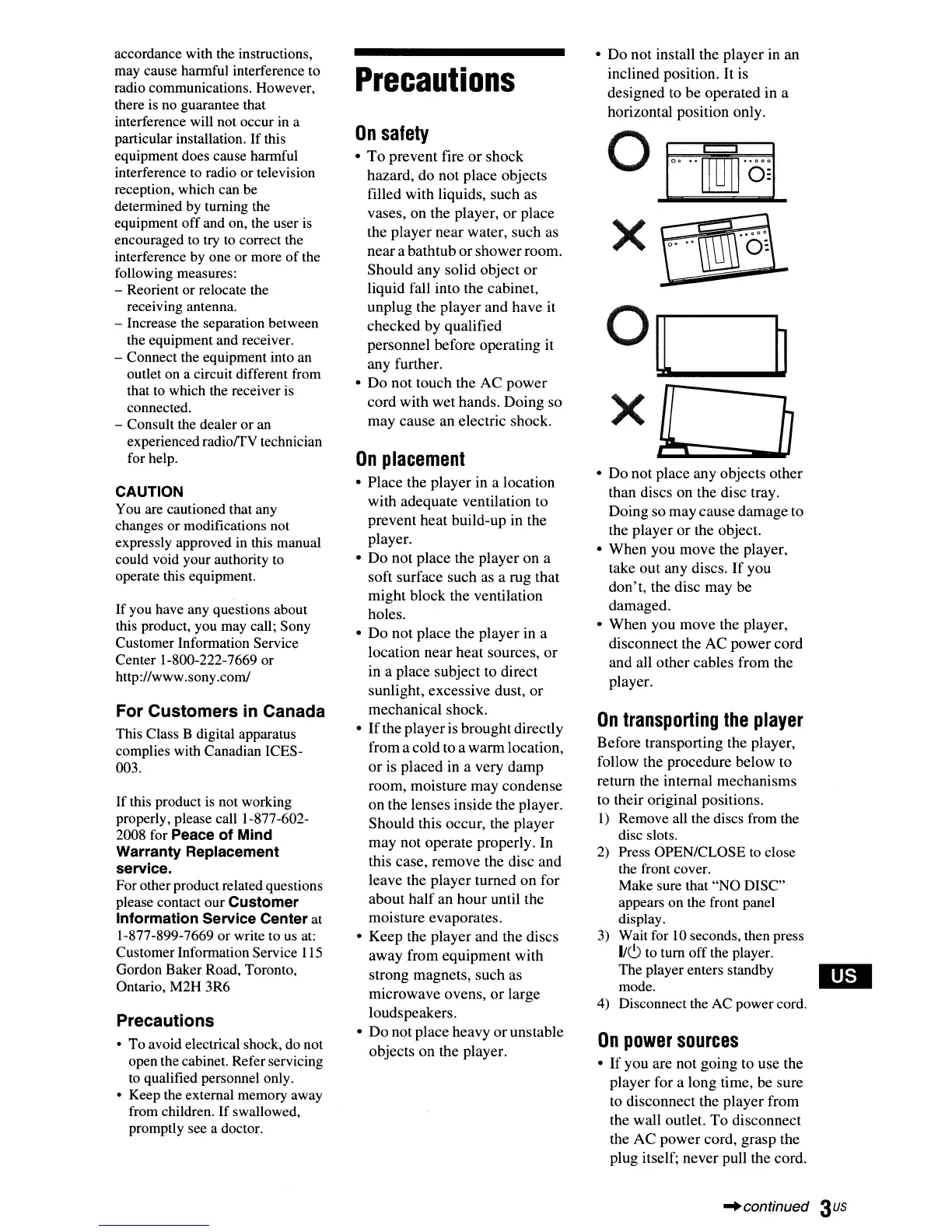
•
Do
not
install the
player
in an
inclined position. It is
designed
to
be
operated in a
horizontal position only.
•
Do
not
place
any
objects
other
than discs
on
the disc tray.
Doing
so
may
cause
damage
to
the
player
or
the object.
•
When
you
move
the player,
take
out
any discs.
If
you
don't,
the disc
may
be
damaged.
•
When
you
move
the player,
disconnect
the
AC
power
cord
and
all
other
cables
from
the
player.
On
transporting
the
player
Before
transporting the player,
follow the
procedure
below
to
return the internal
mechanisms
to
their original positions.
I)
Remove all the discs from the
disc slots.
2)
Press OPEN/CLOSE to close
the front cover.
Make sure that "NO DISC"
appears on the front panel
display.
3) Wait for
10
seconds, then press
1/(9
to tum off the player.
The player enters standby
mode.
4) Disconnect the
AC
powercord.
On
power
sources
•
If
you
are not
going
to
use
the
player
for a long time, be sure
to
disconnect
the
player
from
the wall outlet.
To
disconnect
the
AC
power
cord,
grasp
the
plug itself;
never
pull the cord.
-'continued
3us



 To Next Page