Guide
to
On-screen
Menu
Display
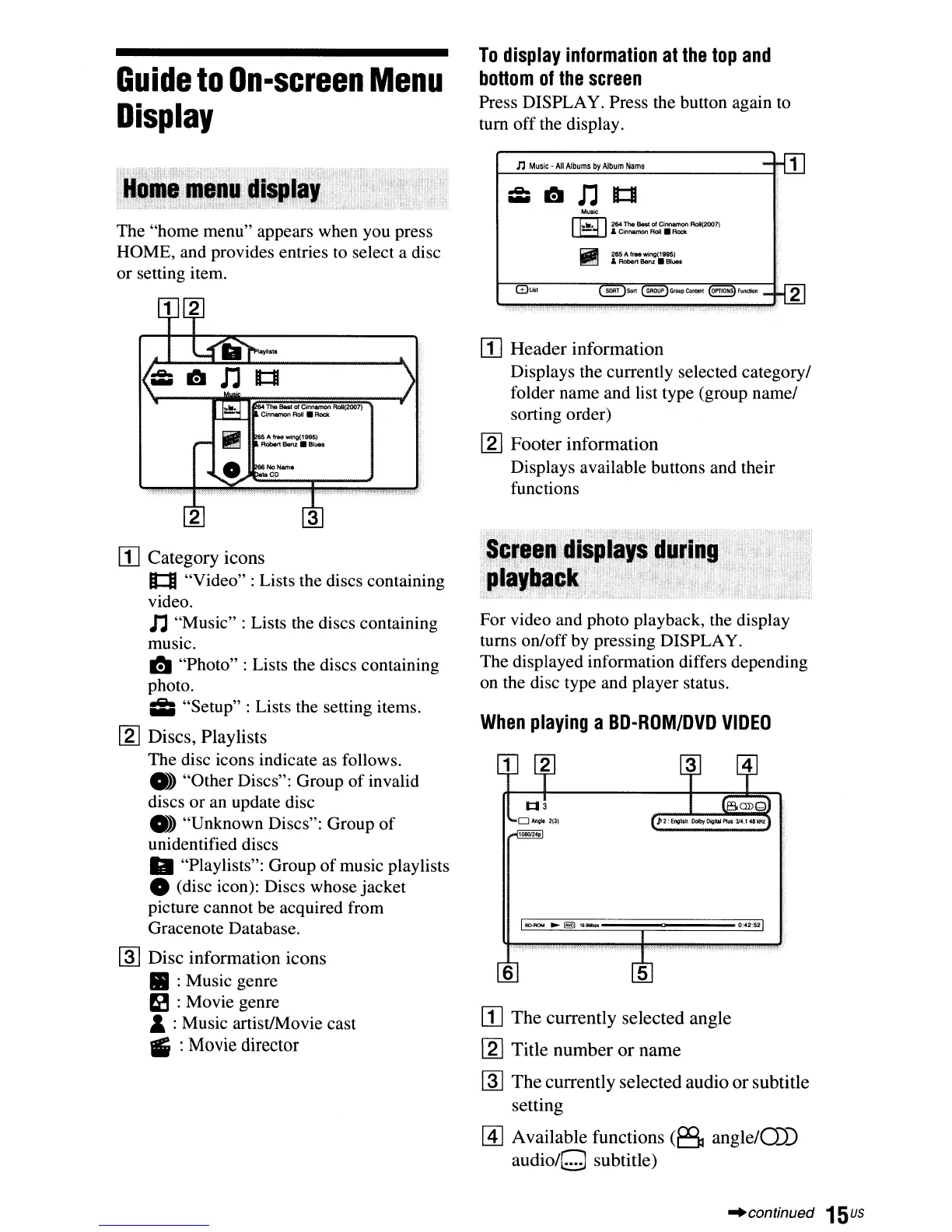
The "home menu" appears when you press
HOME, and provides entries to select a disc
or setting item.
The Best
of
Cinnamon
AoII(2007)
L.I.-..L.lIrCinnamon
Roll.
Rock
3
[j]
Category icons
1::1
"Video": Lists the discs containing
video.
n "Music" : Lists the discs containing
music.
I!I
"Photo" : Lists the discs containing
photo.
Ii;
"Setup" : Lists the setting items.
[2]
Discs, Playlists
The disc icons indicate as follows.
• "Other Discs": Group
of
invalid
discs or an update disc
• "Unknown Discs": Group
of
unidentified discs
II
"Playlists": Group
of
music playlists
o (disc icon): Discs whose jacket
picture cannot
be
acquired from
Gracenote Database.
~
Disc information icons
II
:Music genre
eI
:Movie genre
&:Music artist/Movie cast
IS
:Movie director
To
display
information
at
the top
and
bottom
of
the
screen
Press DISPLAY. Press the button again to
tum off the display.
n
Music·
All
Albums
by
Album
Name
-rlIJ
..e..
~
n
It:II
...
Music
~
264
The
BesI
of
Cinnamon
RoII(2007)
- & Cinnamon
Roll.
Rodt
II
265
A
lree
wing(19Q5)
.&
RObert Benz •
Blue.
mUst
~Sort
(~)GflMlPContent
~Functlon_
!{g]
[j]
Header
information
Displays the currently selected category/
folder name and list type (group name/
sorting order)
[2] Footer information
Displays available buttons and their
functions
For video and photo playback, the display
turns on/off by pressing DISPLAY.
The displayed information differs depending
on the disc type and player status.
When
playing
a
BD-ROM/DVD
VIDEO
6
[j]
The
currently selected angle
[2] Title number
or
name
~
The
currently selected audio
or
subtitle
setting
~
Available functions
(6
angle/O))
audio/O
subtitle)
"continued
15us



 To Next Page