lID
Playback information
Displays Disc typelPlay mode/Video
codeclBit ratelPlaying status bar/
Playing time (Remaining time*)
lID
Output resolutionlVideo frequency
*Displayed when you press TIME repeatedly.
.
~.
• You can also check the playback information
in
the front panel display (page 10).
• Press SUBTITLE, AUDIO, or ANGLE, and you
can check each type
of
information.
When
playing
a
photo
file
~
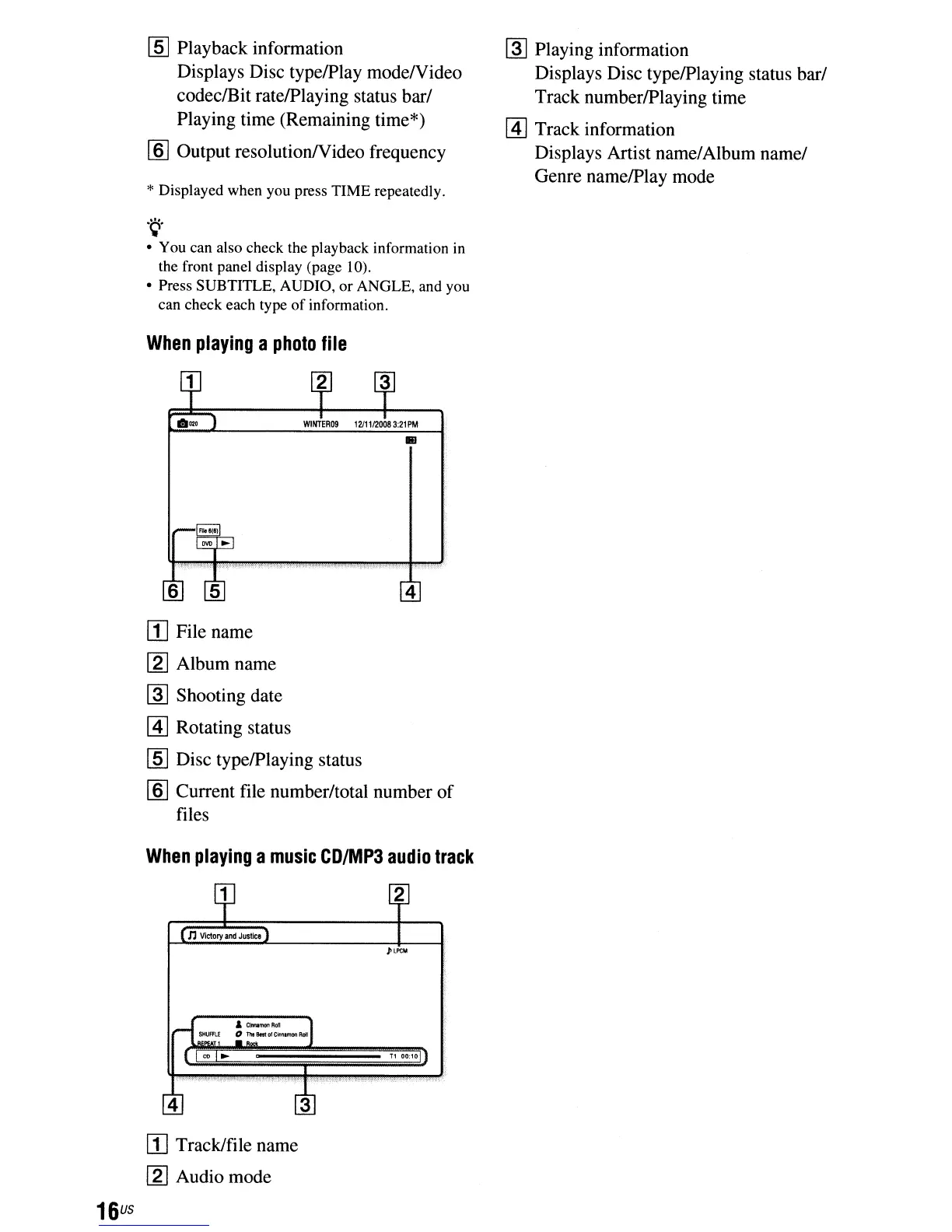
Playing information
Displays Disc typelPlaying status bar/
Track numberlPlaying time
[!]
Track information
Displays Artist name/Album name/
Genre namelPlay mode
..
4
16
us
[I] File name
~
Album name
~
Shooting date
[!]
Rotating status
lID
Disc typelPlaying status
lID
Current file number/total number
of
files
When
playing
a
music
CD/MP3
audio
track
&
CIrlnMIonRol
o TlItBlstolCimunonRdI
T1
00;10
3
II] Track/file name
~
Audio mode



 To Next Page