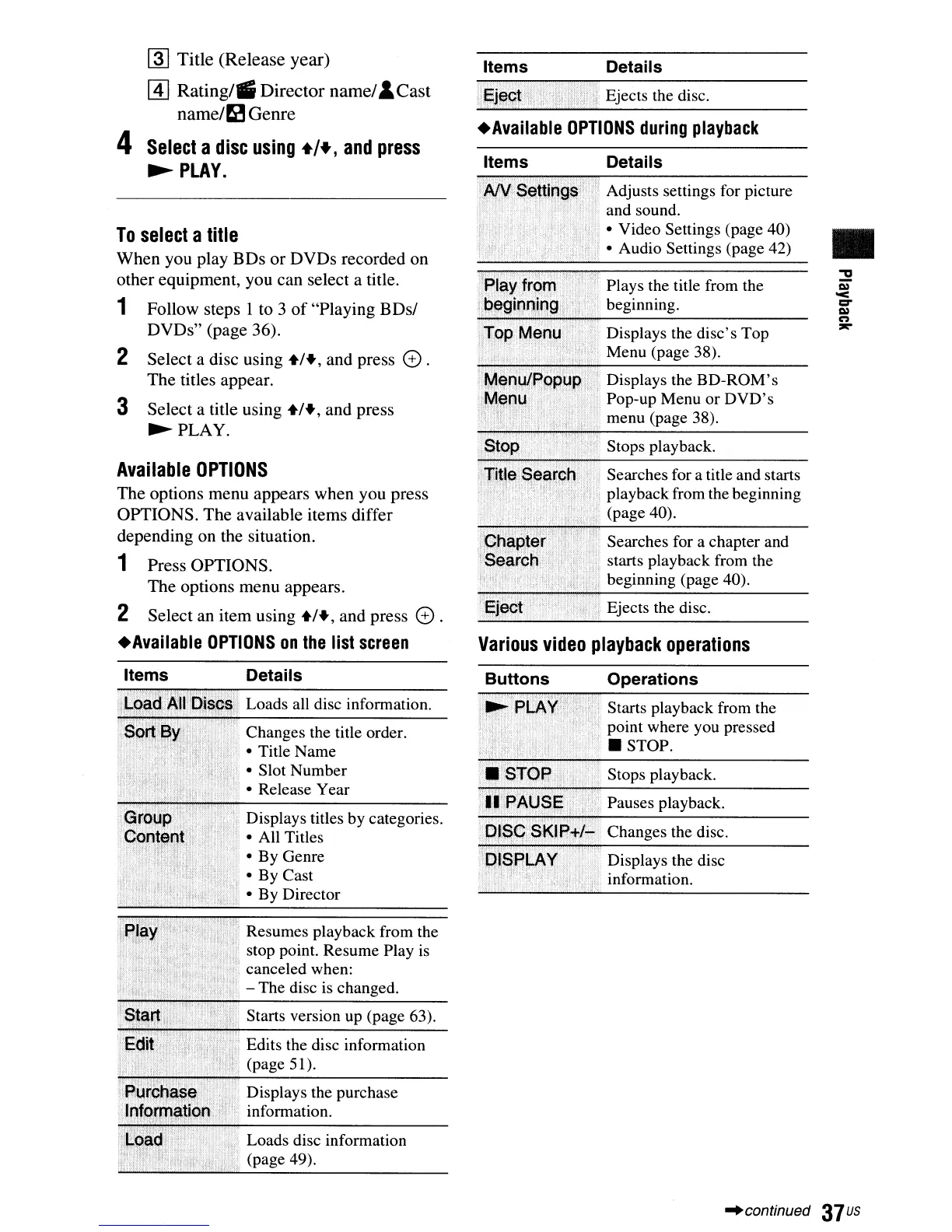
.Available
OPTIONS
during
playback
•
Plays the title from the
beginning.
Displays the
BD-ROM's
Pop-up Menu
or
DVD's
menu (page 38).
Searches for a chapter and
starts playback from the
beginning (page 40).
Searches for a title and starts
playback from the beginning
(page 40).
Displays the
disc's
Top
Menu (page 38).
Stops playback.
Details
Adjusts settings for picture
and sound.
• Video Settings (page 40)
• Audio Settings (page 42)
Ejects the disc.
Details
. Ejects the disc.
Items
Items
Various
video
playback
operations
~
Title (Release year)
[!] Rating/iii Director name/&Cast
name/~
Genre
4
Select
a
disc
using
+/+,
and
press
~PLAY.
Available
OPTIONS
The
options
menu
appears
when
you
press
OPTIONS.
The
available
items
differ
depending
on
the
situation.
1
Press
OPTIONS.
The
options
menu
appears.
2
Select
an
item
using
+1+,
and
press
e .
•
Available
OPTIONS
on
the
list
screen
To
select
a
title
When
you
play
BDs
or
DVDs
recorded
on
other
equipment,
you
can
select
a title.
1
Follow
steps
I
to
3
of
"Playing
BDsl
DVDs"
(page
36).
2
Select
a
disc
using
+1+,
and
press
e.
The
titles
appear.
3
Select
a title
using
+1+,
and
press
~PLAY.
Items
Details
Loads all disc information.
Changes the title order.
• Title Name
• Slot Number
• Release Year
Displays titles by categories.
• All Titles
• By Genre
• By Cast
• By Director
Resumes playback from the
stop point. Resume Play is
canceled when:
- The disc is changed.
Starts version up (page 63).
Edits the disc information
(page 51).
Displays the purchase
information.
Loads disc information
(page 49).
Buttons Operations
Starts playback from the
point where you pressed
• STOP.
Stops playback.
Pauses playback.
Changes the disc.
Displays the disc
information.
-'continued
37
us



 To Next Page