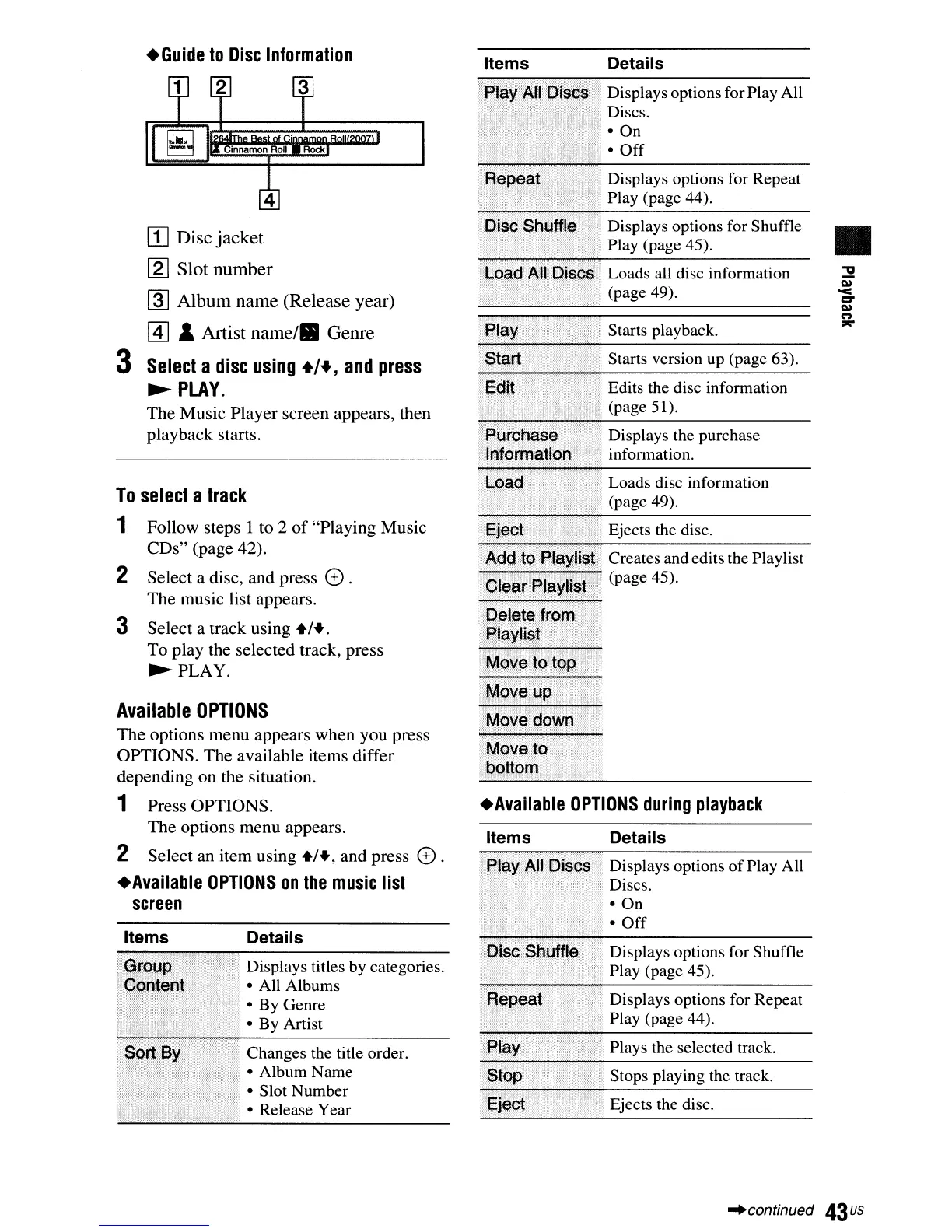
Displays options for Repeat
Play (page 44).
Ejects the disc.
Stops playing the track.
Plays the selected track.
Displays options for Shuffle
Play (page 45).
Details
Displays options
of
Play All
Discs.
• On
•
Off
Items
Items
Details
Displays options for Play All
Discs.
• On
•
Off
Displays options for Repeat
Play (page 44).
Displays options for Shuffle
•
Play (page 45).
Loads all disc information
:::2
(page 49).
C»
'<
c:r
C»
n
Starts playback.
=-:"
Starts version up (page 63).
Edits the disc information
(page 51).
Displays the purchase
information.
Loads disc information
(page 49).
Ejects the disc.
Creates and edits the Playlist
(page 45).
+Available
OPTIONS
during
playback
Details
Changes the title order.
• Album Name
• Slot Number
• Release Year
Displays titles by categories.
• All Albums
• By
Genre
• By Artist
Cinnamon
Roll
Rock
Follow
steps 1 to 2
of
"Playing
Music
CDs"
(page 42).
Select
a disc,
and
press
CD
.
The
music list appears.
Select
a
track
using
+1+.
To
play
the selected track, press
~PLAY.
Items
+Guide
to
Disc
Information
2
2
III
Disc
jacket
[g]
Slot
number
~
Album
name
(Release
year)
@]
&
Artist
name/.
Genre
3
Select
a
disc
using
+/+,
and
press
~
PLAY.
The
Music
Player
screen
appears, then
playback
starts.
3
Available
OPTIONS
The
options
menu
appears
when
you press
OPTIONS.
The
available items
differ
depending
on
the situation.
1
Press
OPTIONS.
The
options
menu
appears.
2
Select
an
item
using
+1+,
and
press
CD
.
+Available
OPTIONS
on
the
music
list
screen
To
select
a
track
1
"continued
43us



 To Next Page