Changing
the
Command
Mode
When you have more than one Sony Blu-ray
disc/DVD player, the supplied remote may
interfere with another player. In this case,
change the command mode for this player
and the supplied remote
to
one that differs
from the other player.
The default command mode for this player
and the supplied remote
is
BDl.
Number
buttons
""-r-- ENTER
.
~~-
POP UP/
MENU
./+/+/./
e
HOME
-4-_=
....
To
switch
the
command
mode
for
the
remote
Set the command mode for the remote so it
matches the command mode you set in step 6
above (for the player).
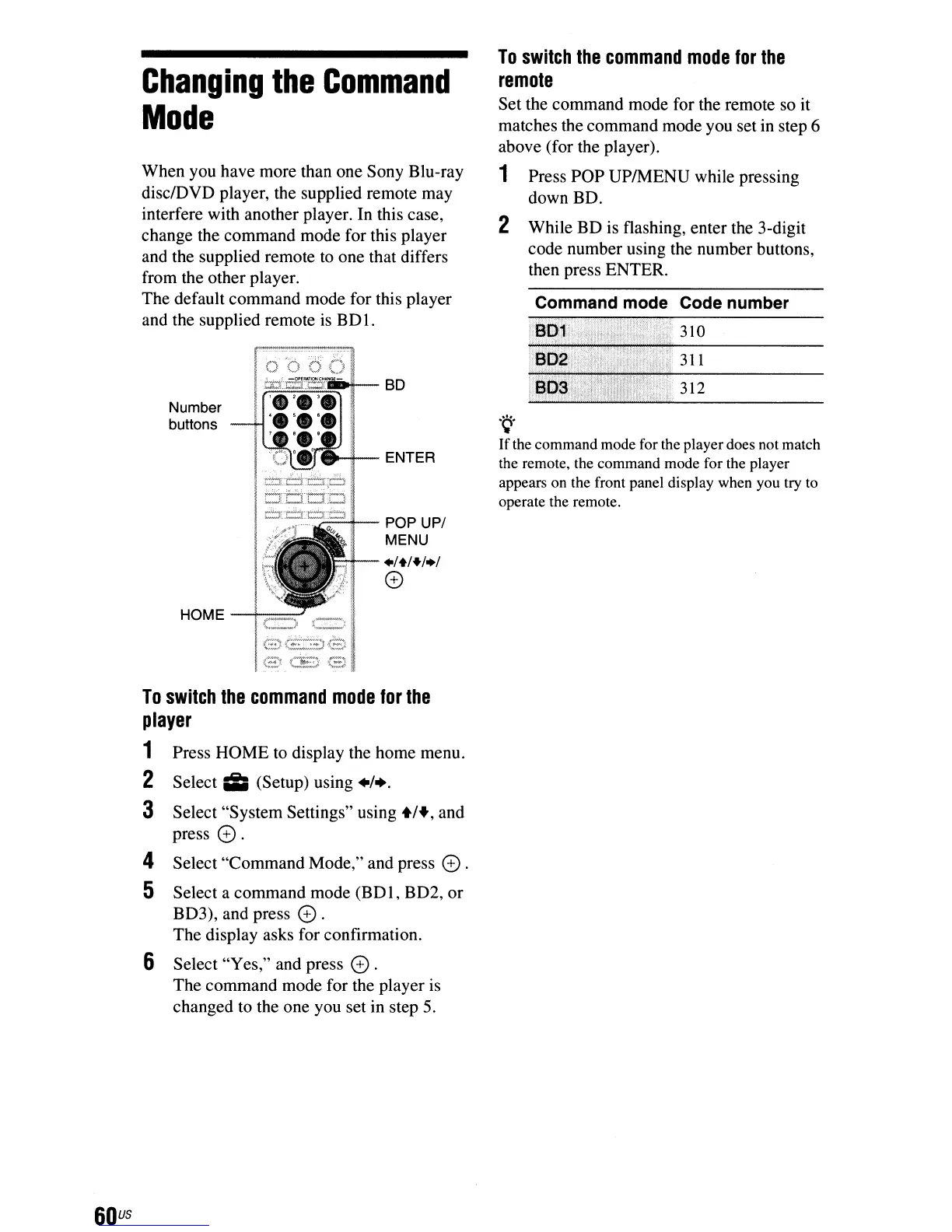
1 Press pOP UPIMENU while pressing
down BD.
2 While BD is flashing, enter the 3-digit
code number using the number buttons,
then press ENTER.
Command mode Code number
310
311
312
.~.
If
the command mode for the playerdoes not match
the remote, the command mode for the player
appears on the front panel display when you try to
operate the remote.
Press HOME to display the home menu.
Select
iii
(Setup) using +1+.
Select "System Settings" using
+1+,
and
press
e.
4 Select "Command Mode," and press e.
5 Select a command mode (BD
I,
BD2, or
BD3), and press
e .
The display asks for confirmation.
6 Select "Yes," and press e.
The command mode for the player
is
changed to the one you set in step
5.
To
switch
the
command
mode
for
the
player
1
2
3
60
us



 To Next Page