124
Een titel wissen
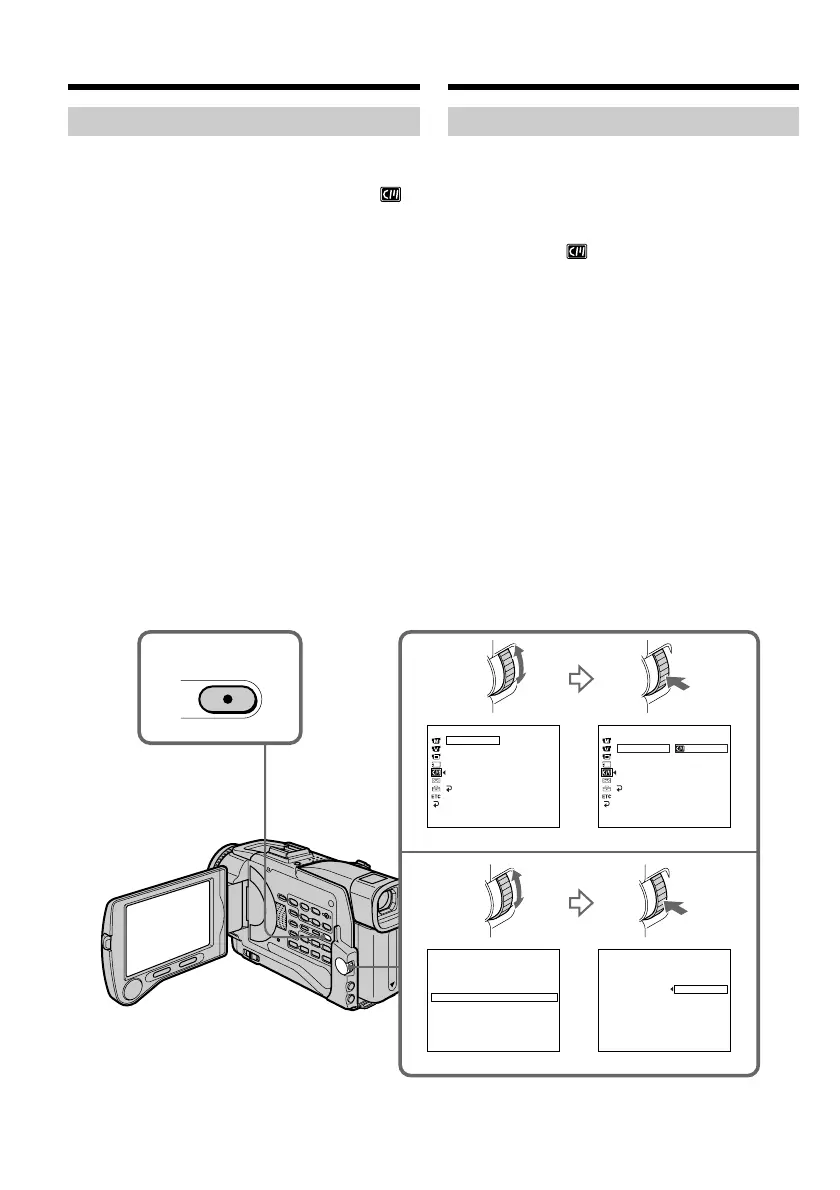
(1)Zet de POWER schakelaar van de camcorder
in de “CAMERA” of “VCR” stand en druk op
de MENU toets om het instelmenu te laten
verschijnen.
(2)Draai aan de SEL/PUSH EXEC regelknop,
stel in op het pictogram en druk de
regelknop in.
(3)Draai aan de SEL/PUSH EXEC regelknop,
kies het onderdeel TITLEERASE en druk de
knop weer in.
Nu verschijnt het titelwisscherm.
(4)Draai aan de SEL/PUSH EXEC regelknop,
kies de titel die u wilt wissen en druk de
regelknop in. De aanduiding “ERASE OK?”
verschijnt.
(5)Controleer of de gekozen titel inderdaad de
titel is die u wilt wissen. Draai aan de SEL/
PUSH EXEC regelknop, stel in op OK en druk
de regelknop in. In plaats van OK verschijnt
er dan EXECUTE.
(6)Draai aan de SEL/PUSH EXEC regelknop om
in te stellen op EXECUTE en druk de
regelknop in. De aanduiding “ERASING”
gaat knipperen en dan verschijnt er
“COMPLETE” wanneer de titel gewist is.
Annuleren van het wissen van de
titel
Kies in stap 6 RETURN.
Superimposing a title
Erasing a title
(1)Set the POWER switch to CAMERA or VCR
and then press MENU to display the menu.
(2)Turn the SEL/PUSH EXEC dial to select
in the menu settings, then press the dial.
(3)Turn the SEL/PUSH EXEC dial to select
TITLEERASE, then press the dial.
Title erase display appears.
(4)Turn the SEL/PUSH EXEC dial to select the
title you want to erase, then press the dial.
“ERASE OK ?” indicator appears.
(5)Make sure the title is the one you want to
erase, and turn the SEL/PUSH EXEC dial to
select OK, then press the dial. OK changes to
EXECUTE.
(6)Turn the SEL/PUSH EXEC dial to select
EXECUTE, then press the dial. ERASING
indicator flashes, then COMPLETE indicator
appears.
To cancel erasing a title
Select RETURN in step 6.
2,3
4,5
1
MENU
CM SET
CM SEARCH
T I TLEERASE
TITLE DSPL
TAPE T I TLE
ERASE ALL
[
MENU
]
:
END
CM S ET
TITLE
TITLEERASE
TI TLE DSPL
CM S EA RCH
TAPE T I TLE
ERASE ALL
[
MENU
]
:
END
[
MENU
]
:
END
TITL EII ERASE
1
HELLO
!
2
CONGRATULAT IONS
!
3
HAPPY NE
W
YEAR
!
4
PRESENT
5
GOOD
M
ORNING
6
W
EDDI NG
4
PRESENT
ERASE O
OK
K
?
RETURN
[
MENU
]
:
END
T I TLE ERASE
R
ETURN
TITLE
YDAER
RETURN
Een titel in beeld opnemen













 To Next Page