68
U kunt de belichting met de hand instellen.
Onder de volgende omstandigheden kunt u
betere opnamen verkrijgen door de belichting
met de hand bij te stellen.
– Bij tegenlicht, dus met een erg heldere
achtergrond
– Als het onderwerp juist erg helder is en de
achtergrond donker
– Als u een donkere sfeer (bijv. nachtscènes)
natuurgetrouw wilt vastleggen.
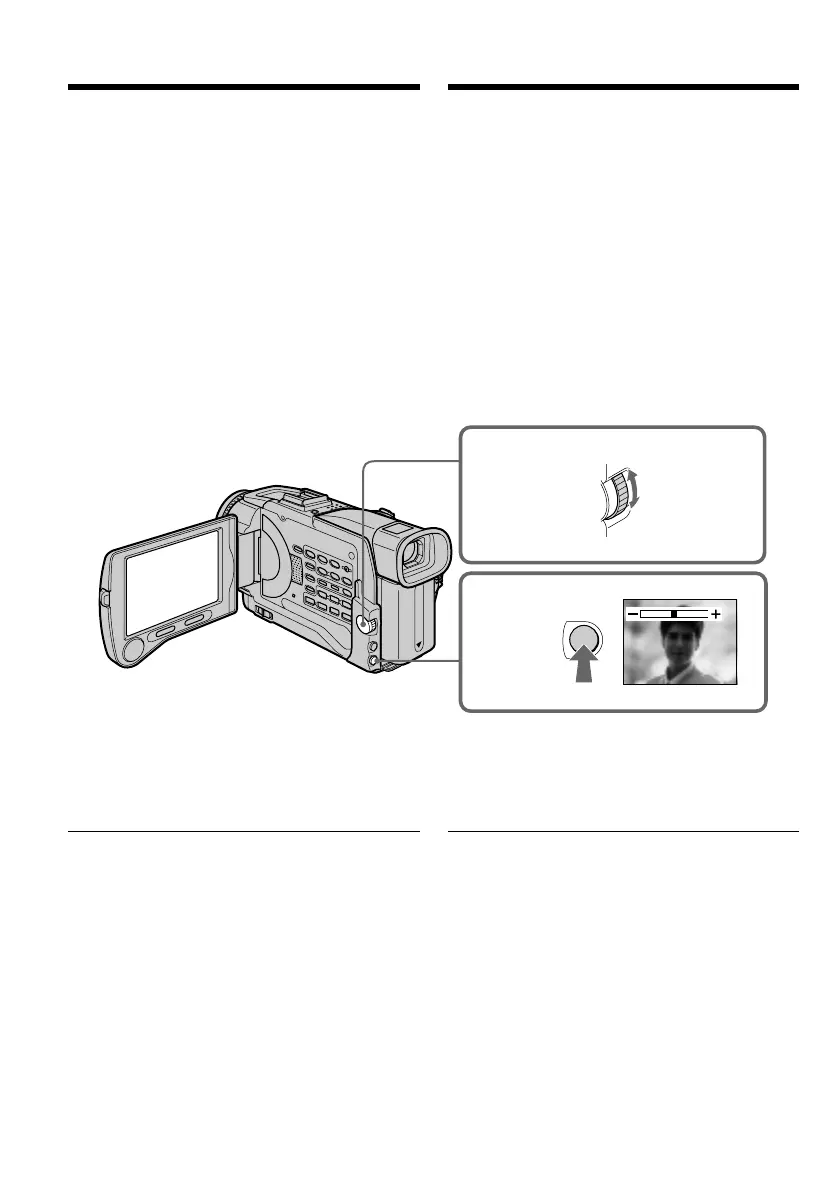
(1)Druk in de “CAMERA” of de “MEMORY”
stand op de EXPOSURE toets. De
belichtingsinstelbalk verschijnt in beeld.
(2)Draai aan de SEL/PUSH EXEC regelknop om
de helderheid naar wens in te stellen.
Terugkeren naar de automatische
belichtingsregeling
Druk nogmaals op de EXPOSURE toets
Opmerking
Bij handmatig instellen van de belichting zal de
tegenlicht-compensatie niet werken.
Uw camcorder keert automatisch terug naar
de automatische belichtingsregeling:
– als u een ander PROGRAM AE
belichtingsprogramma kiest
– als u de NIGHTSHOT schakelaar op “ON” zet.
Adjusting the
exposure manually
You can manually adjust and set the exposure.
Adjust the exposure manually in the following
cases:
– The subject is backlit
– Bright subject and dark background
– To record dark pictures (e.g. night scenes)
faithfully
(1)In CAMERA or MEMORY mode, press
EXPOSURE. The exposure indicator appears.
(2)Turn the SEL/PUSH EXEC dial to adjust the
brightness.
To return to the automatic exposure
mode
Press EXPOSURE.
Note
When you adjust the exposure manually, the
backlight function does not work.
Your camcorder automatically returns to the
automatic exposure mode:
– If you change the PROGRAM AE mode.
– If you slide NIGHTSHOT to ON.
1
2
EXPOSURE
Handmatig instellen
van de belichting













 To Next Page