125
Editing Videomontage
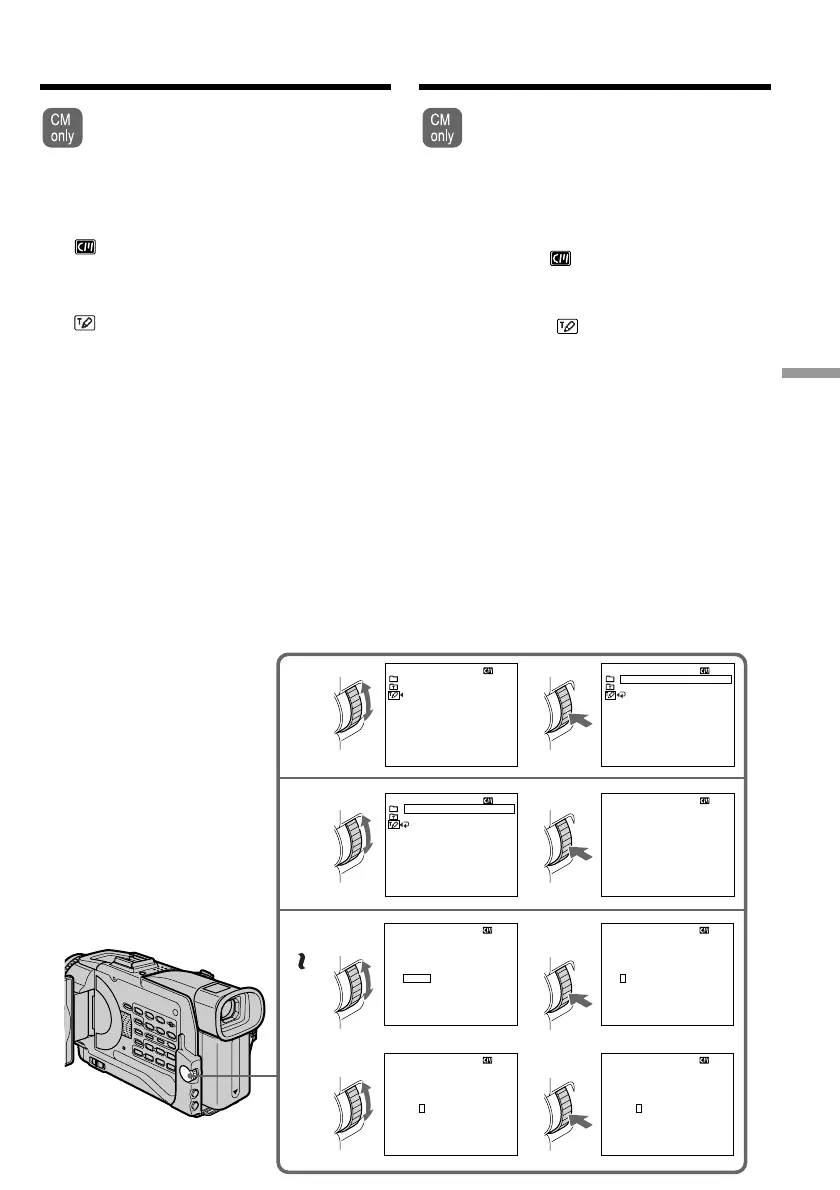
You can make up to 2 titles and store
them in cassette memory. Each title can
have up to 20 characters.
(1) Press MENU to display the menu in the
standby or VCR mode.
(2) Turn the SEL/PUSH EXEC dial to select
, then press the dial.
(3) Turn the SEL/PUSH EXEC dial to select
TITLE, then press the dial.
(4) Turn the SEL/PUSH EXEC dial to select
, then press the dial.
(5) Turn the SEL/PUSH EXEC dial to select the
first line (CUSTOM1 SET) or second line
(CUSTOM2 SET), then press the dial.
(6) Turn the SEL/PUSH EXEC dial to select the
column of the desired character, then press
the dial.
(7) Turn the SEL/PUSH EXEC dial to select the
desired character, then press the dial.
(8) Repeat steps 6 and 7 until you have selected
all characters and completed the title.
(9) To finish making your own titles, turn the
SEL/PUSH EXEC dial to select [SET], then
press the dial.
(
10
) Press MENU to make the title menu
disappear.
Making your own
titles
4
5
6
8
12
34
____________________
TITLE SET
ABCDE
FGHI J
KLMNO
PQRST
UV
W
XY
Z
&?!
12345
67890
’.,/–
[
C
•
]
[
SET
]
[
MENU
]:
END
____________________
TITLE SET
ABCDE
FGHI J
KLMNO
PQRST
UV
W
XY
Z
&?!
12345
67890
’.,/–
[
C
•
]
[
SET
]
[
MENU
]:
END
____________________
TITLE SET
ABCDE
FGHI J
KLMNO
PQRST
UV
W
XY
Z
&?!
12345
67890
’.,/–
[
C
•
]
[
SET
]
[
MENU
]:
END
____________________
TITLE SET
ABCDE
FGHI J
KLMNO
PQRST
UV
W
XY
Z
&?!
12345
67890
’.,/–
[
C
•
]
[
SET
]
[
MENU
]:
END
S
___________________
TITLE SET
ABCDE
FGHI J
KLMNO
PQRST
UV
W
XY
Z
&?!
12345
67890
’.,/–
[
C
•
]
[
SET
]
[
MENU
]:
END
CUSTOM
1
TITLE SET
CUSTOM
2
[
MENU
]:
END
RETURN
TES
TES
TITLE SET
CUSTOM
1
CUSTOM
2
[
MENU
]:
END
TES
TES
CUSTOM
1
TITLE SET
CUSTOM
2
[
MENU
]:
END
RETURN
TES
TES
U kunt twee zelfgemaakte titels in het
geheugen van de camcorder vastleggen. Elk
van uw titels kan uit maximaal 20
lettertekens bestaan.
(1) Druk in de opnamepauzestand of in de “VCR”
stand op de MENU toets om het instelmenu te
laten verschijnen.
(2) Draai aan de SEL/PUSH EXEC regelknop, kies
het onderdeel en druk de regelknop in.
(3) Draai aan de SEL/PUSH EXEC regelknop, stel
in op TITLE en druk de regelknop in.
(4) Draai aan de SEL/PUSH EXEC regelknop, kies
het onderdeel “ ” en druk de regelknop in.
(5) Draai aan de SEL/PUSH EXEC regelknop om
de eerste zelfgemaakte titel (CUSTOM1 SET) te
kiezen, of de tweede zelfgemaakte titel
(CUSTOM2 SET) en druk de regelknop weer in.
(6) Draai aan de SEL/PUSH EXEC regelknop, stel
in op de kolom waarin het gewenste letterteken
staat en druk de regelknop in.
(7) Draai aan de SEL/PUSH EXEC regelknop, kies
het gewenste letterteken en druk de regelknop
in.
(8) Herhaal de stappen 6 en 7 tot u uw titel geheel
naar wens hebt samengesteld.
(9) Om de titelsamenstelling af te ronden, draait u
de SEL/PUSH EXEC regelknop om in te stellen
op [SET] en dan legt u de titel vast met een
laatste druk op de regelknop.
(10) Druk op de MENU toets om het titelmenu te
laten verdwijnen.
Zelf titelbeelden
samenstellen




 To Next Page