194
Om te voorkomen dan belangrijke opnamen per
ongeluk gewist zouden worden, kunt u
afzonderlijke beelden beveiligen tegen wissen of
overschrijven.
Alvorens de camcorder te bedienen
Plaats een “Memory Stick” in de camcorder.
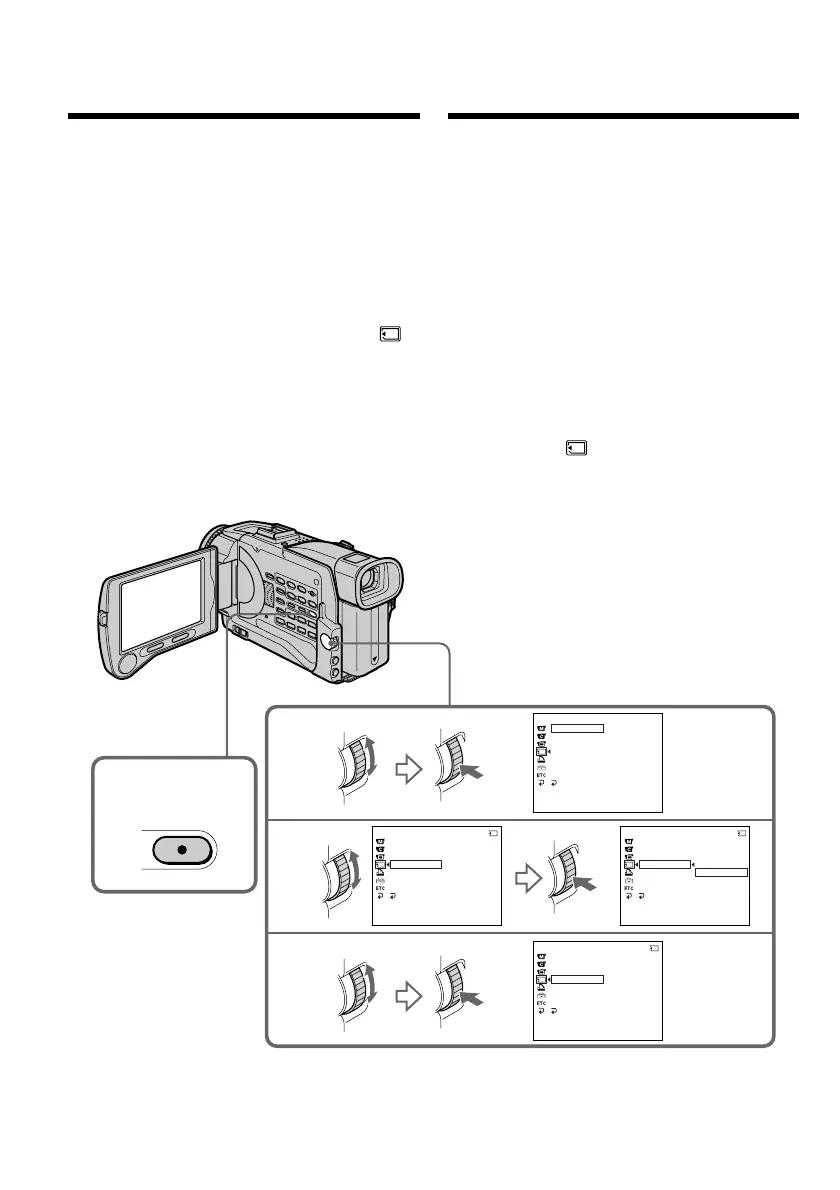
(1)Zet de POWER schakelaar in de “MEMORY”
of “VCR” stand. Zorg dat het LOCK
vergrendelknopje naar links (in de vrije stand)
is geschoven.
(2)Start de weergave van het beeld dat u wilt
beveiligen.
(3)Druk op de MENU toets om het instelmenu te
laten verschijnen.
(4)Draai aan de SEL/PUSH EXEC regelknop,
stel in op het pictogram en druk de
regelknop in.
(5)Draai aan de SEL/PUSH EXEC regelknop,
kies het onderdeel “PROTECT” en druk de
regelknop in.
(6)Draai weer aan de SEL/PUSH EXEC
regelknop om de “ON” stand te kiezen en
druk de regelknop in.
(7)Druk weer op de MENU toets om het
instelmenu te laten verdwijnen. De “-”
beveiligingssleutel verschijnt nu naast de
bestandsnaam van het beveiligde beeld.
Opheffen van de ingestelde
beveiliging
Volg de aanwijzingen, kies de stand “OFF” in
stap 6 en druk weer op de SEL/PUSH EXEC
regelknop.
Preventing accidental
erasure
– Image protection
To prevent accidental erasure of important
images, you can protect selected images.
Before operation
Insert a “Memory Stick” into your camcorder.
(1)Set the POWER switch to MEMORY or VCR.
Make sure that the LOCK switch is set to the
left (unlock) position.
(2)Select the image you want to protect.
(3)Press MENU to display the menu.
(4)Turn the SEL/PUSH EXEC dial to select ,
then press the dial.
(5)Turn the SEL/PUSH EXEC dial to select
PROTECT, then press the dial.
(6)Turn the SEL/PUSH EXEC dial to select ON,
then press the dial.
(7)Press MENU to make the menu display
disappear. The “-“ mark is displayed beside
the data file name of the selected image.
To cancel image protection
Select OFF in step 6, then press the SEL/PUSH
EXEC dial.
3,7
4
5
6
MENU
MEMORY SET
ST I LL SET
MOV I E SE T
PR I NT MARK
PROTECT
SL IDE SHO
W
DELETE ALL
FORMAT
RETURN
[
MENU
]
:
END
MEMORY SET
ST I LL SET
MOV I E S E T
PR I NT MARK
PROTECT
SL IDE SHO
W
OFF
DELETE ALL
FORMAT
RETURN
[
MENU
]
:
END
10/12
MEMORY SET
ST I LL SET
MOV I E S E T
PRINT MARK
PROTECT
SL IDE SHO
W
ON
OFF
DELETE ALL
FORMAT
RETURN
[
MENU
]
:
END
10/12
MEMORY SET
ST I LL SET
MOV I E S E T
PR I NT MARK
PROTECT
SL IDE SHO
W
ON
DELETE ALL
FORMAT
RETURN
[
MENU
]
:
END
10/12
Beveiligen tegen per
ongeluk wissen
– Wispreventie













 To Next Page