74
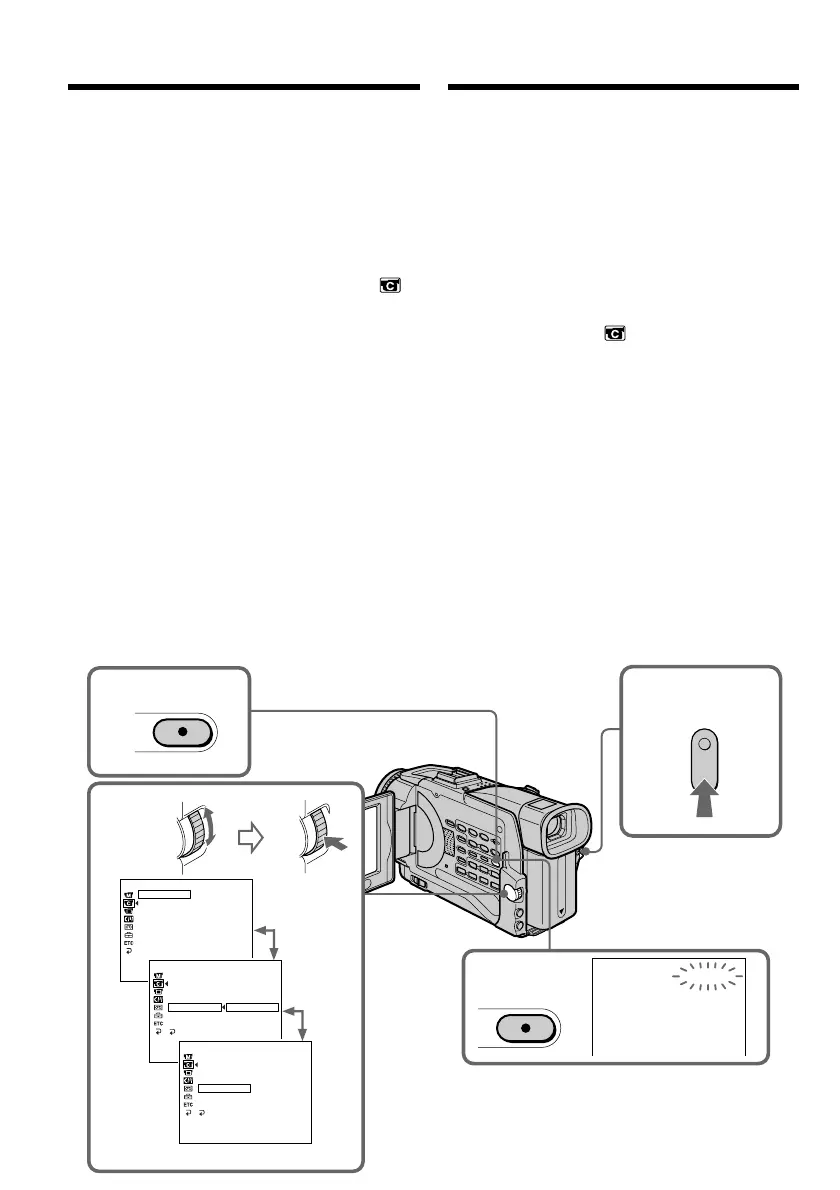
U kunt een beeld-voor-beeld opname maken van
afzonderlijke opeenvolgende scènes, om zo
bijvoorbeeld een animatiefilm samen te stellen. U
maakt een opname, verzet uw onderwerp een
heel klein beetje, maakt de volgende opname
enzovoort. Hierbij is het aanbevolen de
camcorder op een statief te zetten en na stap 6 de
camcorder te bedienen met de afstandsbediening.
(1)Druk in de opnamepauzestand op de MENU
toets om het instelmenu te zien.
(2)Draai aan de SEL/PUSH EXEC regelknop om
in te stellen op het pictogram en druk de
regelknop in.
(3)Draai aan de SEL/PUSH EXEC regelknop om
in te stellen op FRAME REC en druk de
regelknop in.
(4)Draai weer aan de SEL/PUSH EXEC
regelknop om in te stellen op ON en druk de
regelknop in.
(5)Druk op de MENU toets om het instelmenu te
sluiten. De FRAME REC opname-aanduiding
licht op.
(6)Druk op de START/STOP toets om de beeld-
voor-beeld opname te starten.
De camcorder maakt een opname van
ongeveer zes beeldjes en komt dan weer in de
opnamepauzestand.
(7)Verstel uw onderwerp zoals u wilt en herhaal
stap 6.
Frame by frame recording
– Cut recording
You can make a recording with a stop-motion
animated effect using cut recording. To create
this effect, alternately move the subject a little
and make a cut recording. We recommend that
you use a tripod, and operate the camcorder
using the Remote Commander after step 6.
(1)Press MENU to display the menu in standby
mode.
(2)Turn the SEL/PUSH EXEC dial to select ,
then press the dial.
(3)Turn the SEL/PUSH EXEC dial to select
FRAME REC, then press the dial.
(4)Turn the SEL/PUSH EXEC dial to select ON,
then press the dial.
(5)Press MENU to erase the menu display.
The FRAME REC indicator lights up.
(6)Press START/STOP to start cut recording.
The camcorder makes a recording for about
six frames, and returns to recording standby.
(7)Move the subject, and repeat step 6.
1
6
5
FRAME REC
CAMERA SET
D ZOOM
16 : 9W
I
DE
STEADYSHOT
N.
S.
L
I
GHT
FRAME REC
I
NT. REC
FLASH
LVL
[
MENU
]
:
END
CAMERA SET
D ZOOM
16 : 9W
I
DE
STEADYSHOT
N.
S.
L
I
GHT
FRAME REC
I
NT. REC
FLASH
LVL
RETURN
OFF
ON
[
MENU
]
:
END
CAMERA SET
D ZOOM
16 : 9W
I
DE
STEADYSHOT
N.
S.
L
I
GHT
FRAME REC
I
NT. REC
FLASH
LVL
RETURN
ON
[
MENU
]
:
END
OFF
2-4
MENU
MENU
Beeld-voor-beeld opname
– Animatiefilms













 To Next Page