71
Advanced Recording Operations Uitgebreide opnamefuncties
U kunt een serie interval-opnamen maken door
de camcorder automatisch te laten opnemen en
pauzeren. Dit geeft een bijzonder treffend effect
met uitkomende knoppen, bloeiende bloemen
enzovoort.
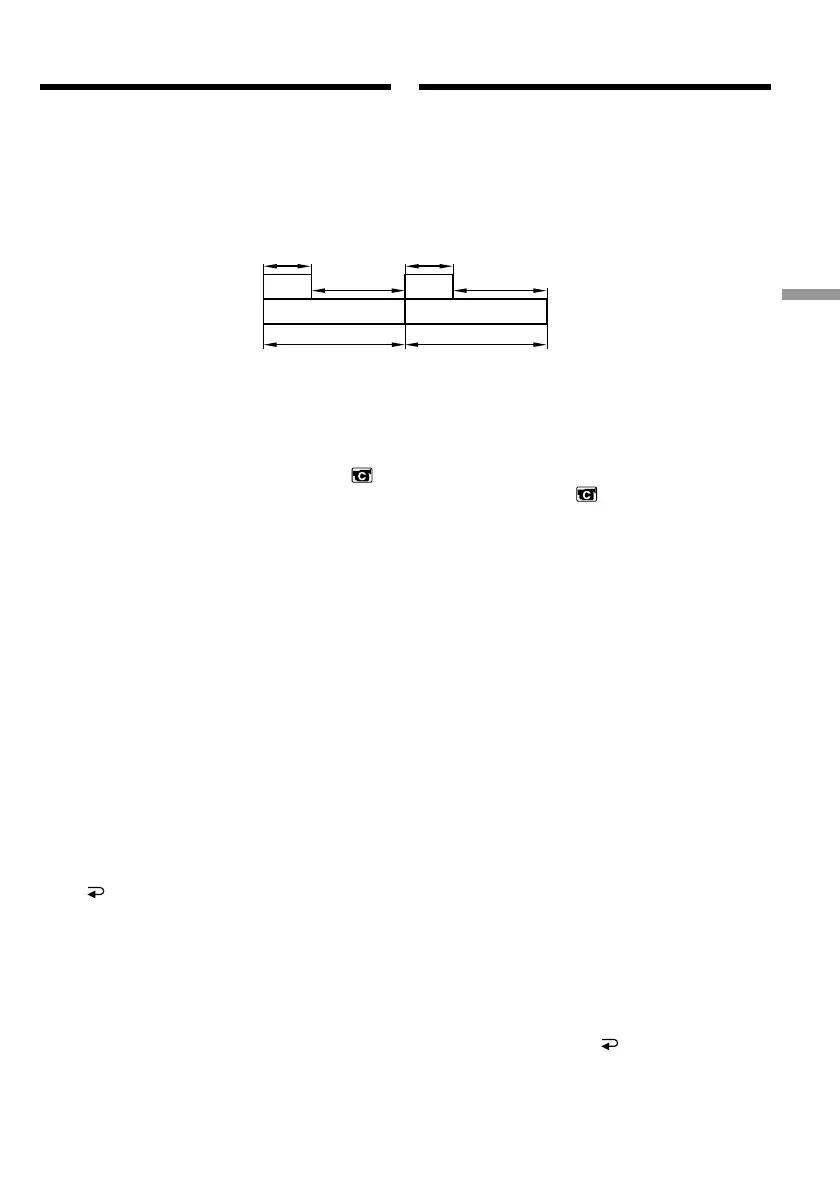
[a]Opnameduur
[b]Wachttijd
(1)Druk in de opnamepauzestand op de MENU
toets om het instelmenu te zien.
(2)Draai aan de SEL/PUSH EXEC regelknop om
in te stellen op het pictogram en druk de
regelknop in.
(3)Draai aan de SEL/PUSH EXEC regelknop om
in te stellen op INT. REC en druk de
regelknop in.
(4)Draai weer aan de SEL/PUSH EXEC
regelknop om in te stellen op SET en druk de
regelknop in.
(5)Stel het wachttijd-INTERVAL en de REC
TIME opnameduur in.
1 Draai aan de SEL/PUSH EXEC regelknop,
stel in op INTERVAL en druk de
regelknop in.
2 Draai aan de SEL/PUSH EXEC regelknop
om het gewenste interval voor de
wachttijd te kiezen en druk dan de
regelknop in.
De wachttijd: 30SEC y 1MIN y 5MIN
y 10MIN
3 Draai aan de SEL/PUSH EXEC regelknop,
stel in op REC TIME en druk de regelknop
in.
4 Draai aan de SEL/PUSH EXEC regelknop
om het gewenste aantal seconden voor de
opnameduur te kiezen en druk dan de
regelknop in.
De opnameduur: 0,5SEC y 1SEC y
1,5SEC y 2SEC
5 Draai aan de SEL/PUSH EXEC regelknop
om in te stellen op RETURN en druk
dan tweemaal op de regelknop.
Interval recording
You can make a time-lapse recording by setting
the camcorder to automatically record and
standby sequentially. You can achieve an
excellent recording for flowering, emergence,
etc., with this function.
[a]Recording time
[b]Waiting time
(1)Press MENU to display the menu in standby
mode.
(2)Turn the SEL/PUSH EXEC dial to select ,
then press the dial.
(3)Turn the SEL/PUSH EXEC dial to select INT.
REC, then press the dial.
(4)Turn the SEL/PUSH EXEC dial to select SET,
then press the dial.
(5)Set INTERVAL and REC TIME.
1 Turn the SEL/PUSH EXEC dial to select
INTERVAL, then press the dial.
2 Turn the SEL/PUSH EXEC dial to select
the desired interval time, then press the
dial.
The time: 30SEC y 1MIN y 5MIN y
10MIN
3 Turn the SEL/PUSH EXEC dial to select
REC TIME, then press the dial.
4 Turn the SEL/PUSH EXEC dial to select
the desired recording time, then press the
dial.
The time: 0.5SEC y 1SEC y 1.5SEC y
2SEC
5 Turn the SEL/PUSH EXEC dial to select
RETURN, then press the dial twice.
10 min10 min
1 s 1 s
9 min 59 s 9 min 59 s
[a][a]
[b][b]
Example/Voorbeeld
Interval-opname













 To Next Page