17
Getting started Voorbereidingen
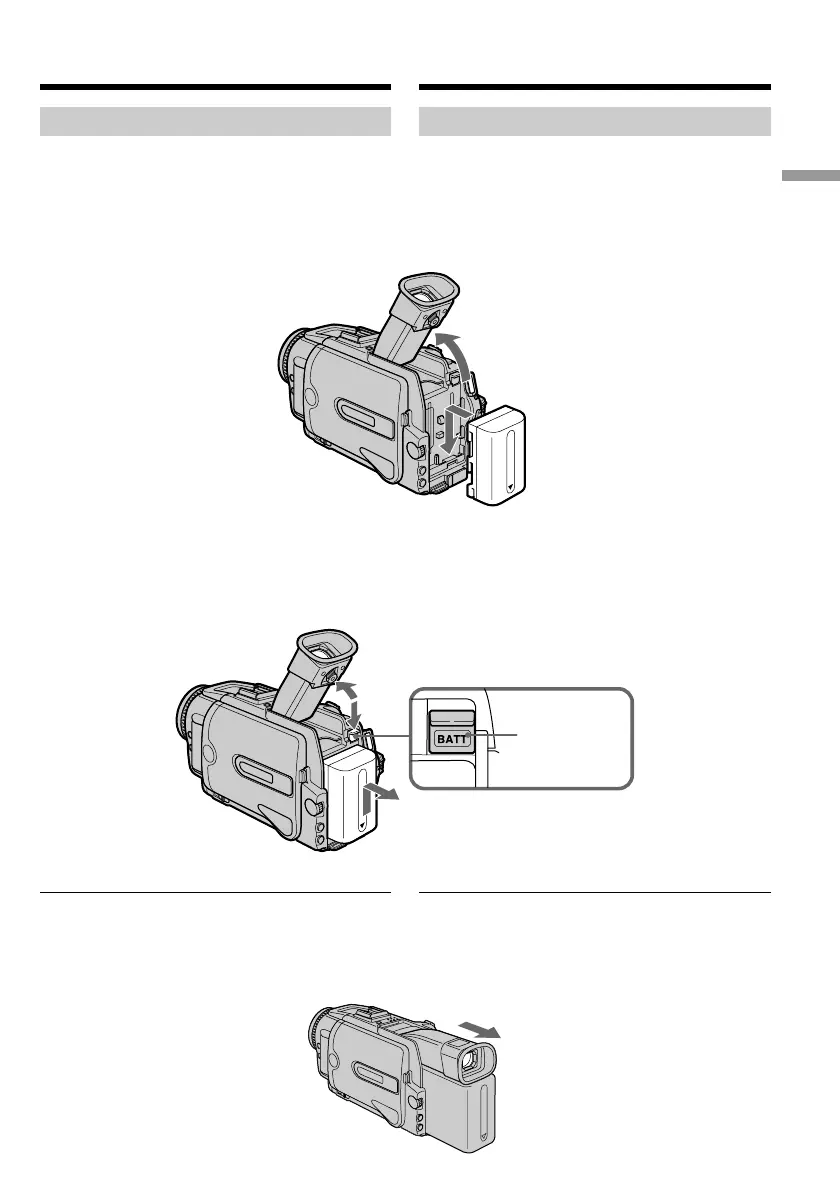
Aanbrengen van het batterijpak
Om uw camcorder buitenshuis te gebruiken,
brengt u er als volgt een batterijpak op aan.
(1)Klap de zoeker omhoog.
(2)Schuif het batterijpak omlaag tot het vastklikt.
Verwijderen van het batterijpak
(1)Klap de zoeker omhoog.
(2)Schuif het batterijpak los in de richting van de
pijl terwijl u het BATT ontgrendelknopje
ingedrukt houdt.
Bij gebruik van een batterijpak met hoge
capaciteit
Als u het NP-FM70/FM90/FM91 batterijpak op
uw camcorder aanbrengt, kunt u de zoeker
uitschuiven.
Step 1 Preparing the
power supply
Installing the battery pack
We recommend that you use the battery pack
when you use your camcorder outdoors.
(1)Lift up the viewfinder.
(2)Slide the battery pack down until it clicks.
To remove the battery pack
(1)Lift up the viewfinder.
(2)Slide the battery pack out in the direction of
the arrow while pressing BATT down.
If you use the large capacity battery pack
If you install the NP-FM70/FM90/FM91 battery
pack on your camcorder, extend its viewfinder.
1
2
1
2
2
BATT release
button/
BATT
ontgrendel-
knopje
Stap 1 Voorbereiden van de
stroomvoorziening













 To Next Page