199
“Memory Stick” operations “Memory Stick” functies
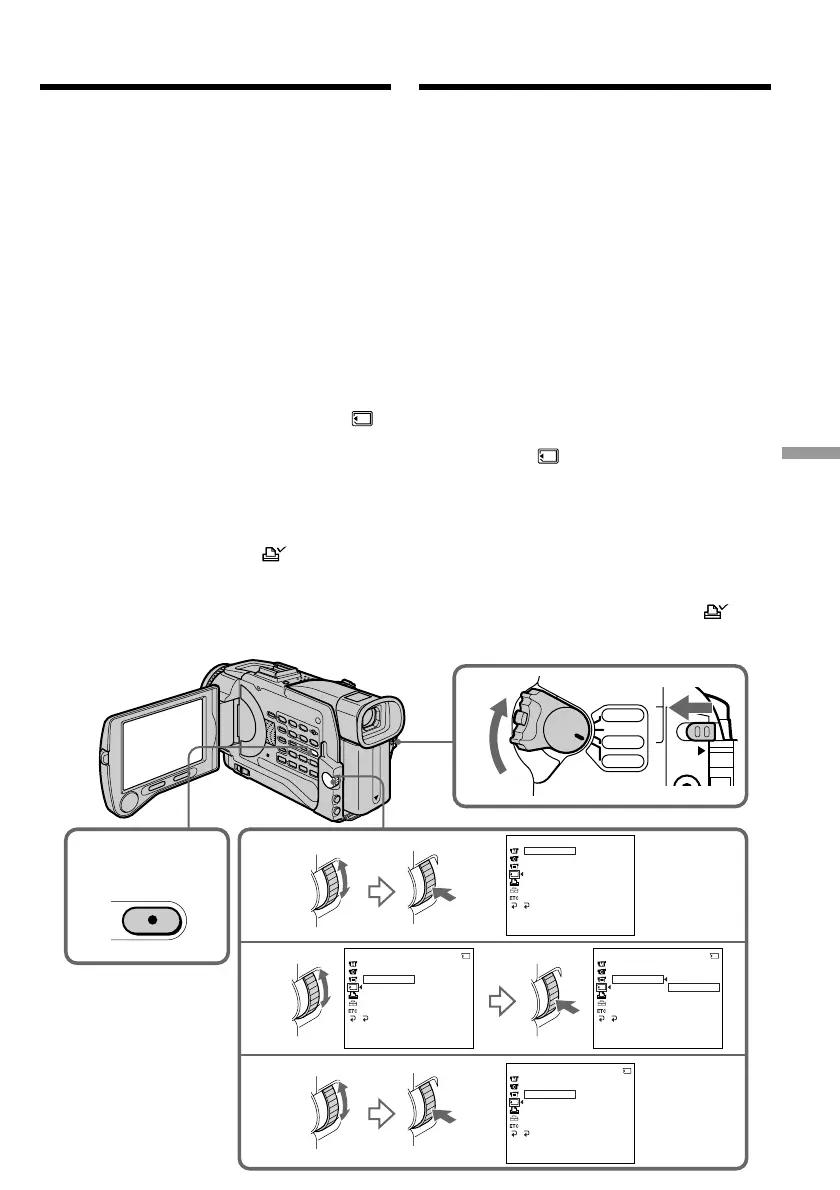
Writing a print mark
– PRINT MARK
You can specify the recorded still image to print
out by putting marks. This function is useful for
printing out still images later.
Your camcorder conforms with the DPOF
(Digital Print Order Format) standard for
specifying the still images to print out.
Before operation
Insert a “Memory Stick” into your camcorder.
(1)Set the POWER switch to MEMORY or VCR.
Make sure that the LOCK switch is set to the
left (unlock) position.
(2)Select the still image you want to write a print
mark on.
(3)Press MENU to display the menu.
(4)Turn the SEL/PUSH EXEC dial to select ,
then press the dial.
(5)Turn the SEL/PUSH EXEC dial to select
PRINT MARK, then press the dial.
(6)Turn the SEL/PUSH EXEC dial to select ON,
then press the dial.
(7)Press MENU to make the menu display
disappear. The print mark “ ” is displayed
beside the data file name of the image.
3,7
4
5
6
1
MENU
VCR
CAMERA
MEMORY
OFF(CHG)
POWER
LOCK
MEMORY SET
ST I LL SET
MOV I E SE T
PR I NT MARK
PROTECT
SL IDE SHO
W
DELETE ALL
FORMAT
RETURN
[
MENU
]
:
END
MEMORY SET
ST I LL SET
MOV I E S ET
PR I NT MARK
PROTECT
SL IDE SHO
W
OFF
DELETE ALL
FORMAT
RETURN
[
MENU
]
:
END
10/12
MEMORY SET
ST I LL SET
MOV I E S ET
PRINT MARK
PROTECT
SL IDE SHO
W
ON
OFF
DELETE ALL
FORMAT
RETURN
[
MENU
]
:
END
10/12
MEMORY SET
ST I LL SET
MOV I E S ET
PR I NT MARK
PROTECT
SL IDE SHO
W
ON
DELETE ALL
FORMAT
RETURN
[
MENU
]
:
END
10/12
Markeren van af te drukken
beelden – PRINT MARK
U kunt aangeven welke van de opgenomen
stilstaande beelden u later wilt afdrukken, door
ze als zodanig te markeren. Dan kunt u later de
gemarkeerde bestanden van de af te drukken
beelden gemakkelijk herkennen.
Uw camcorder volgt de DPOF (Digital Print
Order Format) norm voor de afdrukmarkering
van stilstaande beelden.
Alvorens de camcorder te bedienen
Plaats een “Memory Stick” in de camcorder.
(1)Zet de POWER schakelaar in de “MEMORY”
of “VCR” stand. Zorg dat het LOCK
vergrendelknopje naar links (in de vrije stand)
is geschoven.
(2)Kies het stilstaande beeld dat u voor
afdrukken wilt markeren.
(3)Druk op de MENU toets om het instelmenu
te laten verschijnen.
(4)Draai aan de SEL/PUSH EXEC regelknop,
stel in op het pictogram en druk de
regelknop in.
(5)Draai aan de SEL/PUSH EXEC regelknop,
kies het onderdeel “PRINT MARK” en druk
de regelknop in.
(6)Draai weer aan de SEL/PUSH EXEC
regelknop om de “ON” stand te kiezen en
druk de regelknop in.
(7)Druk weer op de MENU toets om het
instelmenu te laten verdwijnen. De “ ”
afdrukmarkering verschijnt nu naast de
bestandsnaam van het af te drukken beeld.













 To Next Page