170
Superimposing a still picture in
a “Memory Stick” on a moving
picture – MEMORY MIX
You can superimpose a still image you have
recorded on a “Memory Stick” on the top of the
moving picture you are recording.
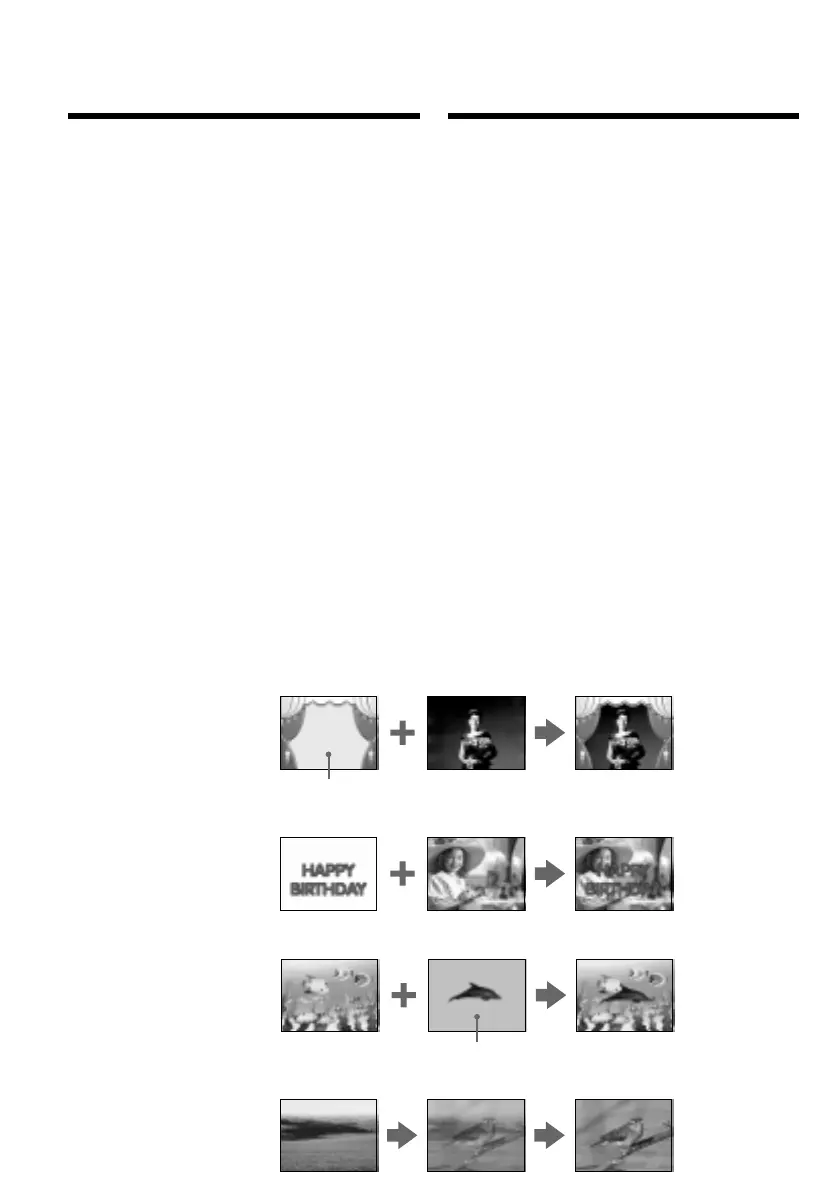
M. CHROM (Memory chromakey)
You can swap a blue area of a still image such as
an illustration or a frame with a moving picture.
M. LUMI (Memory luminancekey)
You can swap a brighter area of a still image such
as a handwritten illustration or title with a
moving picture. Record a title on a “Memory
Stick” before a trip or event for convenience.
C. CHROM (Camera chromakey)
You can superimpose a moving picture on the
top of a still image such as an image can be used
as background. Shoot the subject against a blue
background. The blue area of the moving picture
will be swapped with a still image.
M. OVERLAP (Memory overlap)
You can make a moving picture fade in on top of
a still image.
M. CHROM
Still image/ Moving picture/
Stilstaand beeld Bewegende beelden
M. LUMI
C. CHROM
Blue/Blauw
Still image/ Moving picture/
Stilstaand beeld Bewegende beelden
Still image/ Moving picture/
Stilstaand beeld Bewegende beelden
Blue/Blauw
M. OVERLAP
Still image/ Moving picture/
Stilstaand beeld Bewegende beelden
Een stilstaand beeld van een
“Memory Stick” samenvoegen met
bewegende beelden – MEMORY MIX
U kunt een stilstaand beeld dat werd opgeslagen
op een “Memory Stick”, weergeven tegelijk met
de bewegende beelden die u met de camcorder
opneemt.
M. CHROM (Memory Chroma-key)
In een blauw gedeelte van het stilstaande beeld
kunt u de bewegende beelden laten verschijnen,
zodat de beweging door een stilstaand
beeldkader of omlijsting wordt omgeven.
M. LUMI (Memory Luminance-key)
In een erg helder gedeelte van een stilstaande
beeld, zoals de achtergrond van een met de hand
geschreven of getekende titelkaart, kunt u de
bewegende beelden laten verschijnen. Voor
gebruik op vakantie e.d. kunt u het best van
tevoren uw titelbeeld op een “Memory Stick”
vastleggen.
C. CHROM (Camera Chroma-key)
Als originele achtergrond voor bewegende
beelden kunt u een stilstaand beeld van uw
keuze gebruiken. Neem het bewegende
onderwerp op tegen een blauwe achtergrond.
Dan kunt u de blauwe achtergrond vervangen
door het stilstaande beeld van uw keuze.
M. OVERLAP (Memory Overlap)
Hiermee kunt u een bewegend beeld laten in-
faden (overvloeien) over een stilstaand beeld
heen.













 To Next Page