61
Advanced Recording Operations Uitgebreide opnamefuncties
Op digitale wijze kunt u uw video-opnamen zo
treffend maken als een speelfilm of TV-productie
met speciale effecten.
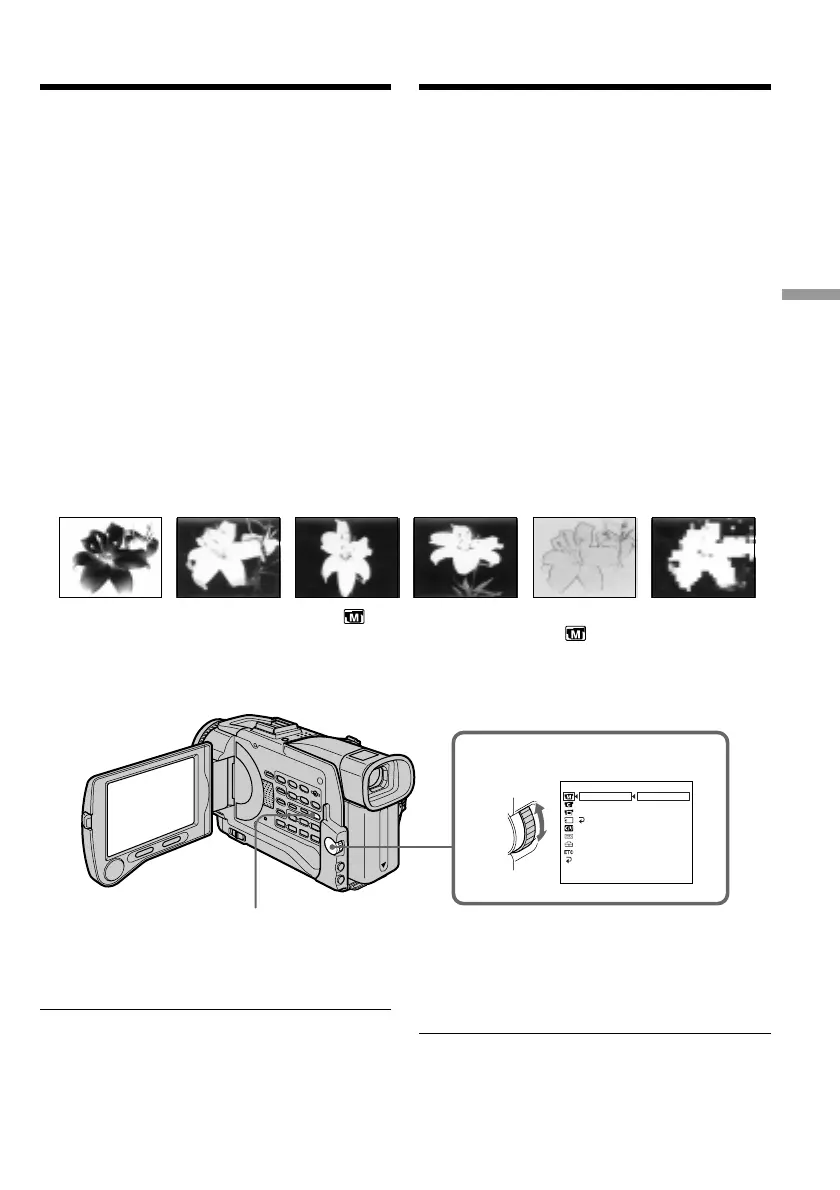
NEG. ART [a] : De kleur en helderheid van het
beeld worden omgekeerd.
SEPIA : Het beeld verschijnt in sepia, de
kleur van oude foto’s.
B&W : Het beeld is in zwart, wit en
grijstinten.
SOLARIZE [b] : De lichtintensiteit wordt
aangescherpt en uw beelden
verkrijgen een abstract effect, als
van een illustratie.
SLIM [c] : Het beeld wordt smaller, in de
hoogte uitgerekt.
STRETCH [d] : Het beeld wordt in de breedte
uitgerekt.
PASTEL [e] : Versterkt het contrast en geeft
tekenfilm-achtige kleuren.
MOSAIC [f] : Uw onderwerp komt als een
mozaïek van kleine blokjes in
beeld.
(1)Kies in de CAMERA stand het onderdeel
P EFFECT onder in het instelmenu (zie
blz. 137).
(2)Draai aan de SEL/PUSH EXEC regelknop om
in te stellen op het gewenste kleur/
beeldeffect.
Uitschakelen van de beeld/
kleureffecten
Zet het onderdeel P EFFECT op “OFF” in het
instelmenu.
Tijdens gebruik van de beeld/kleureffecten
U kunt nu niet de oude speelfilm-sfeer
inschakelen met de DIGITAL EFFECT toets.
(OLD MOVIE)
Bij uitschakelen van de camcorder
Uw camcorder keert automatisch terug naar de
normale beeldweergave.
Using special effects
– Picture effect
You can digitally process images to obtain special
effects like those in films or on TV.
NEG. ART [a] : The colour and brightness of the
picture are reversed.
SEPIA : The picture gets sepia.
B&W : The picture appears in
monochrome (black-and-white).
SOLARIZE [b] : The light intensity is clearer, and
the picture looks like an
illustration.
SLIM [c] : The picture expands vertically.
STRETCH [d] : The picture expands
horizontally.
PASTEL [e] : The contrast of the picture is
emphasised, and the picture
looks like an animated cartoon.
MOSAIC [f] : The picture gets mosaic-
patterned.
(1)In CAMERA mode, select P EFFECT in in
the menu settings (p. 130).
(2)Turn the SEL/PUSH EXEC dial to select the
desired picture effect mode.
To cancel the picture effect function
Set P EFFECT to OFF in the menu settings.
While using the picture effect function
You cannot select OLD MOVIE mode with
DIGITAL EFFECT.
When you turn the power off
The picture effect is automatically canceled.
[a] [b] [c] [d] [e] [f]
1
MANUAL SET
.
FFO
TRAGEN
AIPES
W
&B
EZIRALOS
MILS
HCTERTS
LETSAP
CIASOM
TCEFFEP
LABTH
W
RTHSOTUA
NRUTER
[
MENU
]
:
END
MENU
Speciale effecten
– Beeldeffect/kleurenpalet













 To Next Page