192
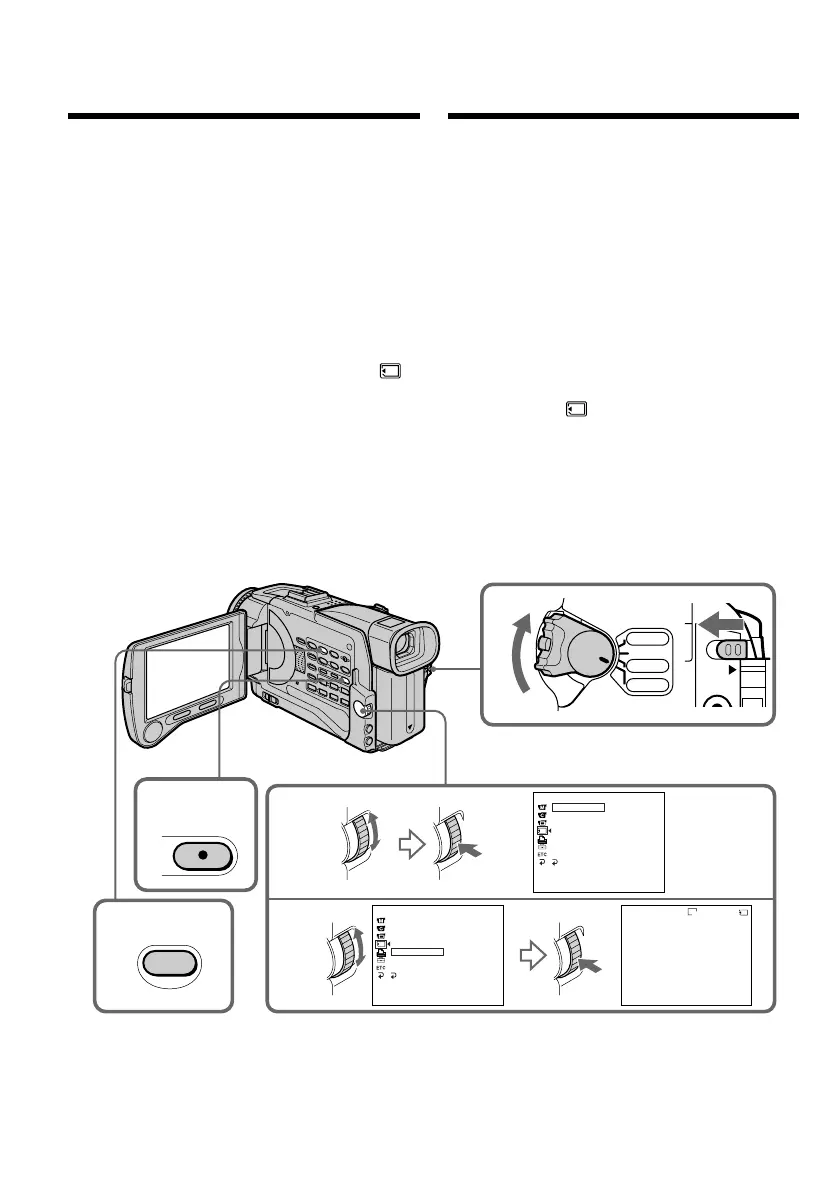
U kunt automatisch een reeks stilstaande beelden
achtereen laten weergeven. Deze functie kan
bijzonder handig zijn voor het controleren van de
opgenomen beelden of voor een presentatie.
Alvorens de camcorder te bedienen
Plaats een “Memory Stick” in de camcorder.
(1)Zet de POWER schakelaar in de “MEMORY”
stand. Zorg dat het LOCK vergrendelknopje
naar links (in de vrije stand) is geschoven.
(2)Druk op de MENU toets om het instelmenu te
laten verschijnen.
(3)Draai aan de SEL/PUSH EXEC regelknop,
stel in op het pictogram en druk de
regelknop in.
(4)Draai aan de SEL/PUSH EXEC regelknop,
kies het onderdeel “SLIDE SHOW” en druk
de regelknop in.
(5)Druk op de MEMORY PLAY toets. De
camcorder geeft dan alle stilstaande beelden
die zijn opgeslagen op de “Memory Stick” één
voor één in volgorde weer.
Uitschakelen van de fotoserie-
presentatie
Druk op de MENU toets.
Pauzeren van de fotoserie
Druk op de MEMORY PLAY toets.
Playing back images
in a continuous loop
– SLIDE SHOW
You can automatically play back images in
sequence. This function is useful especially when
checking recorded images or during a
presentation.
Before operation
Insert a “Memory Stick” into your camcorder.
(1)Set the POWER switch to MEMORY. Make
sure that the LOCK switch is set to the left
(unlock) position.
(2)Press MENU to display the menu.
(3)Turn the SEL/PUSH EXEC dial to select ,
then press the dial.
(4)Turn the SEL/PUSH EXEC dial to select
SLIDE SHOW, then press the dial.
(5)Press MEMORY PLAY. Your camcorder plays
back the images recorded on a “Memory
Stick” in sequence.
To stop the slide show
Press MENU.
To pause during a slide show
Press MEMORY PLAY.
2
5
3
4
1
MEMORY SE T
ST I LL SET
MOV I E S ET
PR I NT MARK
PROTECT
SL IDE SHO
W
READY
DELETE ALL
FORMAT
RETURN
[
MENU
]
:
END
MEMORY SE T
ST I LL SET
MOV I E S E T
PRINT MARK
PROTECT
SL IDE SHO
W
DELETE ALL
FORMAT
[
MENU
]
:
END
640
[
MPLAY
]:
START
[
MENU
]:
END
SL IDE SHO
W
100-0001
1/100
MENU
PLAY
VCR
CAMERA
MEMORY
OFF(CHG)
POWER
RETURN
LOCK
Weergeven van een
doorlopende serie
beelden – SLIDE SHOW













 To Next Page