129
Customising Your Camcorder Uw camcorder naar eigen inzicht aanpassen
— Customising Your Camcorder —
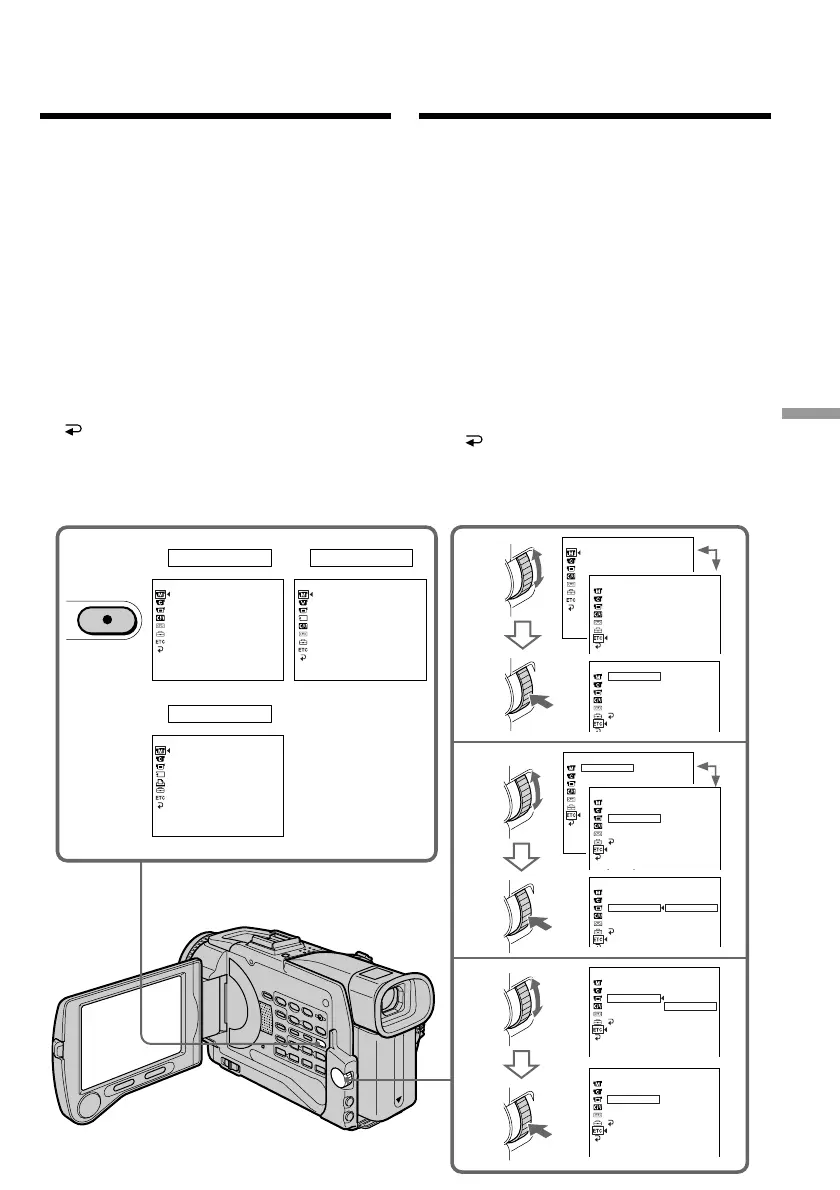
Changing the menu
settings
To change the mode settings in the menu
settings, select the menu items with the SEL/
PUSH EXEC dial. The default settings can be
partially changed. First, select the icon, then the
menu item and then the mode.
(1)In CAMERA, MEMORY or VCR mode, press
MENU.
(2)Turn the SEL/PUSH EXEC dial to select the
desired icon, then press the dial to set.
(3)Turn the SEL/PUSH EXEC dial to select the
desired item, then press the dial to set.
(4)Turn the SEL/PUSH EXEC dial to select the
desired mode, then press the dial to set.
(5)If you want to change other items, select
RETURN and press the dial, then repeat
steps 2 to 4.
For details, see “Selecting the mode setting of
each item” (p. 130).
1
CAMERA
2
3
4
VCR
MEMORY
MENU
MANUAL SET
PEFFECT
W
HT BAL
AUTO SHTR
[
MENU
]
:
END
MANUAL SET
PEFFECT
[
MENU
]
:
END
MANUAL SET
W
HT BAL
[
MENU
]
:
END
MANUAL SET
OTHERS
W
ORLD T I ME
BEEP
0
HR
OTHERS
W
ORLD T I ME
BEEP
COMMANDER
DISPLAY
REC LAMP
RETURN
ON
OFF
MENU
:
END
CE TFE
P
F
W
HTUUBALSS ET
AUTO / SHTRTT
OTHERS
W
ORLD T I ME
BEEP
COMMANDER
DISPLAY
REC LAMP
OTHERS
W
ORLD T I ME
BEEP
COMMANDER
DISPLAY
REC LAMP
RETURN
OFF
:
OTHERS
W
ORLD T IME
BEEP
COMMANDER
DISPLAY
REC LAMP
RETURN
ON
OTHERS
W
ORLD T I ME
BEEP
COMMANDER
DISPLAY
REC LAMP
RETURN
0
HR
OTHERS
W
ORLD T I ME
BEEP
COMMANDER
DISPLAY
REC LAMP
RETURN
ON
OFF
—
Uw camcorder naar eigen inzicht aanpassen
—
Wijzigen van de oorspronkelijke
menu-instellingen
Om de functies van de camcorder aan te passen via
het instelmenu, kiest u de instellingen met de SEL/
PUSH EXEC regelknop. Dan kunt u de
fabrieksinstellingen naar wens aanpassen. Eerst kiest
u het pictogram voor de functie, dan het menu-
onderdeel en tenslotte de gewenste instelling.
(1) Druk in de “CAMERA” stand, de “MEMORY” of
de “VCR” stand op de MENU toets.
(2) Draai aan de SEL/PUSH EXEC regelknop, stel in
op het pictogram voor de gewenste functie en
druk de regelknop in.
(3) Draai aan de SEL/PUSH EXEC regelknop, kies
het aan te passen menu-onderdeel en druk de
regelknop in.
(4) Draai aan de SEL/PUSH EXEC regelknop om het
gekozen onderdeel in de gewenste stand te
zetten en druk de regelknop weer in.
(5) Als u nog andere punten wilt wijzigen, stelt u in
op RETURN en drukt u de regelknop in en
dan herhaalt u de stappen 2 t/m 4.
Zie voor nadere bijzonderheden het “Overzicht van
de instellingen voor elk menu-onderdeel” op blz.
137.













 To Next Page