Changing the menu settings
POWER
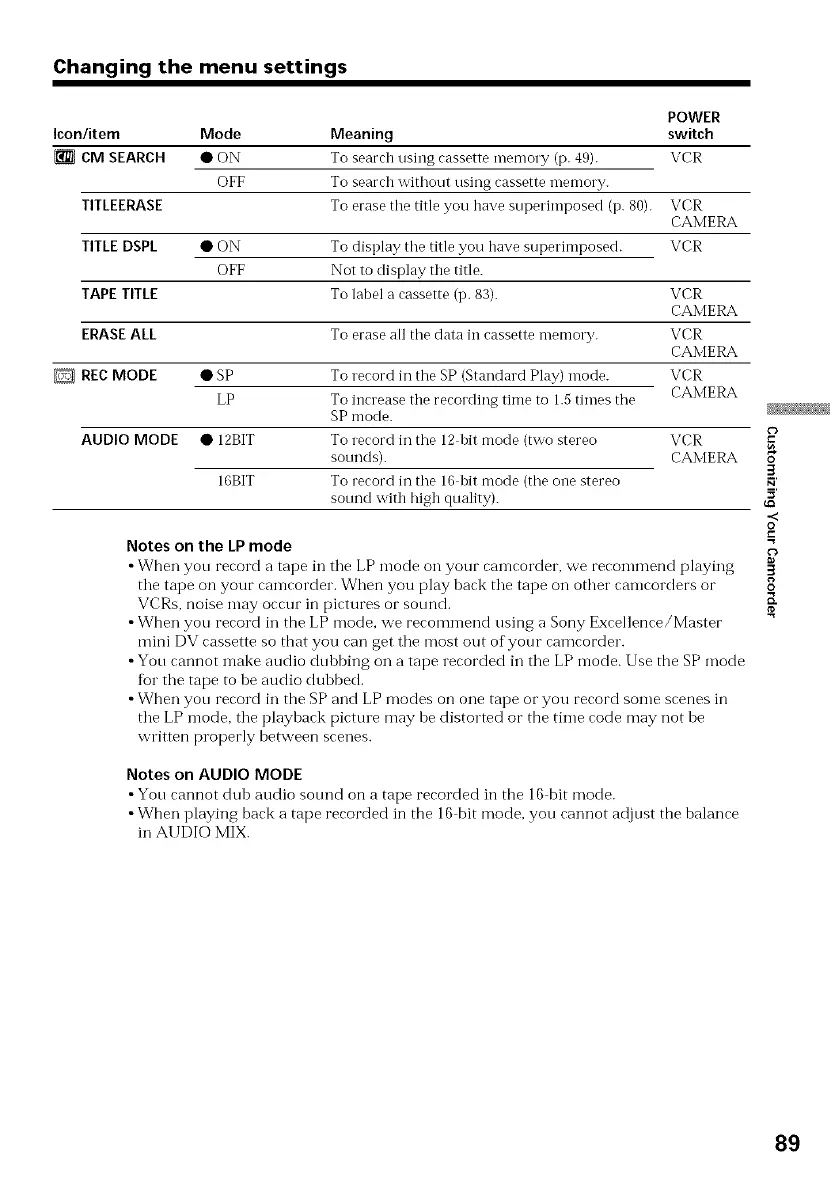
Icon/item Mode Meaning switch
CM SEARCH • ON To search using cassette memory (p. 49). VCR
OFF To search without using cassette Tnemory.
TITLEERASE To erase the title you have superimposed (p. 80).
TITLE DSPL
TAPE TITLE
ERASE ALL
D REC MODE
•ON
OFF
To display tile title you have superimposed.
Not to display the title.
To label a cassette (p. 83).
To erase all tile data in cassette memory.
VCR
CAMERA
VCR
VCR
CAMERA
VCR
CAMERA
VCR
CAMERA
• SP To record in the SP (Standard Play) mode.
LP To increase the recording time to 1.5 times the
SP mode.
AUDIO MODE • 12BIT To record in the 12 bit mode (two stereo VCR
sonnds). CAMERA
16BIT To record in the 16 bit mode (the one stereo
sound with high quality).
Notes on the LP mode
• When yon record a tape in tile LP mode on your camcorder, we recommend playing
tile tape on your camcorder. When you play back tile tape on other camcorders or
VCRs, noise may occur in pictures or sotmd.
• When yon record in the LP mode, we recommend using a Sony Excellence/Master
mini DV cassette so that you can get tile most out of your camcorder.
• Yon cannot make audio dubbing on a tape recorded in tile LP mode. Use the SP mode
for tile tape to be audio dubbed.
• When yon record in the SP and LP modes on one tape or you record some scenes in
tile LP mode, tile playback picture may he distorted or the time code may not be
written properly between scenes.
Notes on AUDIO MODE
• Yon cannot dub audio sotmd on a tape cecorded in the 16 bit mode.
• When playing back a tape recorded in the 16 bit mode, you cannot adjust the balance
in AUDIO MIX.
3
.<
O
.=
3
8
K
89


 To Next Page
 Loading...