-- Customizing Your Camcorder --
Changing the menu settings
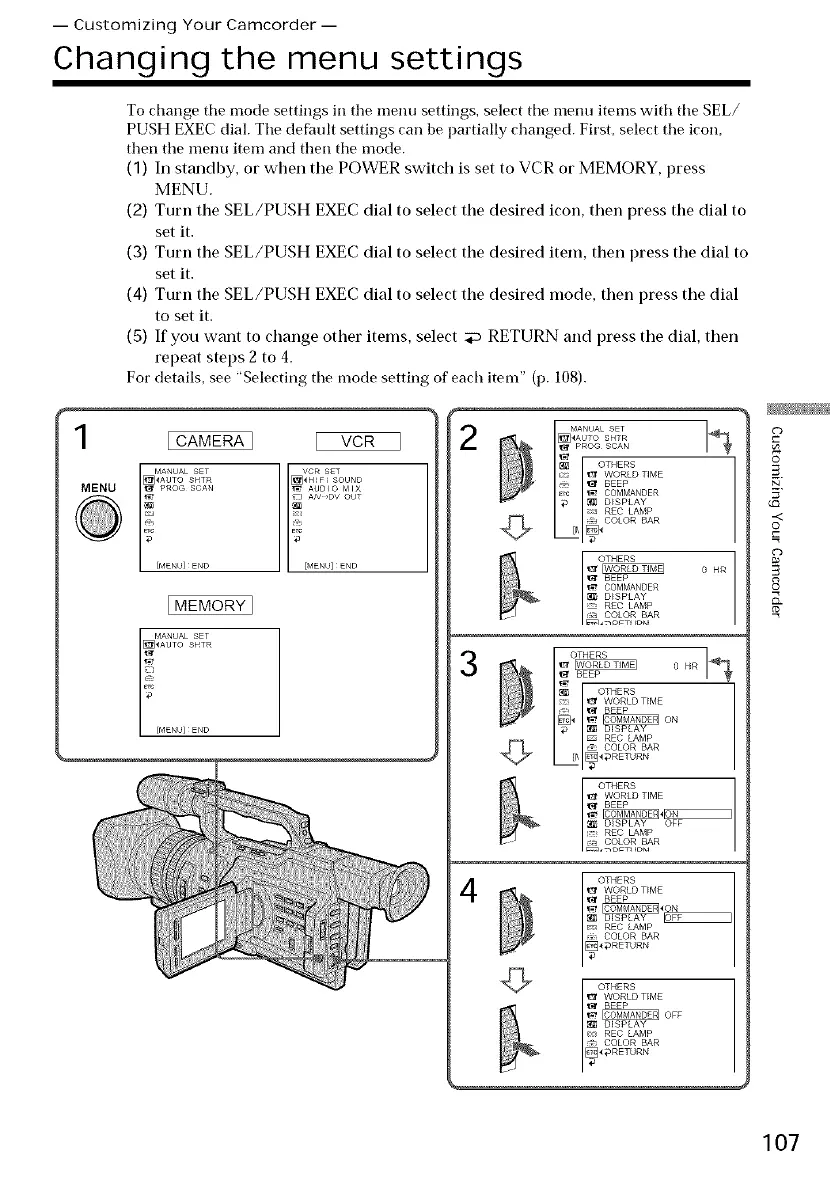
To change the mode settings in the menu settings, select the nlenu items with the SEL/
PUSH EXEC dial. The defitult settings can be partially changed. First, select the icon,
then the menu item and then the mode.
(1) In standby, or when the POWER switch is set to VCR or MEMORY, press
MENU.
(2) Turn the SEL/PUSH EXEC dial to select the desired icon, then press the dial to
set it.
(3) Turn the SEL/PUSH EXEC dial to select the desired item, then press the dial to
set it.
(4) Turn the SEL/PUSH EXEC dial to select the desired mode, then press the dial
to set it.
(5) If you want to change other items, select _ RETURN and press the dial, then
repeat steps 2 to 4.
For details, see "Selecting the mode setting of each item" (p. 108).
VCR
l!......
[MENU] END
2
1
MENU
@
[CAMERA]
[MENU]END
[MEMORY]
I MANUAL SET
[_AUTO SHTR
2
/MENU]ENO
O
[_AUTO SHTR
__'[_ PROG SCAN ]
OTHERS
WORLD TIME
:* '1_ BEER
grc _ COMMANDER
:_ DISPLAY
REC LAMP
t COLOR BAR
0 HR
3
I OTHERS
e_ o HR
BEEP
OTHERS
zzT_ _ WORLD TIME
r_ _ BEEP
_ ON
_ DISPLAY
REC LAMP
:- COLOR BAR
4
c
0
-<
©
c
8
S.
107





 To Next Page