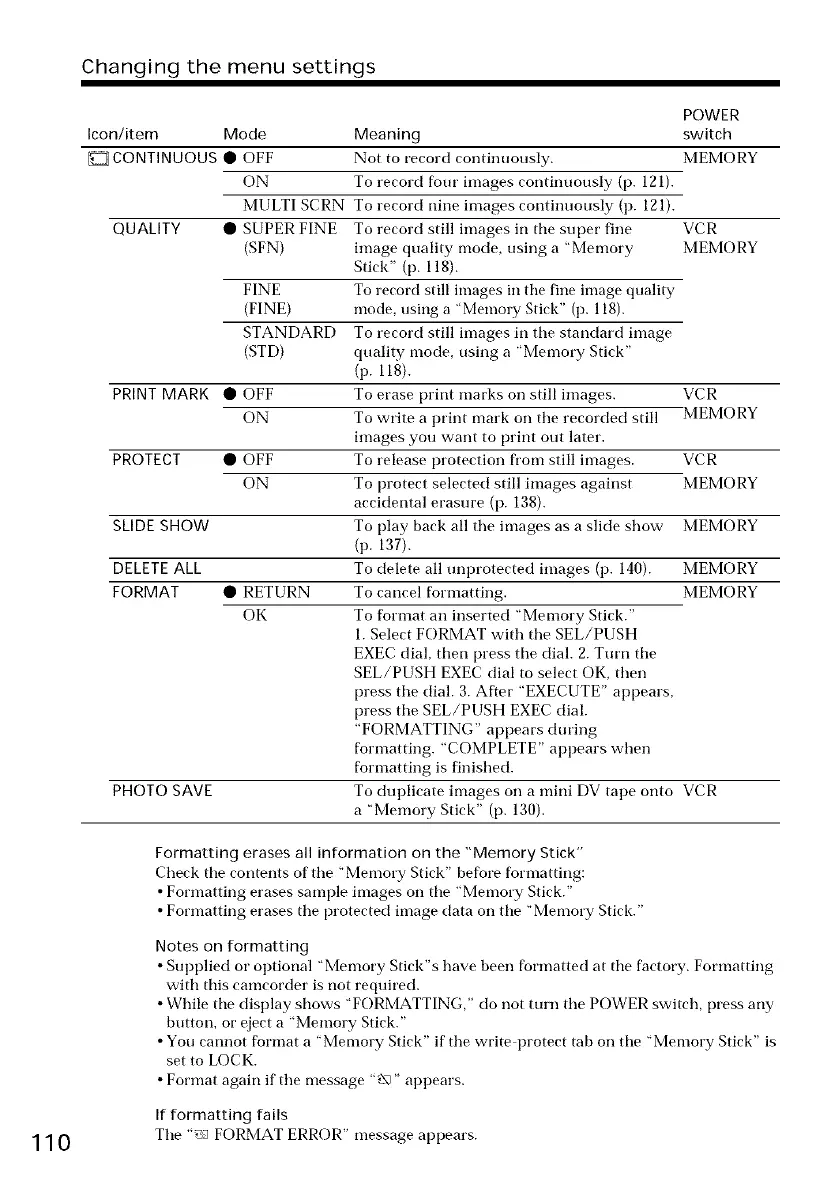
Changing the menu settings
POWER
Icon/item Mode Meaning switch
CONTINUOUS • OFF Not to record continuously. MEMORY
ON To record four images continuously (p. 121).
MULTI SCRN To record nine images continuously (p. 121).
QUALITY • SUPER FINE To record still images ill tile super fine VCR
(SFN) image quality mode, using a "Memory MEMORY
Stick" (p. 118).
FINE To record still images ill tire fine image quality
(FINE) mode, using a ' Memol T Stick" (p. 118).
STANDARD To record still images ill tile standard image
(STD) quality mode, using a "Menmry Stick"
(p. 118).
PRINT MARK • OFF To erase print marks on still images. VCR
ON To write a print mark on tile recorded still MEMORY
images you want to print out later.
PROTECT • OFF To release protection frmn still images. VCR
ON To protect selected still images against MEMORY
accidental erasure (p. 138).
SLIDE SHOW To play back all tile images as a slide show MEMORY
(p. 137).
DELETE ALL To delete all unprotected images (p. 140). MEMORY
FORMAT • RETURN To cancel fbnnatting. MEMORY
OK To fornmt all inserted "Memory Stick."
1. Select FORMAT with tile SEL/PUSH
EXEC dial, then press tile dial. 2. Turn tile
SEL/PUSH EXEC dial to select OK, then
press tile dial. 3. After "EXECUTE" appears,
press tile SEL/PUSH EXEC dial.
"FORMATTING" appears during
fbnnatting. "COMPLETE" appears when
fbnnatting is finished.
PHOTO SAVE To duplicate images on a mini DV tape onto VCR
a "Memory Stick" (p. 130).
Formatting erases all information on the "Memory Stick"
Check tile contents of tile "Memory Stick" before formatting:
• Formatting erases sample images on tile "Memory Stick."
• Formatting erases tile protected image data on tile "Memory Stick."
Notes on formatting
• Supplied or optional "Memory Stick"s have been formatted at tile factory. Formatting
with this camcorder is not required.
• While tile display shows "FORMATTING," do not turn tile POWER switch, press ally
button, or eject a "Memory Stick."
• You cannot format a "Memory Stick" if tile write protect tab on tile "Memory Stick" is
set to LOCK.
• Format again if tile message "','\" appears.
If formatting fails
110 Tile "_n FORMAT ERROR" message appears.









 To Next Page