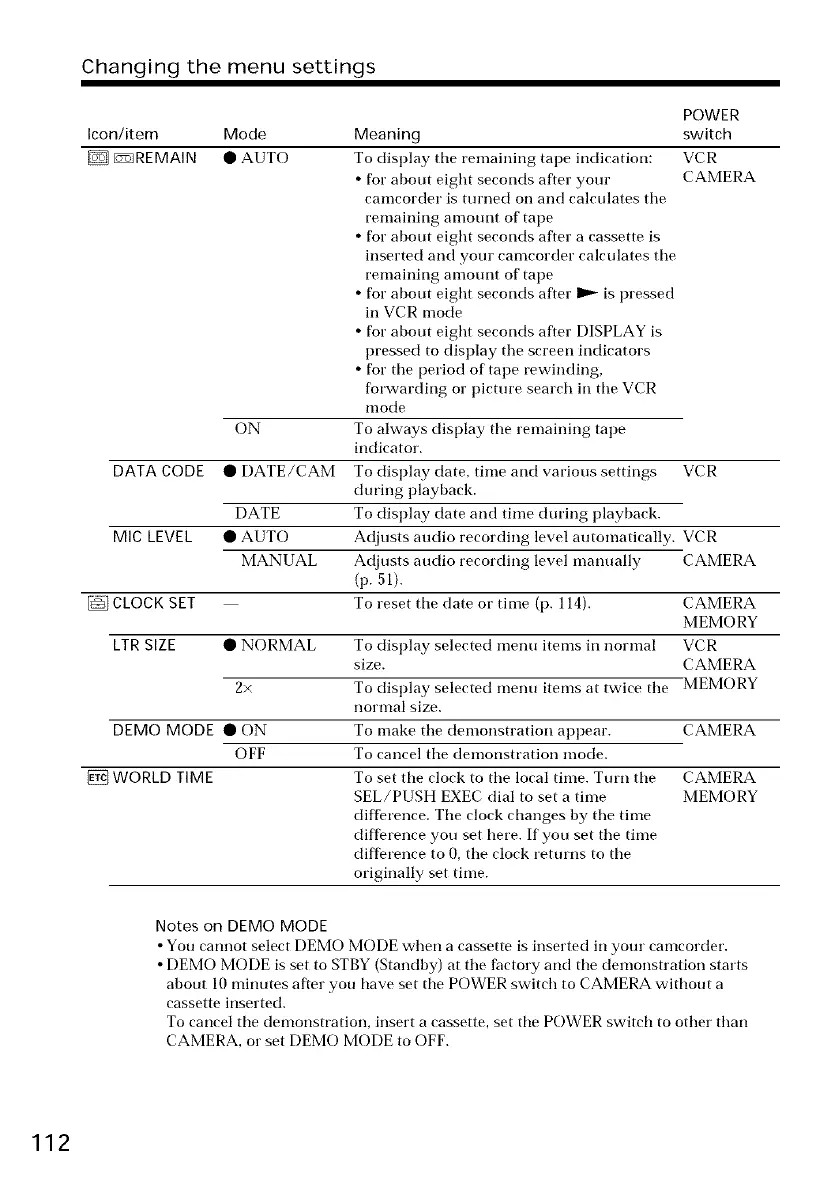
Changing the menu settings
POWER
Icon/item Mode Meaning switch
[:_1REMAIN • AUTO To display the remaining tape indication: VCR
• for about eight seconds after your CAMERA
camcorder is turned on and calculates tile
remaining amount of tape
• f'or about eight seconds after a cassette is
inserted and your camcorder calculates tile
remaining anlount of tape
• f'or about eight seconds after I_- is pressed
in VCR mode
• f'or about eight seconds after DISPLAY is
pressed to display the screen indicators
• f'or tile period of tape rewinding,
forwarding or picture search in tile VCR
mode
ON To always display tile remaining tape
indicator.
• DATE/CAM To display date. time and various settings VCR
during playback.
DATE To display (late and time during playback.
• AUTO
MANUAL
DATA CODE
MIC LEVEL
CLOCK SET
LTR SIZE • NORMAL
Adjusts audio recording level automatically. VCR
Adjusts audio recording level manually
(p. 51).
To reset tile date or time (p. 114).
2x
DEMO MODE • ON
OFF
_ WORLD TIME
CAMERA
CAMERA
MEMORY
To display selected menu items in normal VCR
size. CAMERA
To display selected menu items at twice tile MEMORY
CAMERA
CAMERA
MEMORY
normal size.
To make tile demonstration appear.
To cancel the demonstration mode.
To set the clock to tile local time. Turn the
SEL/PUSH EXEC dial to set a time
difference. Tile clock changes by tile time
diffierence you set here. If you set tile time
difference to O,the clock returns to the
originally set time.
Notes on DEMO MODE
• You cannot select DEMO ME)DEwhen a cassette is inserted in your camcorder.
• DEMO ME)DE is set to STBY (Standby) at tile factory and tile demonstration starts
about 10minutes after you have set tile POWER switch to CAMERA without a
cassette inserted.
To cancel tile demonstration, insert a cassette, set tile POWER switch to other than
CAMERA, or set DEMO MODE to OFF.
112




 To Next Page