Using the guide frame
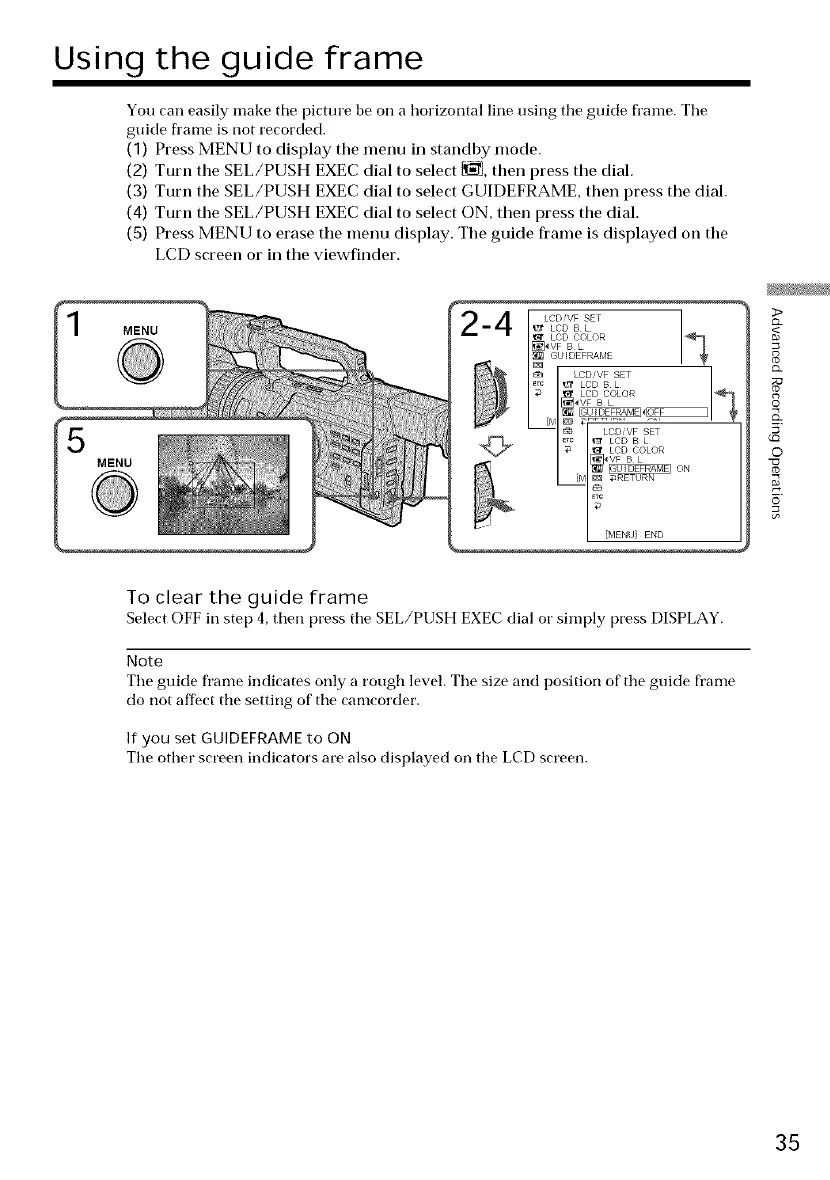
You can easily make tile picture be on a horizontal line using tile guide flame. Tile
guide fl'ame is !tot recorded.
(1) Press MENU to display the menu in standby mode.
(2) Turn the SEL/PUSH EXEC dial to select _, then press tile dial.
(3) Turn the SEL/PUSH EXEC dial to select GUIDEFRAME, then press the dial.
(4) Turn the SEL/PUSH EXEC dial to select ON, then press the dial.
(5) Press MENU to erase the menu display. The guide frame is displayed on the
LCD screen or in the viewfinder.
MENU
%
LCDVF SET
LCDBL
LCD COLOR
_VF B L
I_ GUIDEFRAME I*
g_
_% LCD,VF SET
_Tc _ LCD B L
_ LCD COLOR
[]_\/F B L
_Tc _ LCD B L_t LCD COLOR
_VF B L
[_°[MENUIE_D
>
8
g
©
Q_
5'
0
To clear the guide frame
SelectOFFinstep 4,then press tile SEL/PUSHEXECdial or simply press DISPLAY.
Note
Tile guide frame indicates only a rough level. Tile size and position of' tile gt!ide frame
do !tot affect tile setting of tile camcorder.
If you set GUIDEFRAMEto ON
Tile other screen indicators are also displayed on tile LCD screen.
35















 To Next Page