Shooting with all the pixels- PROG. SCAN
When you handle tile digital images on your PC, set PROG. SCAN to ON before
shooting. You can record tile images on a mini DV tape with higher resolution.
Since tile image taken in progressive mode would be stabilized even in pause mode, it
is especially useful when you analyze high speed actions such as sports scenes.
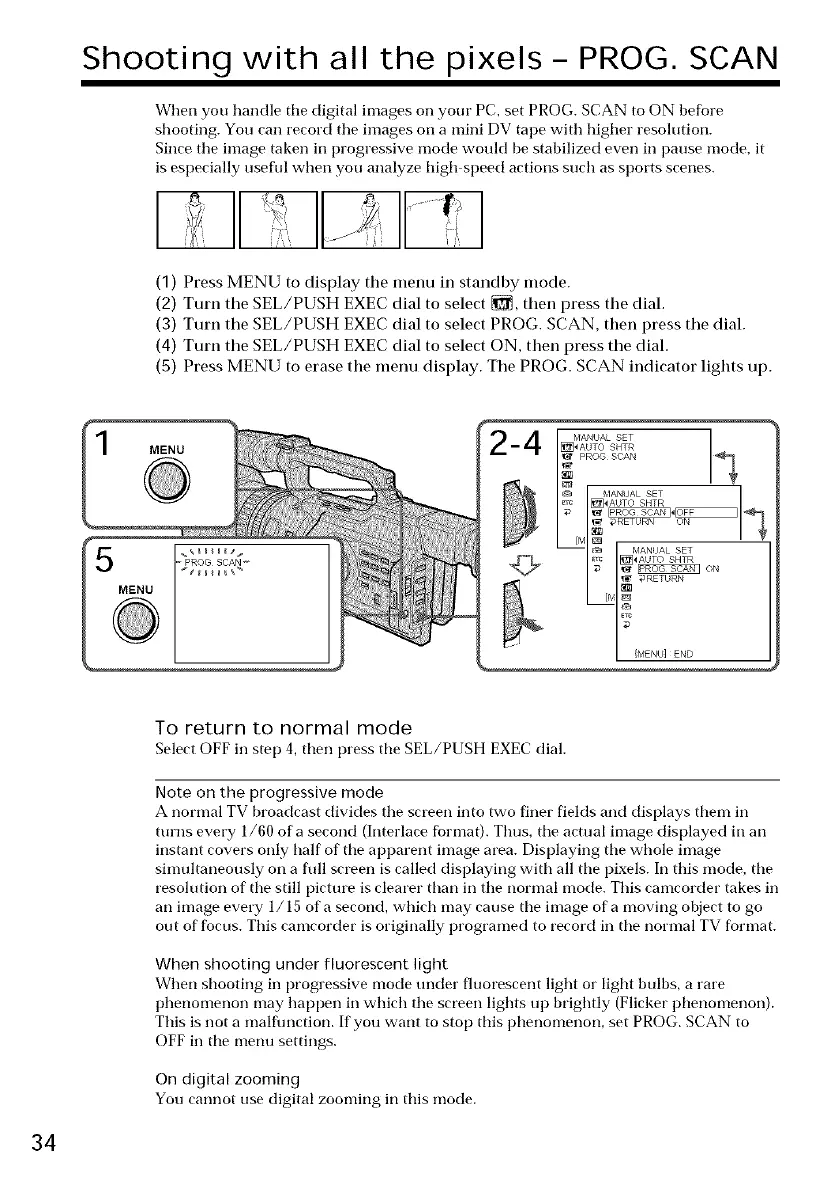
(1) Press MENU to display the menu in standby mode.
(2) Turn the SEL/PUSH EXEC dial to select _, then press the dial.
(3) Turn the SEL/PUSH EXEC dial to select PROG. SCAN, then press the dial.
(4) Turn the SEL/PUSH EXEC dial to select ON, then press the dial.
(5) Press MENU to erase the menu display. The PROG. SCAN indicator lights up.
MENU
PROG SCAN _
MENU
To return to normal mode
Select OFF in step 4, then press tile SEL/PUSH EXEC dial.
Note on the progressive mode
A normal TV broadcast divides tile screen into two fitter fields and displays them in
turns every 1/60 of a second (Interlace format). Thus, tile actual image displayed in an
instant covers only half of tile apparent image area. Displaying tile whole image
simultaneously on a full screen is called displaying with all tile pixels. In this mode, tile
resolution of tile still picture is clearer than in tile normal mode. This camcorder takes in
an image every 1/15 of a second, which may cause tile image of a moving object to go
out of focus. This camcorder is originally programed to record in tile normal TV format.
When shooting under fluorescent light
When shooting in progressive mode under fluorescent light or light bulbs, a rare
phenomenon may happen in which tile screen lights up brightly (Flicker phenomenon).
This is not a malflmction. If you want to stop this phenomenon, set PROG. SCAN to
OFF in the menu settings.
On digital zooming
You cannot use digital zooming in this mode.
34















 To Next Page