Recording a still image on a tape - Tape Photo recording
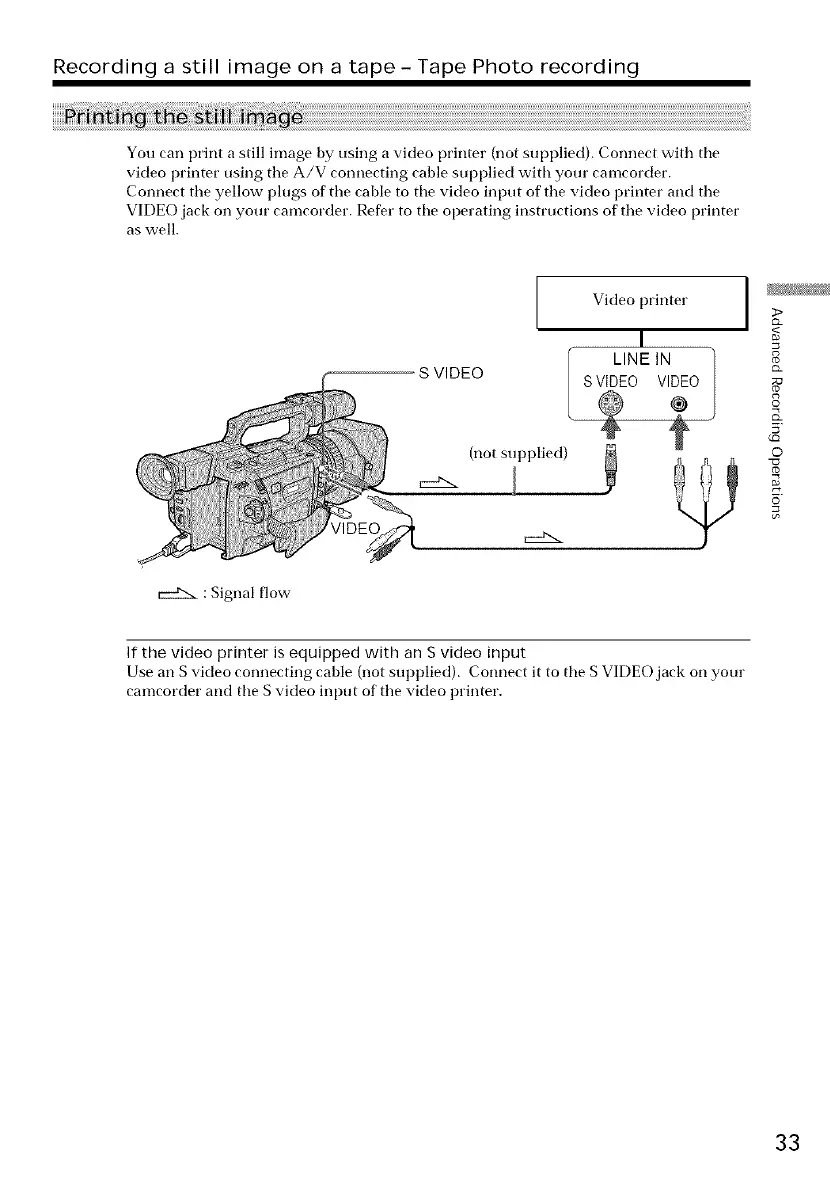
You can print a still image by using a video printer (not supplied). Connect with the
video printer using tile A/V connecting cable supplied with your camcorder.
Connect tile yellow plugs of tile cable to tile video input of tile video printer and tile
VIDEO jack on your camcorder. Refer to tile operating instructions of tile video printer
as well.
: Signal flow
S VIDEO
Video printer
(not supplied)
V
VIDE_/7_
I
>
<
8
g
©
(Q
o
If the video printer is equipped with an S video input
Use an S video connecting cable (not supplied). Connect it to tile S VIDEO jack on your
camcorder and tile S video input of tile video printer.
33















 To Next Page