Adjusting the white balance
White balance adjustment makes white subjects look white and allows more natural
color balance fbr camera recording. Normally, white balance is automatically adjusted.
You can obtain better results by adjusting tile white balance manually when lighting
conditions change quickly or when recording outdoors: e.g., neon signs, fireworks.
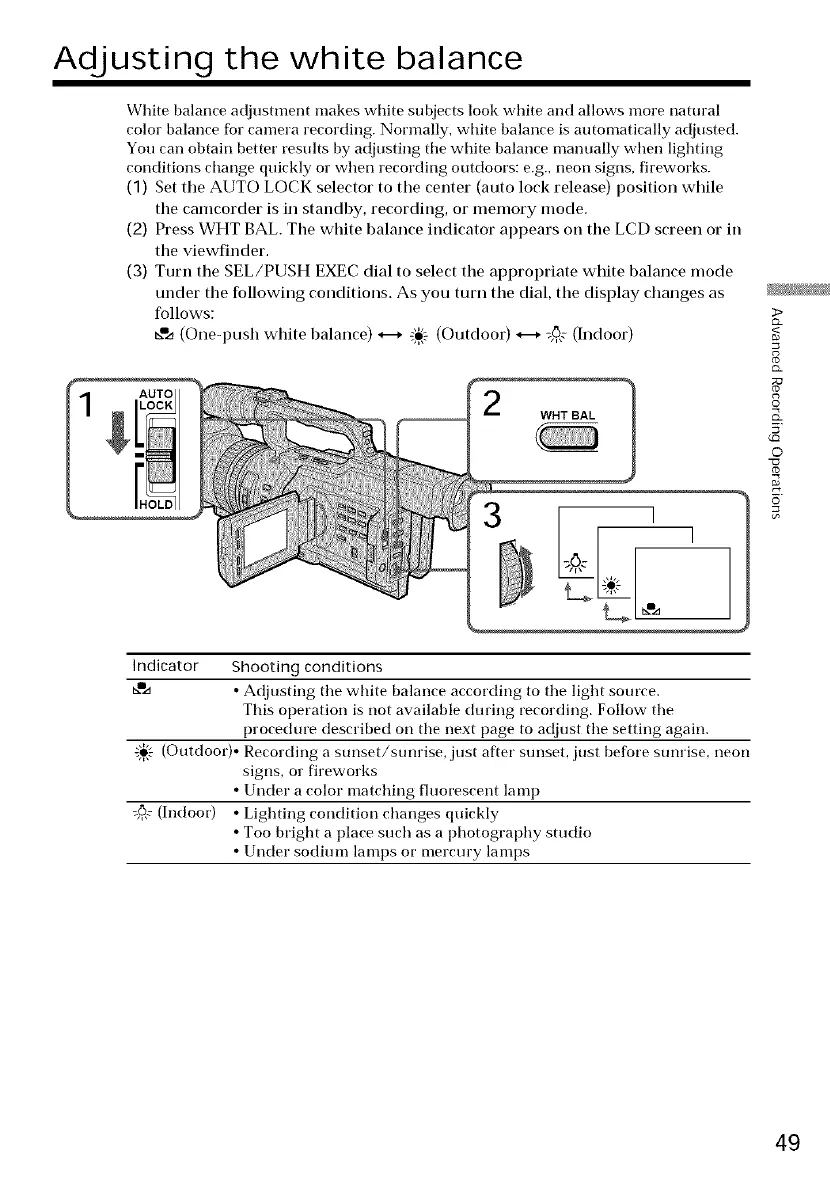
(3) Set the AUTO LOCK selector to the center (auto lock release) position while
the camcorder is in standby, recording, or memory mode.
(2) Press WHT BAh The white balance indicator appears on the LCD screen or in
the viewfinder.
(3) Turn the SEL/PUSH EXEC dial to select the appropriate white balance mode
under the following conditions. As you turn the dial, the display changes as
follows:
b,% (Oneq_ush white balance) H -i_÷ (Outdoor) H _6,,¢(Indoor)
WHT BAL
>
8
g
©
o
Indicator Shooting conditions
_',a • Adjusting tile white balance according to tile light source.
This operation is not available during recording. Follow tile
procedure described on tile next page to adjust tile setting again.
-_- (Outdoor)• Recording a sunset/sunrise, just after sunset, just before sunrise, neon
signs, or fireworks
• Under a color matching fluorescent lamp
:_ (Indoor) • Lighting condition changes quickly
• Too bright a place such as a photography studio
• Under sodium lamps or mercury lamps
49















 To Next Page