Presetting the adjustment for picture
quality- Custom preset
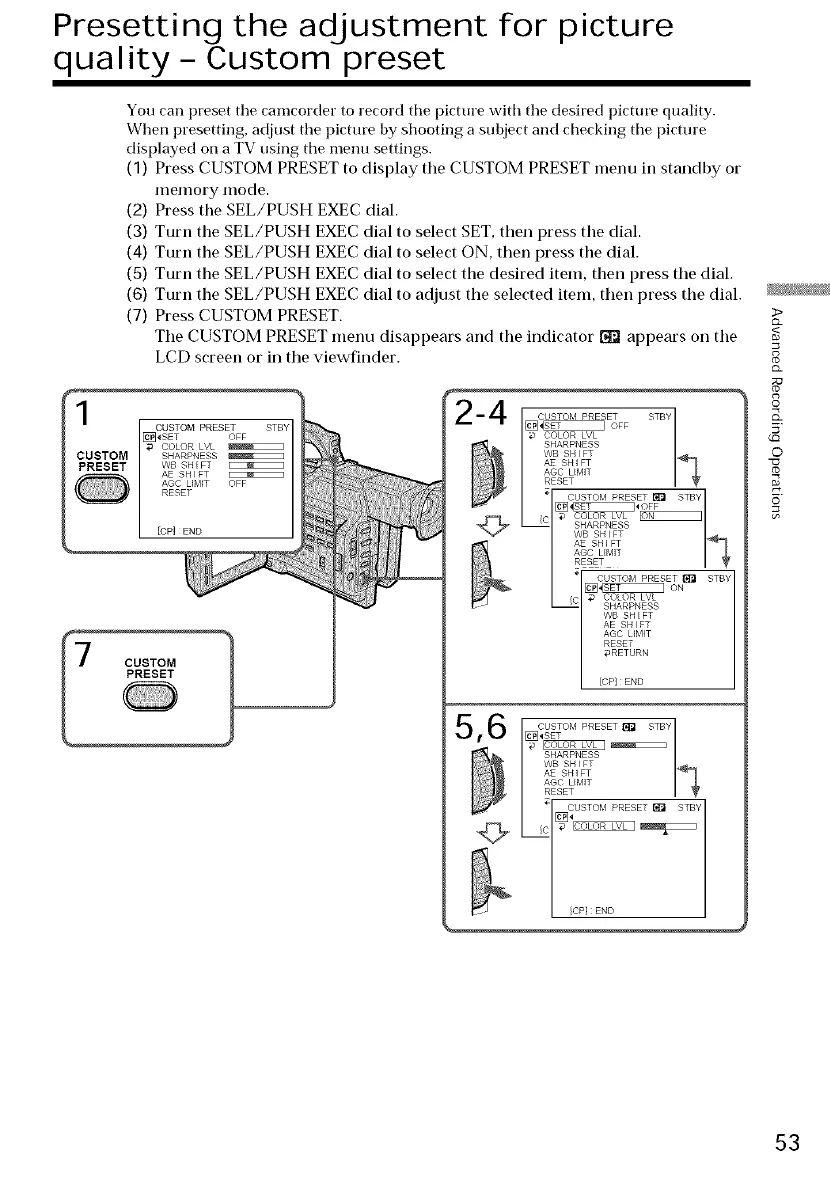
You can [)reset tile camcorder to record tile picture with tile desired picture quality.
When presetting, adjust the picture by shooting a subject and checking tile picture
displayed on a TV using tile menu settings.
(1) Press CUSTOM PRESET to display tile CUSTOM PRESET menu in standby or
IlleIllory Illode.
(2) Press the SEL/PUSH EXEC dial.
(3) Turn the SEL/PUSH EXEC dial to select SET, then press the dial.
(4) Turn the SEL/PUSH EXEC dial to select ON, then press the dial.
(5) Turn the SEL/PUSH EXEC dial to select the desired item, then press the dial.
(6) Turn the SEL/PUSH EXEC dial to adjust the selected item, then press the dial.
(7) Press CUSTOM PRESET.
The CUSTOM PRESET menu disappears and the indicator _1 appears on the
LCD screen or in the viewfinder.
r USTOM PRESET 1
[_]_SET OFF
COLOR LVL
SHARPNESS
WB SH_FT
AE SHIFT
AGC LIMIT OFF
RESET
[CP]END
CUSTOM PRESET I_ STBY
c_ ON
COLOR LVL
SHARPNESS
WB SHIFT
AE SHIFT
AGC LIMIT
RESET
@RETURN
[CP] END
5_ CUSTOM PRESET_ STBY/
[_]_SET 1
SHARPNESS
WB SHIFT
AE SHIFT
AGO LIMIT
RESET
CUSTOM PRESET_ STBY
[CPI END
>
8
©
o
53















 To Next Page