Recording video or TV programs
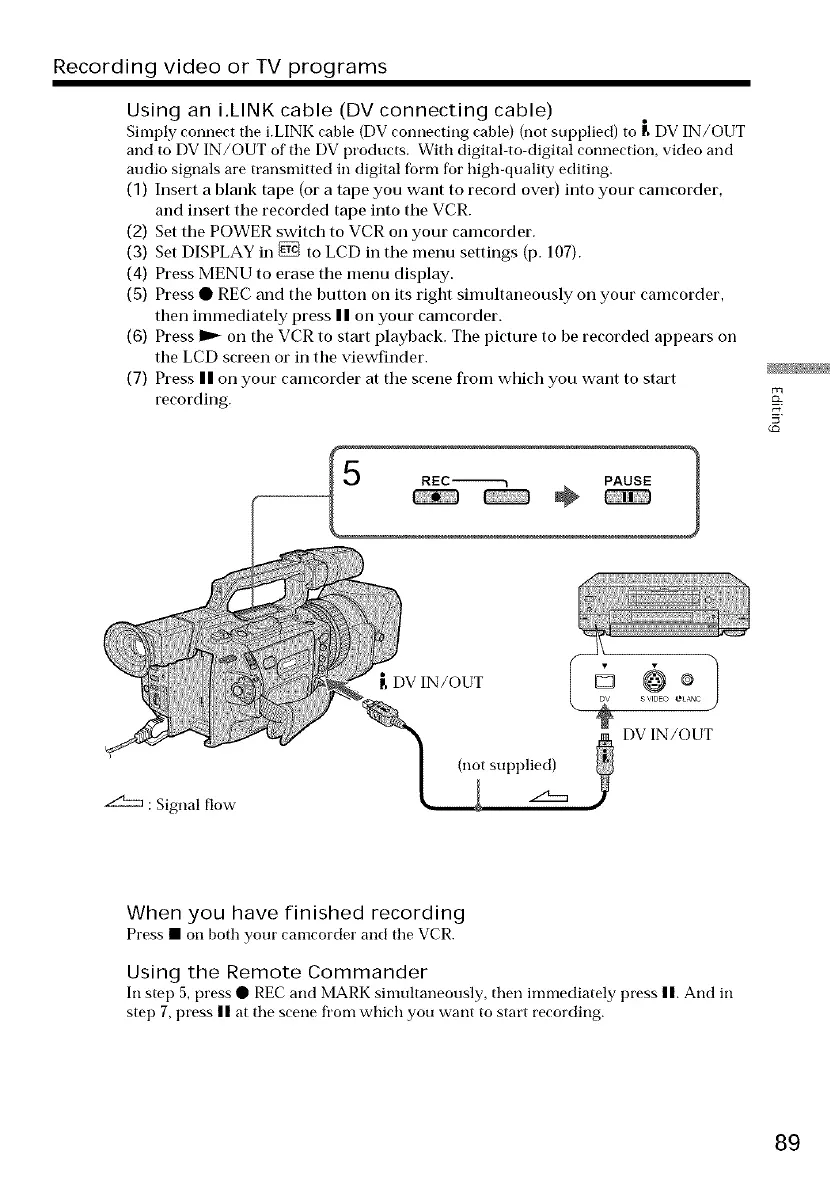
Using an i.LINK cable (DV connecting cable)
Simply connect the i.LINK ('able (DV connecting ('able) (not supplied) to [_DV IN/OUT
and to DV IN/OUT of the DV products. With digital to digital connection, video and
audio signals are transmitted in digital fbrm for high-quality editing.
(1) Insert a blank tape (or a tape you want to record over) into your cam(order,
and insert tile recorded tape into the VCR.
(2) Set the POWER switch to VCR on your cam(order.
(3) Set DISPLAY in _ to LCD in the menu settings (p. 107).
(4) Press MENU to erase the menu display.
(5) Press • REC and the I)utton on its right simultaneously on your cam(order,
then immediately press | | on your cam(order.
(6) Press I_ on the VCR to start playback. The picture to be recorded appears on
the LCD screen or in the viewfinder.
(7) Press II on your cam(order at the scene fl'om which you want to start
recording.
z£Sz:m : Signal flow
[, DV IN/OUT
(not supl)lied)
+1
D @
s VIDE0 eLAN(
DV IN/OUT
When you have finished recording
Press • on both your cam(order and the VCR.
Using the Remote Commander
In step 5, press • REC and MARK simultaneously, then immediately press n. And in
step 7, press n at the scene from which you want to start recording.
89















 To Next Page