20
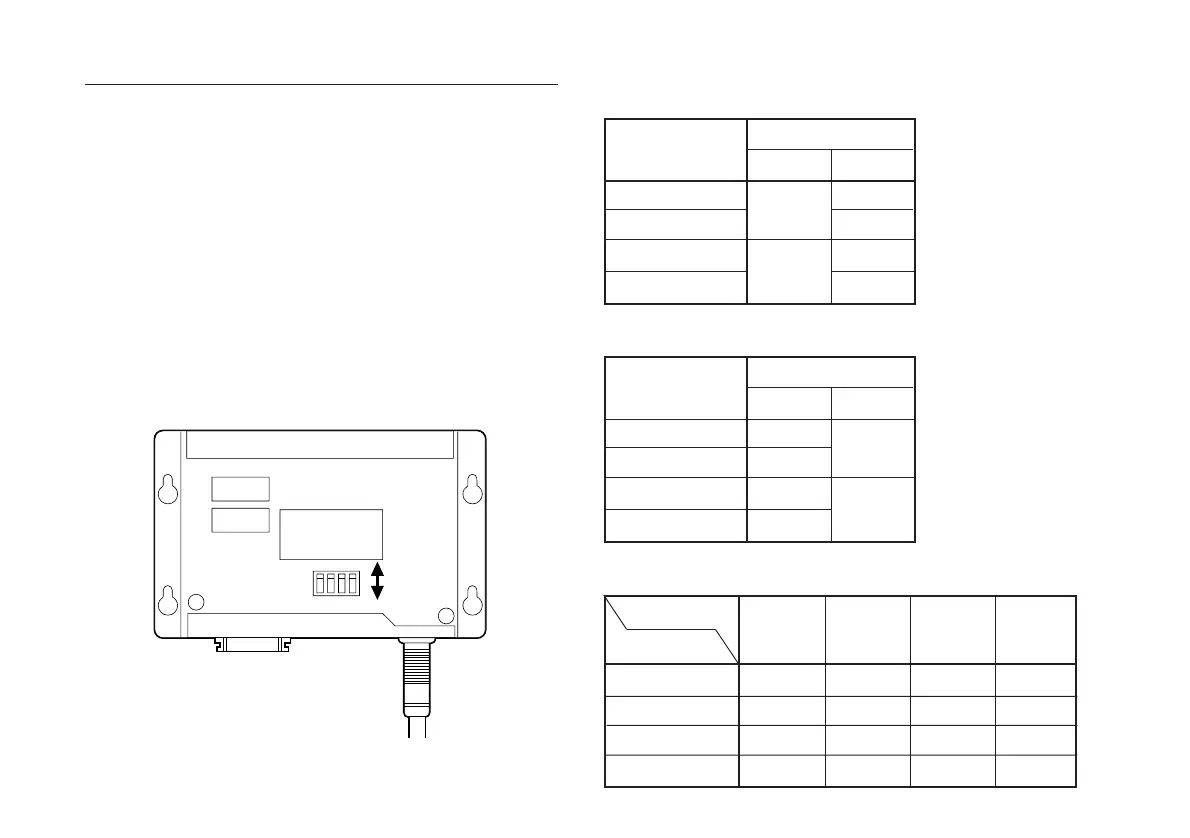
S101
1234
OFF
ON
Fig. 3-1
• Resolution switch setting: (Table 3-1.)
Change the Resolution
To change the resolution or increase the response speed,
follow the procedure below.
1. Remove the cover (two M3 × 6 screws).
2. Reset the dip switches on the printed circuit board (Fig.
3-1. S101) by referring to Tables 3-1 and 3-2.
3. Reinstall the cover and fasten with screws.
4. Install the unit on the machinery and confirm
operations (counter status, etc.)
• Responce speed switch setting: (Table 3-2.)
Resolution (µm)
100
50
20
10
Switch setting
S101-1
OFF
ON
S101-2
OFF
ON
OFF
ON
• Maximum response speed (m/min):(Table 3-3.)
TW (µsec)
Output cycle (kpps)
2.5 (100)
5 (50)
10 (25)
20 (12.5)
Switch setting
S101-4
OFF
ON
S101-3
OFF
ON
OFF
ON
20
240
120
48
24
Tw (µs)
Resolution (µm)
100
50
20
10
2.5
300
300
300
192
10
300
240
96
48
5
300
300
192
96



 To Next Page