RadarW
Adjust the period which the mechanical shutter is closed, and com-
pensate the exposure.
Mode CAMERA
Subject Clear chart
(Standard picture frame with the
zoom lens at WIDE end)
Adjustment Page F
Adjustment Address B8 to D7
Note 1: Check that the data of page: 6, address: 02 is “00”.
If not, turn the power of unit OFF/ON.
Adjusting method:
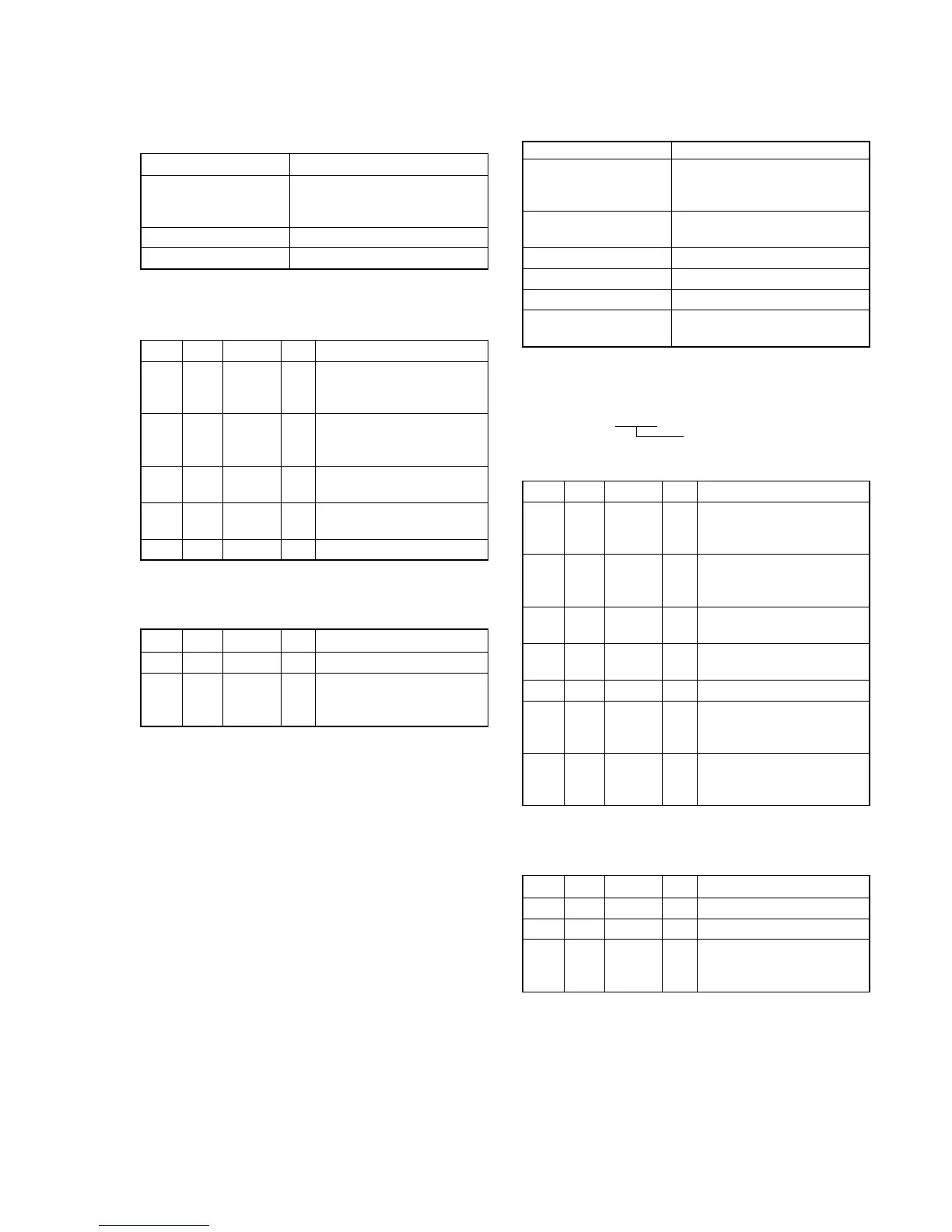
Order Page Address Data Procedure
1
Perform “Data setting during
camera system adjustment”.
(Refer to page 5-13)
2
Perform “Picture Frame
setting”.
(Refer to page 5-14)
36 01AD
Press PAUSE button.
(Note 2)
46 02
Check the data changes to
“01”.
56 AB Check the data is “00”.
Note 2: The adjustment data will be automatically input to page:
F, address: B8 to D7.
Processing after Completing Adjustment:
Order Page Address Data Procedure
16 01 00 Press PAUSE button.
2
Release the data setting
performed at step 1.
(Refer to page 5-13)
7. Light Value Adjustment
RadarWRadarWRadarW
Adjust the standard LV value.
Mode CAMERA
Subject Clear chart
(Standard picture frame with the
zoom lens at WIDE end)
Measurement Point Displayed data of page: 1 (Note
2) and page: F, address: 65
Measuring Instrument Adjusting remote commander
Adjustment Page F
Adjustment Address 65 to 67
Specified Value AE level 1: 0FE0 to 1020
AE level 2: 30 to 50
Note 1: Check that the data of page: 6, address: 02 is “00”.
If not, turn the power of unit OFF/ON.
Note 2: The right four digits of the page: 1 displayed data of the
adjusting remote commander.
1:XX:XX
Displayed data
Adjusting method:
Order Page Address Data Procedure
1
Perform “Data setting during
camera system adjustment”.
(Refer to page 5-13)
2
Perform “Picture Frame
setting”.
(Refer to page 5-14)
36 010D
Press PAUSE button.
(Note 4)
46 02
Check the data changes to
“01”.
50 0306
61
Check that the displayed data
(Note 2) satisfies the AE
level 1 specified value.
7F 65
Check that the displayed data
satisfies the AE level 2
specified value.
Note 3: The adjustment data will be automatically input to page:
F, address: 65 to 67.
Processing after Completing Adjustment:
Order Page Address Data Procedure
10 0300
26 01 00 Press PAUSE button.
3
Release the data setting
performed at step 1.
(Refer to page 5-13)







 To Next Page