1-44
DSC-P31/P31M
92
Menu items
Menu items that can be changed differ
depending on the position of the Mode dial.
The LCD screen shows only the items you
can operate based on the current position of
the Mode dial. Factory settings are
indicated with x.
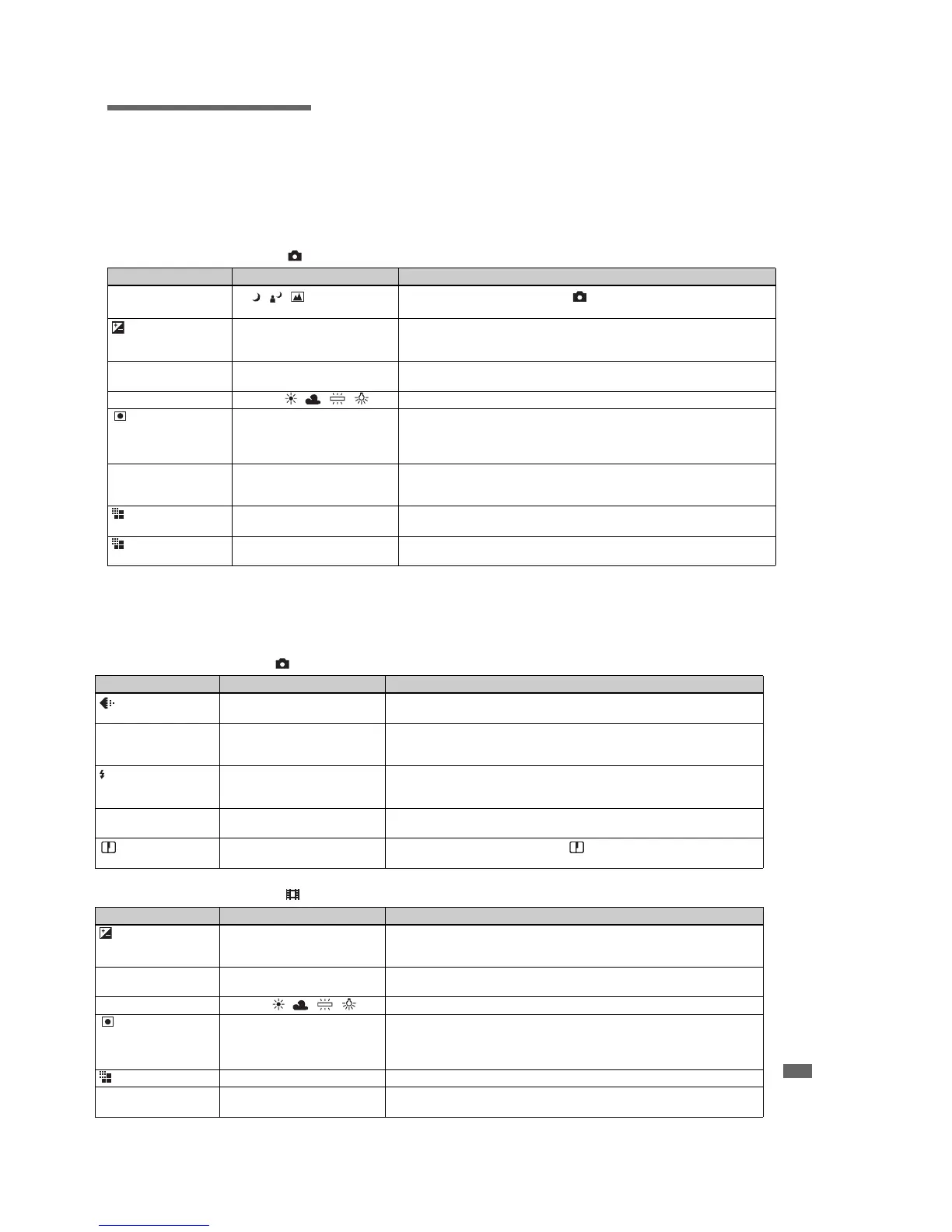
When the Mode dial is set to , SCN
Item Setting Description
SCN
x / /
Selects one of the scene selections. (In mode, this setting cannot be carried out.)
(page 34)
EV
+
2.0 /
+
1.7 /
+
1.3 /
+
1.0 /
+
0.7 /
+
0.3 / x0 /
−
0.3 /
−
0.7 /
−
1.0 /
−
1.3 /
−
1.7 /
−
2.0
Adjusts the exposure (page 56).
9 (FOCUS) x MULTI AF / CENTER AF /
0.5 m / 1.0 m / 3.0 m / 7.0 m /
∞
Chooses the auto focus method, set the prefocus distance (pages 58, 60)
WB (WHITE BAL) xAUTO / / / / Sets the white balance (page 57)
Spot light-metering
(can be set using a
menu with the DSC-
P71 only)
ON / x OFFTo match the exposure to the subject you want to shoot (page 61).
ISO xAUTO / 100 / 200 / 400 Selects the ISO sensitivity. When recording under dark conditions or recording a fast-
moving subject, use a high-number setting. When recording high-quality images, use
a low-number setting (except when the Mode dial is set to SCN).
(IMAGE SIZE)
(DSC-P71)
x2048×1536 / 2048 (3:2)/
1600×1200 / 1280×960 / 640×480
Selects the image size used when shooting still pictures (page 24).
(IMAGE SIZE)
(DSC-P31)
x1600×1200 / 1600 (3:2) /
1280×960 / 640×480
Selects the image size used when shooting still pictures (page 24)
on
93
Additional information
When the Mode dial is set to , SCN. (continued)
When the Mode dial is set to (MOVING IMAGE is set to MPEG MOVIE in the SET UP settings.)
Item Setting Description
(QUALITY) xFINE / STANDARDRecords images with fine image quality mode. / Records images in the standard
image quality mode (page 24).
MODE(REC MODE) E-MAIL
xNORMAL
–Records a small-size (320×240) JPEG file in addition to the selected image size
(page 65).
–Records an image using the normal recording mode.
(FLASH LEVEL) BRIGHT
xSTANDARD
DARK
–Makes the flash level higher than normal.
–Normal setting.
–Makes the flash level lower than normal.
PFX (P.EFFECT) SOLARIZE/B&W/SEPIA/
NEG.ART/xOFF
Sets the special effects for the image (page 60).
(SHARPNESS) +2 / +1 / x0 / –1 / –2 Adjusts the sharpness of the image. The indicator appears (except when the
setting is 0).
Item Setting Description
EV
+
2.0 /
+
1.7 /
+
1.3 /
+
1.0 /
+
0.7 /
+
0.3 / x0 /
−
0.3 /
−
0.7 /
−
1.0 /
−
1.3 /
−
1.7 /
−
2.0
Adjusts the exposure (page 56).
9 (FOCUS) x MULTI AF / CENTER AF /
0.5 m / 1.0 m / 3.0 m / 7.0 m /
∞
Chooses the auto focus method, set the prefocus distance (pages 58, 60).
WB (WHITE BAL) xAUTO / / / / Sets the white balance (page 57).
Spot light-metering
(can be set using a
menu with the DSC-
P71 only)
ON / x OFFTo match the exposure to the subject you want to shoot (page 61).
(IMAGE SIZE) 320(HQX)/ 320×240/ x160×112 Selects the MPEG image size when recording movies (page 74).
PFX (P.EFFECT) SOLARIZE/B&W/SEPIA/
NEG.ART/xOFF
Sets the special effects for the image (page 60).








 To Next Page