1-16
DSC-P31/P31M
36
Viewing images on the LCD screen of your
camera
You can see the images you shoot with this
camera almost immediately on the LCD
screen. This camera offers the following
three methods for viewing your images.
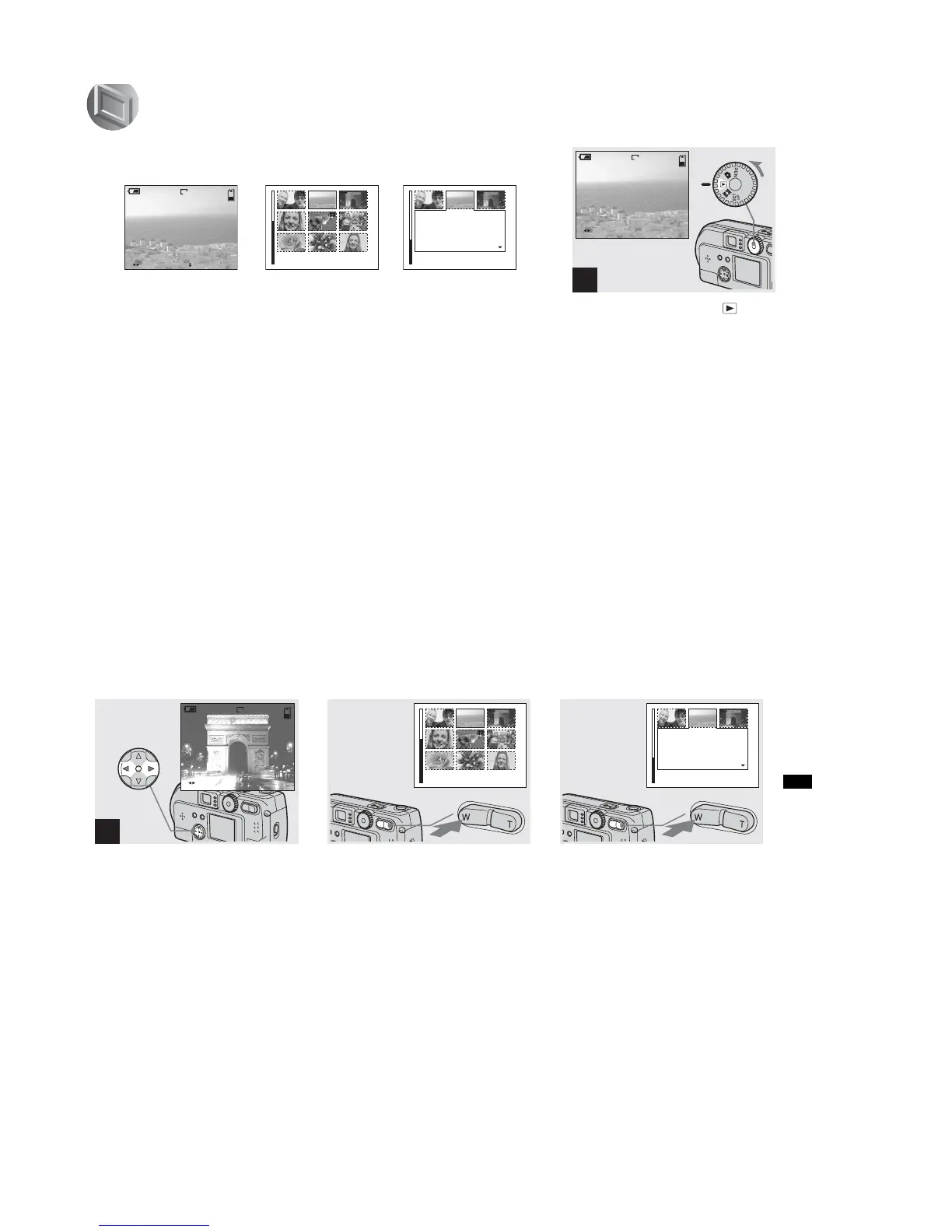
Single (Single image display)
You can view one image at a time,
occupying the entire screen.
Index (9 images display)
Nine images will be displayed
simultaneously in separate panels on the
screen.
Index (3 images display)
Three images will be displayed
simultaneously in separate panels on the
screen. Various items of image information
will also be displayed.
FILE BACK/NEXT VOLUME
10:30
PM
2002 7 4100-0028
6/8
640
•
SINGLE
•
SINGLE
APERTURE VALUE :
SHUTTER SPEED :
EXPOSURE VALUE :
ISO
:
F2.2
1/125
0.0
100
10:30
PM
2002 7 4100-0028
Single
(Single image display)
Index
(9 images display)
Index
(3 images display)
• For movies, see page 75.
• For information on the various symbols
displayed, see page 105.
Viewing single images
, Turn the mode dial to , and
turn on the power.
The last image you shot will be displayed.
1
FILE BACK/NEXT
10:30
PM
2002 7 4100-0028
6/8
640
mages
37
Viewing still images
, Select Still Image using b/B on
the control button.
b : Displays the previous image.
B : Displays the next image.
Viewing Index
(9 or 3 images display)
, Press the Zoom W button once.
The display switches to the Index (9
images) screen.
To display the previous (next) Index
screen
Press v/V/b/B on the control button to
move the yellow frame up/down/left/right.
, Press the Zoom W button once
more.
The display switches to the Index (3
images) screen.
When you press v/V on the control button,
the remaining image information is
displayed.
To display the previous (next) Index
screen
Press b/B on the control button.
To return to the Single image screen
Repeatedly press the Zoom T button, or
press the center z on the control button.
2
FILE BACK/NEXT
10:30
PM
2002 7 4100-0029
6
/
8
640
•
SINGLE
•
SINGLE
APERTURE VALUE :
SHUTTER SPEED :
EXPOSURE VALUE :
ISO
:
F2.2
1/125
0.0
100
10:30
PM
2002 7 4100-0028











 To Next Page