RadarW
Adjust the white balance when the strobe light flashed.
Mode CAMERA
Subject Flash adjustment box (Note 3)
(1 m from the front of lens)
Measurement Point Displayed data of page: 1 (Note
4) and page: F, address: E8, EA,
EC, EE
Measuring Instrument Adjusting remote commander
Adjustment Page F
Adjustment Address B6, B7, DB to EF
Specified Value Y level data: 03 to 08
R-Y level data:
FA to FF or 00 to 06 (Note 4)
B-Y level data:
FA to FF or 00 to 06 (Note 4)
Note 1: Check that the data of page: 6, address: 02 is “00”.
If not, turn the power of unit OFF/ON.
Note 2: Perform this adjustment in the Flash adjustment box.
Note 3: Refer to “4. Preparing the Flash adjustment box”.
(See page 5-7)
Note 4: The right four digits of the page: 1 displayed data of the
adjusting remote commander.
1:XX:XX
B-Y level data
R-Y level data
Note 5: “Strobe White Balance Adjustment” is available only
once after the power is turned on. Turn the power off,
then on again if the adjustment is retried.
Switch setting:
1) FLASH (Control button) .............. ON
Adjusting method:
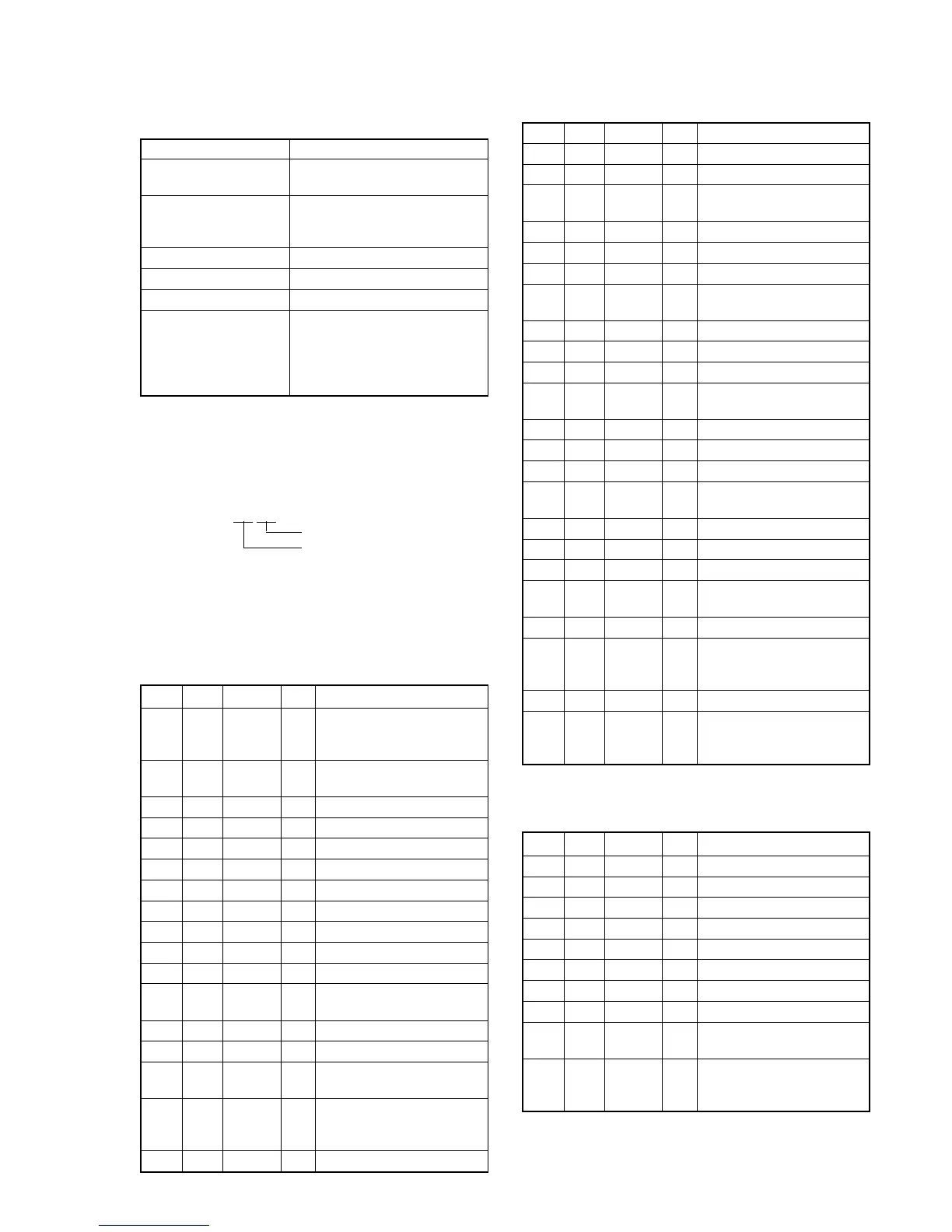
Order Page Address Data Procedure
1
Perform “Data setting during
camera system adjustment”.
(Refer to page 5-13)
2
Perform “Picture Frame
setting ”. (Refer to page 5-14)
34 1E Note down the data.
44 1E00
56 2C01
66 9000
76 9100
86 92FF
96 93FF
10 6 6C 01
11 6 01 79 Press PAUSE button.
12 6 07
Check the data changes to
“01”.
13 6 01 67 Press PAUSE button.
14 Check the flashing.
15 6 02
Check the data changes to
“01”.
16 F E8
Check that the displayed data
satisfies the Y level specified
value.
17 6 01 00 Press PAUSE button.
Order Page Address Data Procedure
18 6 01 67 Press PAUSE button.
19 Check the flashing.
20 6 02
Check the data changes to
“01”.
21 6 01 00 Press PAUSE button.
22 6 01 67 Press PAUSE button.
23 Check the flashing.
24 6 02
Check the data changes to
“01”.
25 6 01 00 Press PAUSE button.
26 6 01 67 Press PAUSE button.
27 Check the flashing.
28 6 02
Check the data changes to
“01”.
29 6 01 00 Press PAUSE button.
30 601B9Press PAUSE button. (Note 6)
31 Check the flashing.
32 6 02
Check the data changes to
“01”.
33 6 01 00 Press PAUSE button.
34 6 01 E7 Press PAUSE button.
35 Check the flashing.
36 6 02
Check the data changes to
“01”.
37 Wait for 1 second.
38 F
EA Check that the displayed data
EC satisfies the Y level specified
EE value.
39 0 03 02
40 1
“Check that the R-Y, B-Y
level data (Note 4) satisfies
the specified value. “
Note 6: The adjustment data will be automatically input to page:
F, address: B6 to B7 and DB to EF.
Processing after Completing Adjustment:
Order Page Address Data Procedure
16 01 00 Press PAUSE button.
26 9000
36 9100
46 9200
56 9300
66 2C00
76 6C00
80 0300
94 1E
Set data noted down at step
3, and press PAUSE button.
10
Release the data setting
performed at step 1. (Refer to
page 5-13)









 To Next Page