5-58
DSR-45/45P
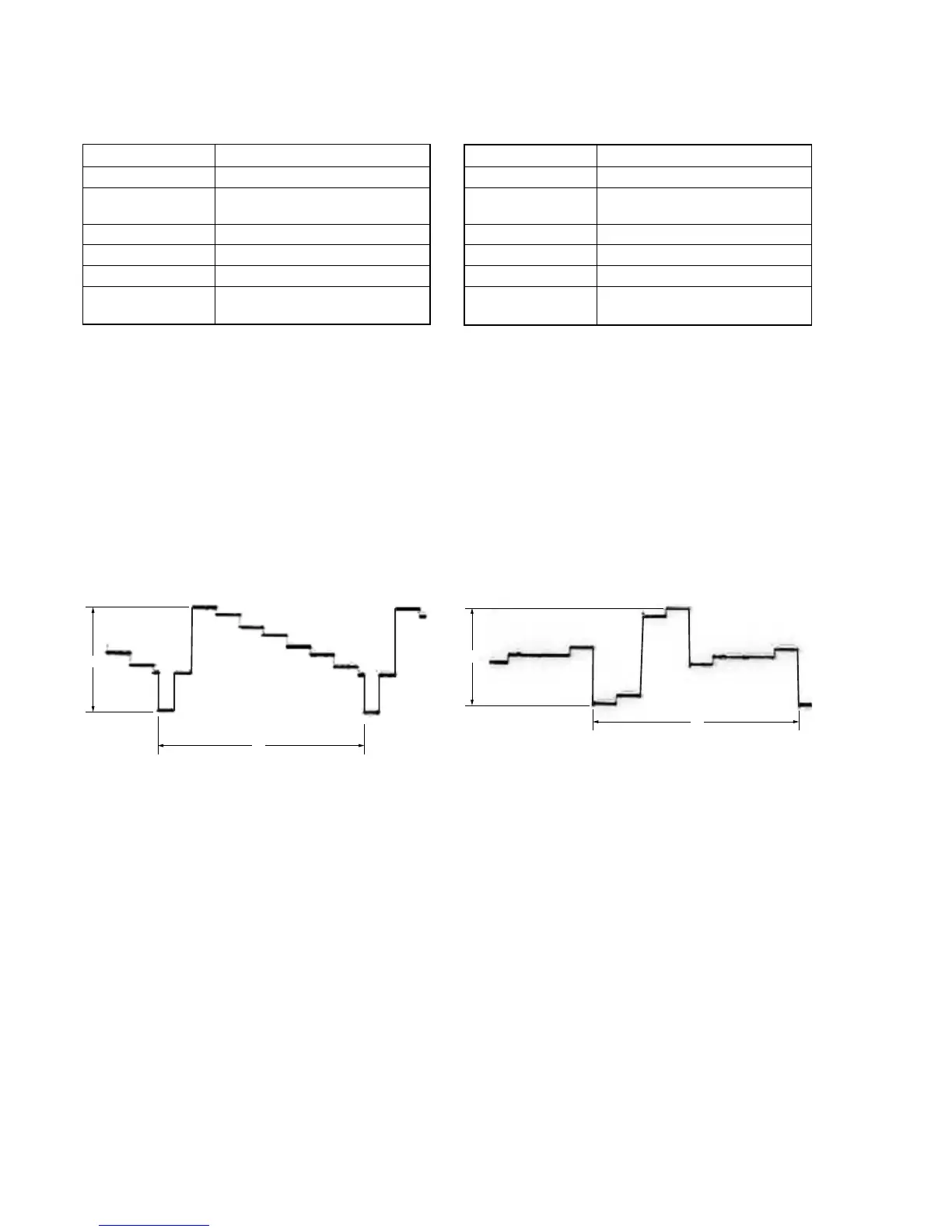
4. Playback CR Signal Level Adjustment with 0%
Setup (VD-032 Board)
Mode Playback
Signal Arbitrary
Measurement Point COMPONENT OUT R-Y terminal
(75 Ω terminated)
Measuring Instrument Oscilloscope
Adjustment Page E
Adjustment Address AE
Specified Value A = 757 ± 10 mVp-p (NTSC)
A = 525 ± 10 mVp-p (PAL)
Adjusting method:
1) Select page: 0, address: 01, and set data: 01.
2) Select page: 3, address: 0C, set data: 01, and press the PAUSE
button of the adjustment remote commander.
3) Select page: E, address: AE, change the data and adjust the
component CR signal level (A) to the specified value. Read
the this adjustment data, and this data is named D
AE
.
4) Press the PAUSE button of the adjustment remote commander.
5) Select page: E, address: BC, set data: D
AE
, and press the PAUSE
button.
6) Select page: 3, address: 0C, set data: 00, and press the PAUSE
button.
7) Select page: 0, address: 01, and set data: 00.
A
H
3. Playback Y Signal Level Adjustment with 0% Setup
(VD-032 Board)
Mode Playback
Signal Arbitrary
Measurement Point COMPONENT OUT Y terminal
(75 Ω terminated)
Measuring Instrument Oscilloscope
Adjustment Page E
Adjustment Address AC
Specified Value A = 822 ± 10 mVp-p (NTSC)
A = 825 ± 10 mVp-p (PAL)
Adjusting method:
1) Select page: 0, address: 01, and set data: 01.
2) Select page: 3, address: 0C, set data: 01, and press the PAUSE
button of the adjustment remote commander.
3) Select page: E, address: AC, change the data and adjust the
component Y signal level (A) to the specified value. Read the
this adjustment data, and this data is named D
AC
.
4) Press the PAUSE button of the adjustment remote commander.
5) Select page: E, address: BA, set data: D
AC
, and press the PAUSE
button.
6) Select page: 3, address: 0C, set data: 00, and press the PAUSE
button.
7) Select page: 0, address: 01, and set data: 00.
Fig. 5-3-11
A
H
Fig. 5-3-12


 To Next Page