5-86
DSR-45/45P
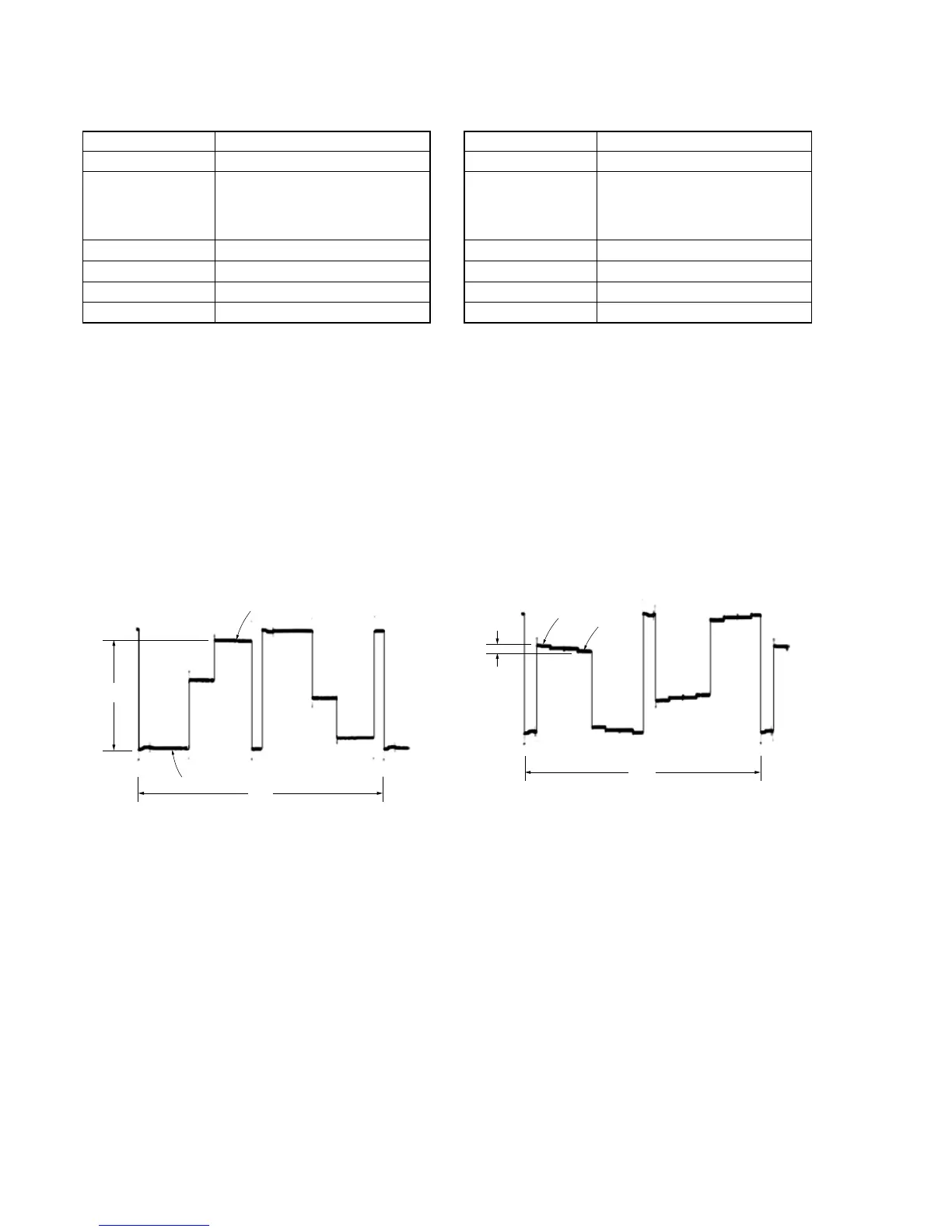
2H
A
Green
White
Adjust so that the green level is lower than the white level.
2H
Pedestal
3 steps peak
A
4. Contrast Adjustment (PD-170 Board)
Mode E-E
Signal Arbitrary
Measurement Point Pin 5 of CN1504 on VD-032 board
(VG)
External trigger: Pin 3 of CN1504
on VD-032 board (PANEL_COM)
Measuring Instrument Oscilloscope
Adjustment Page E
Adjustment Address 84
Specified Value A = 3.31 ± 0.07 Vp-p
Adjusting method:
1) Select page: 0, address: 01, and set data: 01.
2) Select page: 3, address: 0C, set data: 60, and press the PAUSE
button of the adjustment remote commander.
3) Select page: 3, address: 22, set data: 02, and press the PAUSE
button.
4) Select page: E, address: 84, change the data and set the volt-
age (A) between the pedestal and 3 steps peak to the specified
value.
5) Press the PAUSE button of the adjustment remote commander.
6) Select page: 3, address: 22, set data: 00, and press the PAUSE
button.
7) Select page: 3, address: 0C, set data: 00, and press the PAUSE
button.
8) Select page: 0, address: 01, and set data: 00.
Fig. 5-3-49
5. Color Adjustment (PD-170 Board)
Mode E-E
Signal Arbitrary
Measurement Point Pin 5 of CN1504 on VD-032 board
(VG)
External trigger: Pin 3 of CN1504
on VD-032 board (PANEL_COM)
Measuring Instrument Oscilloscope
Adjustment Page E
Adjustment Address 81
Specified Value A = 200 ± 50 mVp-p
Adjusting method:
1) Select page: 0, address: 01, and set data: 01.
2) Select page: 3, address: 0C, set data: 01, and press the PAUSE
button of the adjustment remote commander.
3) Select page: E, address: 81, change the data and set the volt-
age (A) between the white and green to the specified value.
4) Press the PAUSE button of the adjustment remote commander.
5) Select page: 3, address: 0C, set data: 00, and press the PAUSE
button.
6) Select page: 0, address: 01, and set data: 00.
Fig. 5-3-50



 To Next Page