7-27
DVW-250/250P
7-2-11. T3 Guide Height Adjustment
Tools
• Alignment tape ZR2-1 8-960-073-11
• Alignment tape ZR2-1P 8-960-073-61
• Digital Betacam cassette BCT-D124L Standard product
Checks
1. Play mode (Beginning portion of the tape)
(1) Put into the PLAY mode at the beginning portion of an
alignment tape ZR2-1/1P (from 5:00 to 10:00)
(2) Check that the tape running conditions (tape curl and
tape contacting flange of tape guide) at T3 guide meets
the following specification 1.
If not, perform the adjustment from steps 9) and later.
2. REV SEARCH mode (Beginning portion of the
tape)
(1) On the setup menu, set SEARCH speed to ×2. (Refer
to Section 3-1.)
(2) Put into the REV SEARCH mode (press the REW
button after pressing the SEARCH button) at the
beginning portion of an alignment tape ZR2-1/1P
(from 5:00 to 10:00)
(3) Check that the tape runs without any curl at T3 guide.
If tape curl occurs by all means, the tape curl shown in the
table below is acceptable.
If not, perform the adjustment from steps 9) and later.
3. F FWD mode (Beginning portion of the tape)
(1) Put into the F FWD mode at the beginning portion of
an alignment tape ZR2-1/1P (from 5:00 to 10:00)
(2) Check that the tape runs without any curl at T3 guide.
If tape curl occurs by all means, the tape curl shown in the
table below is acceptable.
If not, perform the adjustment from steps 9) and later.
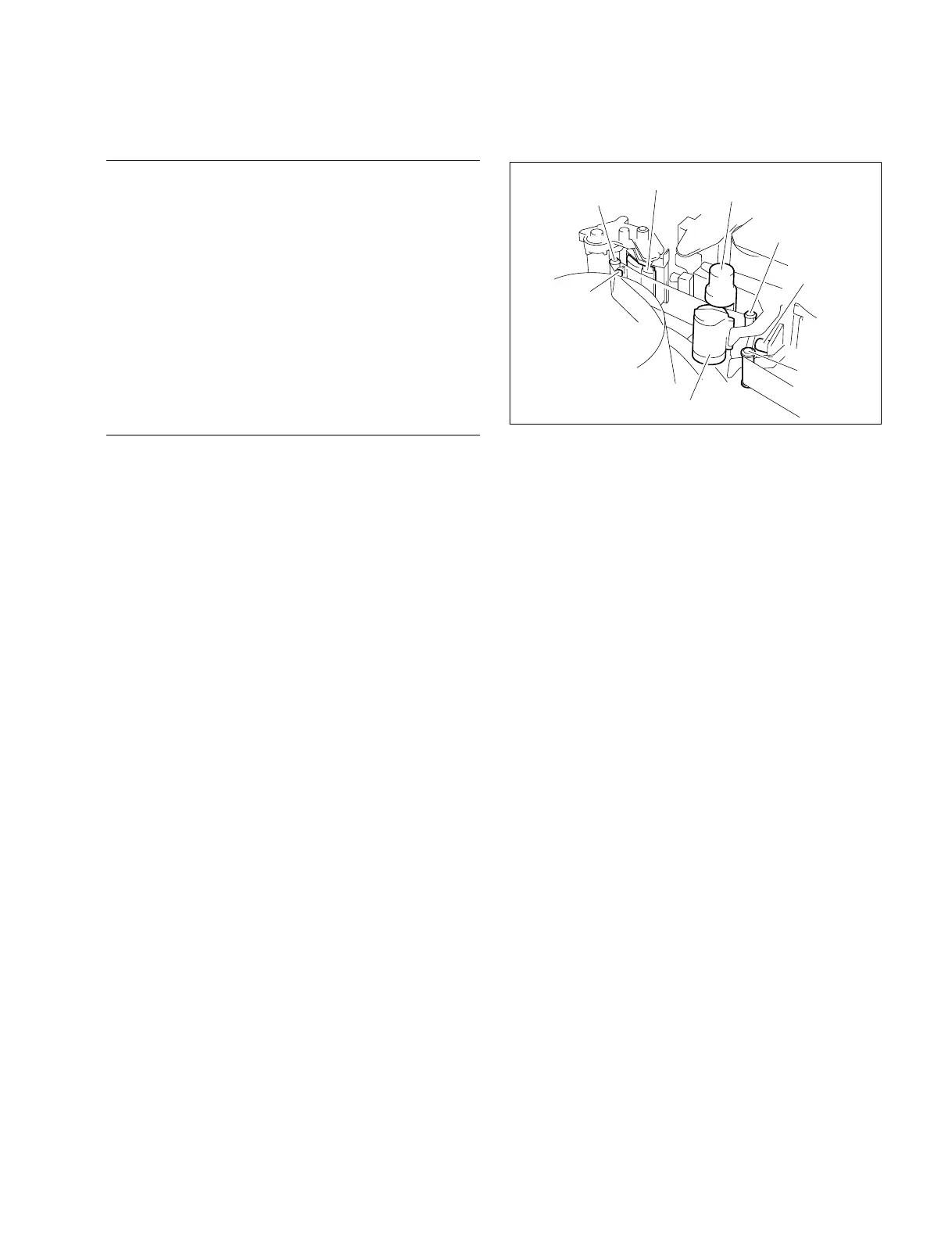
Tape end sensor
T3(T-drawing)
tape guide
Capstan
CUE/TC head
T2 tape guide
Pinch roller
T1 tape guide
T4 tape guide
7-2-11. T3 Guide Height Adjustment


 To Next Page