6-27
DVW-250/250P
6-6. Driving Belt Replacement
6-6. Driving Belt Replacement
Overviews
Driving belt removal
Cleaning
Driving belt installation
Closing the back side of chassis.
Caution
The replacement procedure for supply side driving belt is the same as for take-up
side ones.
Preparations
1. Put the unit into the unthreading end mode.
2. Turn off the power
Tools
• Cleaning piece : 2-034-697-00
• Cleaning fluid : 9-919-573-01
Removal
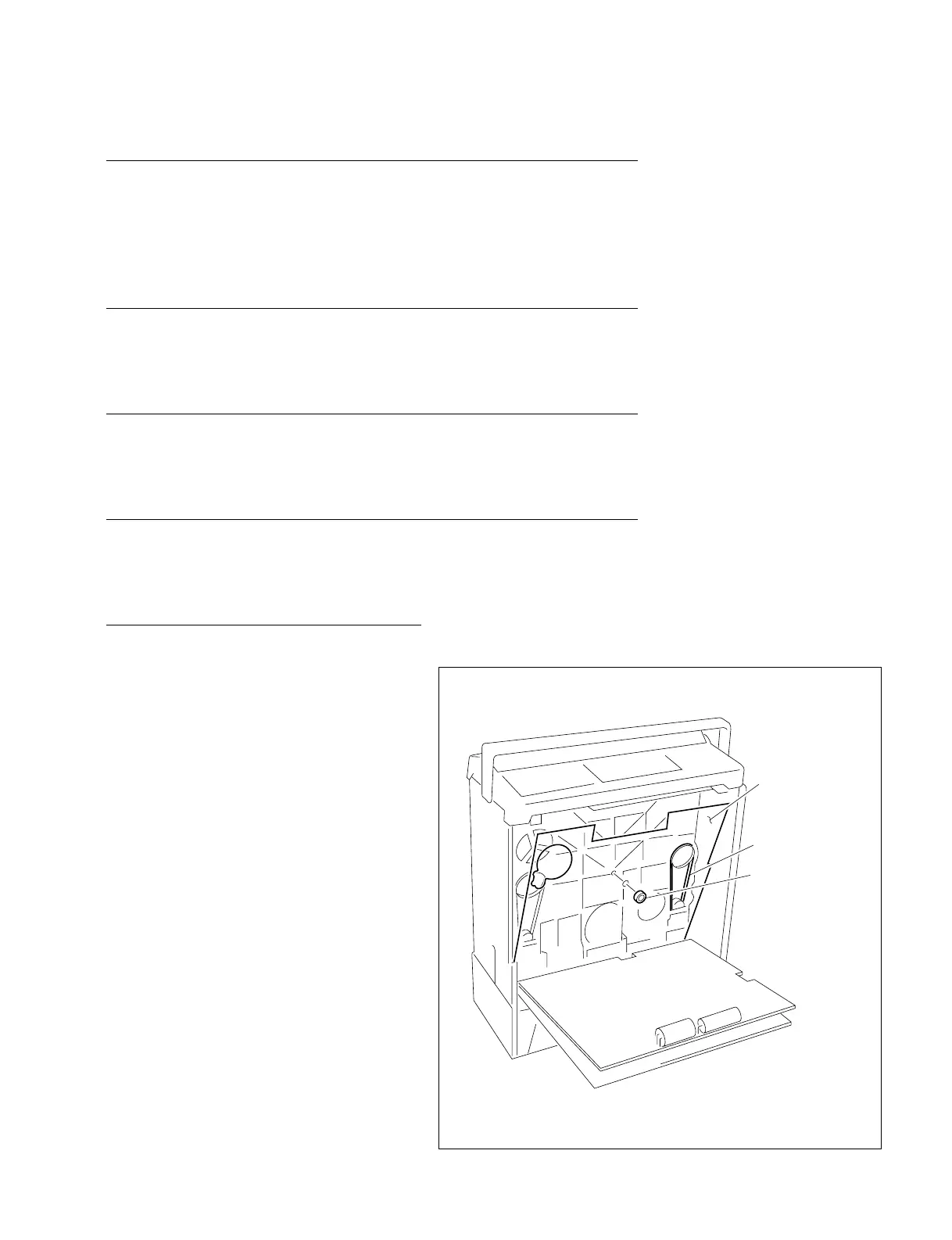
1. Driving belt removal
(1) Remove the bottom plate. (Refer to “1-5.
Removal/Installation of Cabinet”.)
(2) Open the DPR-62 and SST-3 boards. (Refer
to Section 8-2-1 and 8-3.)
(3) Remove the rubber ring attached to the boss
in the center of the chassis, then remove the
insulating plate.
(4) Remove the driving belt.
Insulating plate
Driving belt
Rubber ring


 To Next Page