1-24
DVW-250/250P
1-11. Ejecting the Cassette Tape
Manually
If the cassette tape cannot be ejected or the cassette
compartment does not rise up due to a trouble occurs,
perform the following procedures to eject the cassette tape.
c
Be sure to turn the power off, and disconnect the power
cord.
1. Remove the top panel.(Refer to “1-5. Removal/
Installatin of Cabinet”.)
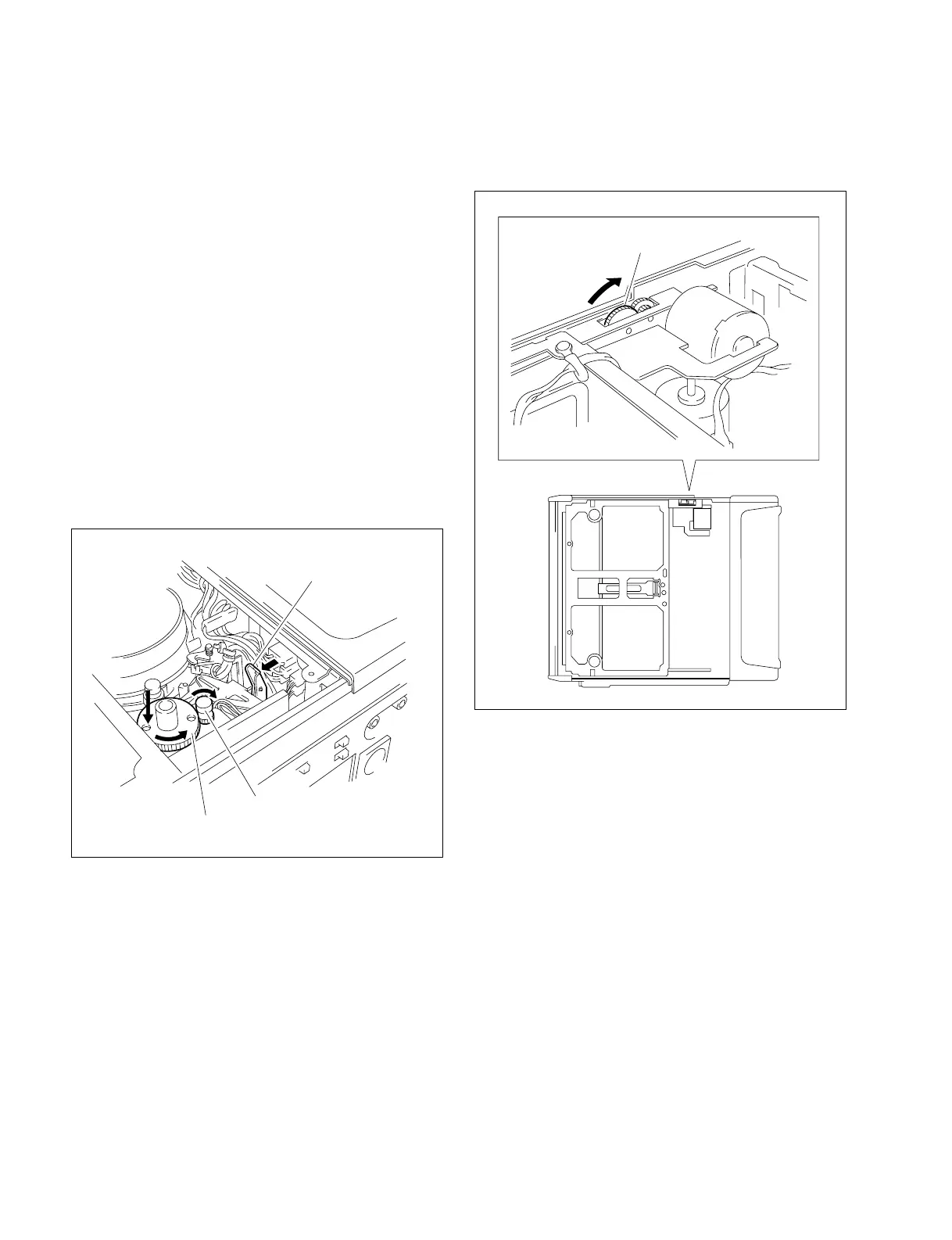
2. Pushing downward and turn the manual eject gear
(red) fully counterclockwise while pulling the brake
release lever in the direction of the arrow. And then
the tape is taken up in the cassette. If not, turn the reel
motor driving gear to clockwise while pulling the
brake release lever in the direction of the arrow.
3. Turn the gear (red) of the cassette compartment in the
direction of the arrow. The cassette compartment is
raise-up and eject the cassette tape.
Brake release lever
Manual eject gear (red)
Reel motor driving gear
Gear (red)
1-11. Ejecting the Cassette Tape Manually


 To Next Page