77
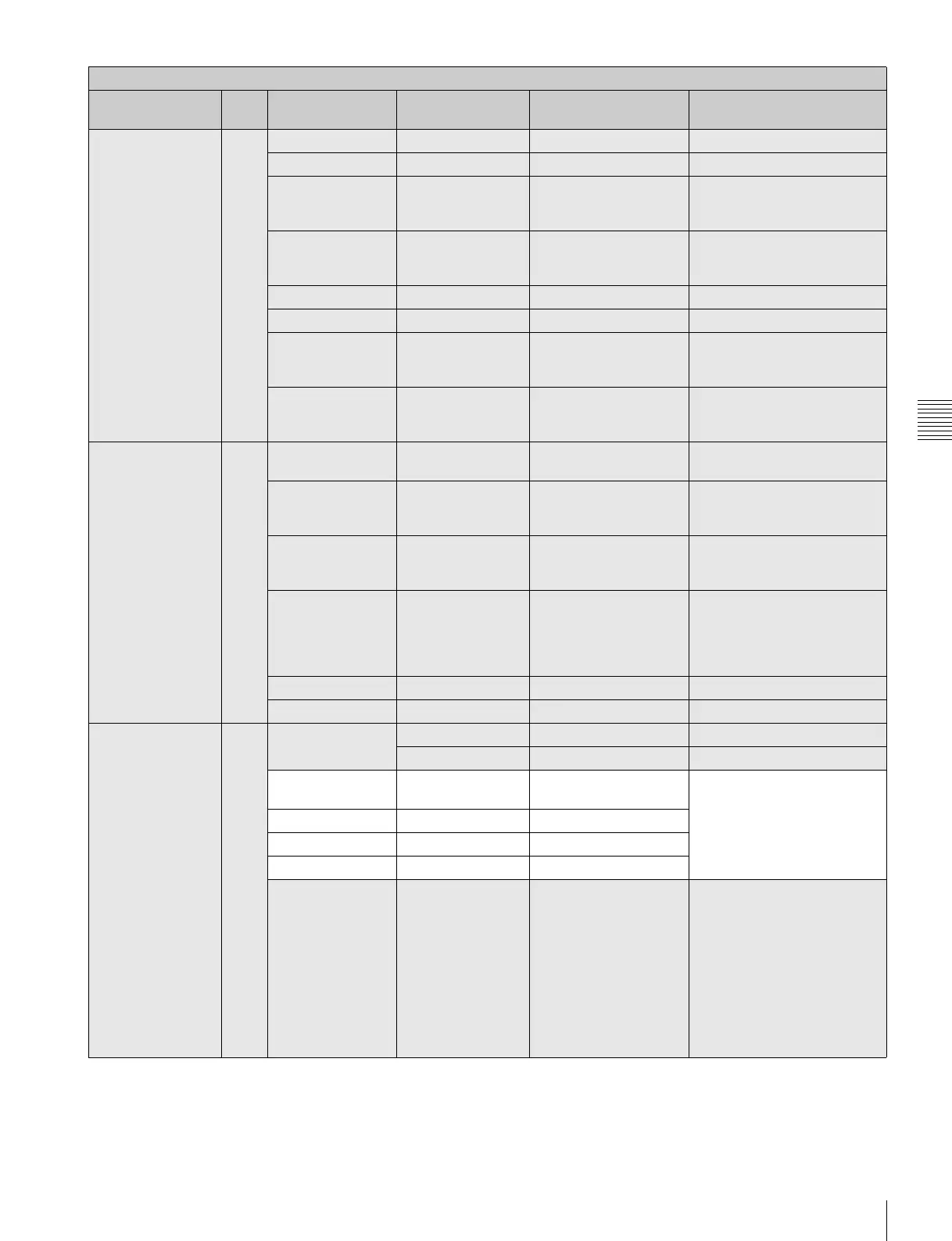
Menu List
Chapter 4 Menu Configuration and Detailed Settings
<BATTERY
ALARM>
Confirming the
operating power
voltage
15
(U15)
DC IN (24V)
TYPE AC ADP BATT1, BATT2, AC ADP
NEAR END (22.2) Display only (Setting is
achieved using the
MAINTENANCE menu.)
END (21.6) Display only (Setting is
achieved using the
MAINTENANCE menu.)
DC IN (12 V)
TYPE AC ADP BATT1, BATT2, AC ADP
NEAR END (11.1) Display only (Setting is
achieved using the
MAINTENANCE menu.)
END (10.8) Display only (Setting is
achieved using the
MAINTENANCE menu.)
<OPERATOR
FILE>
Operating the
Operator file
16
(U16)
READ
(MStCAM)
Execute by ENTER. To read the operator file from
a “Memory Stick”
WRITE
(CAMtMS)
Execute by ENTER. To write the current settings of
the operator file items to a
“Memory Stick”
PRESET Execute by ENTER. To set the operator file items
to the preset values in internal
memory
FILE ID alphanumerics (max.14
characters)
Enter a comment for the
operator file to be written to a
“Memory Stick.”
See “Specifying a character
string” (page 68).
CAM CODE Camera code Display only
DATE Display only
<LENS FILE>
Operating the lens
files
17
(U17)
FILE 1 1 to 32
No Offset Lens file name Display only
CENTER
MARKER
To set and store the center
marker position:
H POS: Increasing the value
moves it to the right.
V POS: Increasing the value
moves it downwards.
H POS 0 –96 to 95
V POS 0 –54 to 53
STORE Execute by ENTER.
WHITE R/G/B ON ON, OFF To turn the WHITE R/G/B
compensation by the lens file
on or off.
For color balance
compensation against lens
dispersion. As G can be
compensated in addition to R
and B, compensation of
dispersion of sensitivity is also
possible.
OPERATION menu
Page title &
purpose
No. Item Default Settings Remarks



 To Next Page